
MyDockFinder is a software for quick system startup and control viewing system functions. You can drag and drop to add your favorite programs or files, and drag and drop to directly use the program to open the file. Based on WinUI using GPU rendering, smooth animation effects, Bezier curve rounded corners and blur and the blur intensity can be adjusted. Minimize the animation of all windows in the management system.
Features
Main functions
- Global real-time dynamic blur effect can adjust the blur intensity
- Support 4K high resolution and multi-display environment
- The light and dark mode of the system can be modified simultaneously
- Steam cloud backup configuration file (manual backup, steam achievement)
MyDock
- Dock icons can quickly launch applications
- You can manually modify the icon
- Window minimization animation (three effects are optional)
- Starting station quick start program panel
- Special program message reminder function
- Quickly view all files in the open folder
- View current city weather details
- Window preview management application window
- Display the progress bar of application downloading and playing media
- Apply a unified mask to the icons to make them more coordinated
- Multiple hidden display modes
- Each application can set an independent hidden mode
MyFinder
- Quickly shut down, restart, log off the computer
- CPU, memory, disk, network speed, temperature monitoring(Need to manually open, steam achievement)
- Manage WiFi network connection
- System tray icon display management operation
- Bluetooth connection pairing
- Adjust the brightness of the monitor, including desktop monitors (Adjusting the brightness of the desktop monitor may damage your monitor, the HDMI interface may fail, and the DP interface can adjust the brightness perfectly)
- Quickly adjust the volume, switch the audio output device, you can modify the volume of each program separately
- The right mouse button of all function buttons can display the corresponding system functions
- Media control function
- Volume change prompt
- Immersive display, better fusion window background
More Features
Using WinUI Blur Effect
Perfect support for the latest version of win11 system, use WinUI blur effect to adjust the blur strength, some interfaces use Win11 mica effect.
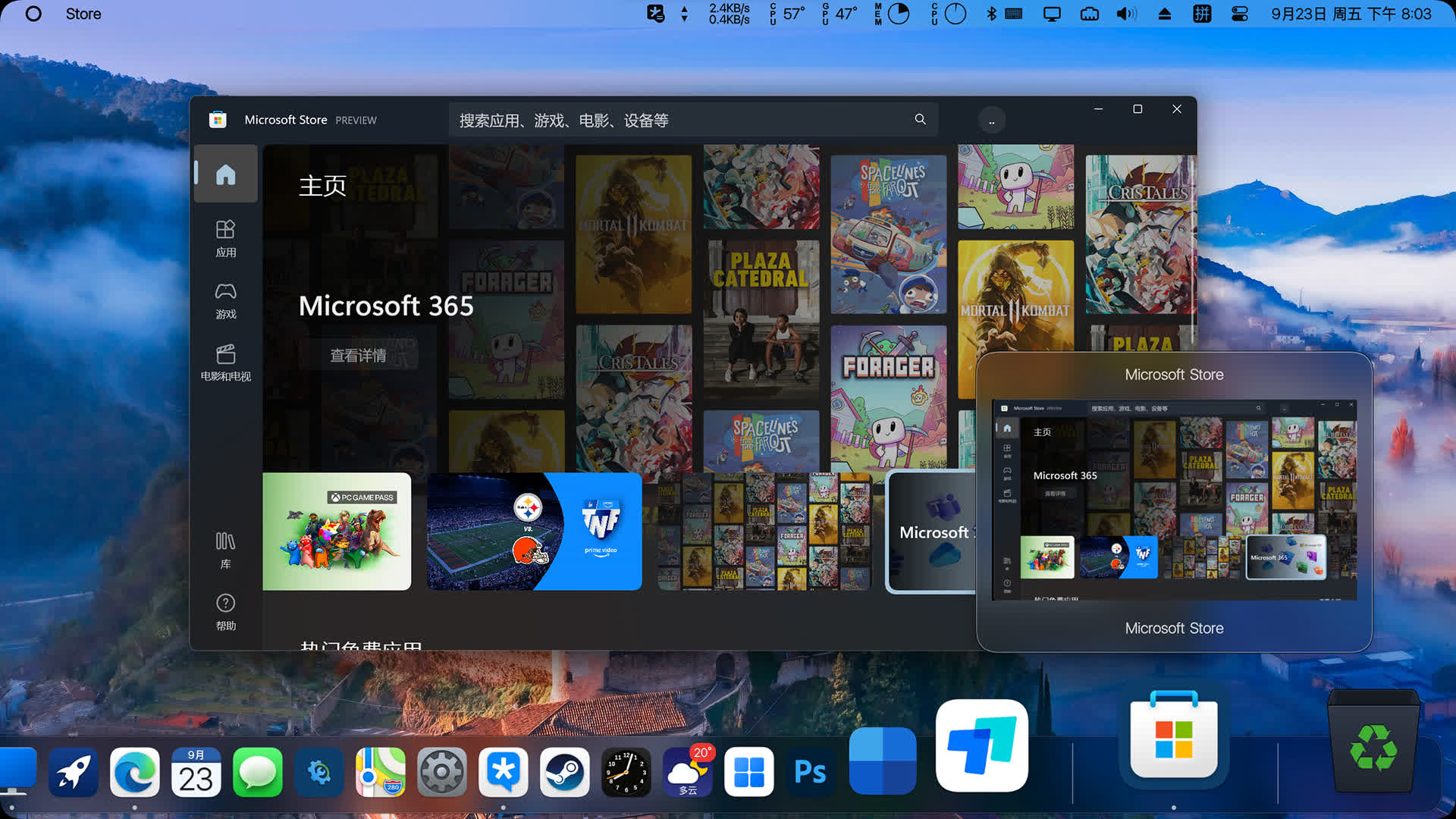
Run program icon showing window preview
All programs that run icons and have windows can display a window preview after hovering the mouse (UWP programs are supported). It needs to be turned on in Dock Preferences - Preview, and the preview size and delay time can be customized.
Drag and drop files (folders) directly into the dock
All files (including UWP shortcuts) and folders can be directly placed in the Dock, and multiple files (folders) can be dragged in in batches; this animation effect will not be available when the administrator account Administrator and administrator mode are running, so it is not recommended Run with an administrator account and in administrator mode.
Discord, WeChat, QQ, DingTalk message reminder
Support Discord, QQ, TIM, WeChat (UWP WeChat) and other software message counting and prompting effects. This message counting algorithm is an original software and has no public interface, so it cannot display specific chat content.
Show current city weather
Add system icon - weather forecast You can add a weather icon, the Dock icon is the real-time weather, and the preview window is the future weather, so the icon will be different from the previewed weather.
Icons show task progress
Supports copying files, downloading from browsers such as Chrome, playing music on Foobar, PotplayerPlay Video, etc. When the window icon on the system tray shows the progress, the corresponding icon in the Dock will display the progress bar.
Window minimized to dock
It comes with three kinds of window minimization effect animations, which can be checked and enabled in Dock Preferences - Minimization. The minimization animation adopts D3D11 hardware-accelerated rendering.
Show full folder contents
After adding a folder, the right-click menu of the icon can modify the display thumbnails in the folder and the sorting method of the file content. Left-click to display all files in the completed folder, and click the second-level directory in the folder to display all the files in the lower-level directory again; folder The files in the file also support drag-and-drop operations, which can be directly dragged out with the mouse to move or copy.
What's New
- Cancel the GPU multithreading optimization feature
- Corrected the German and English translations, thanks to netizen @Medienflow
- Fix the issue in all previous versions where screen corners sometimes displayed incorrectly when the screen resolution changed
- Optimize built-in window display animation and synchronize it with global window display animation
- Fix the issue in all previous versions where missing built-in theme icons caused infinite loop memory leaks
- Adjust global D3D11 level from 11.1 to 11.0 to improve compatibility and stability
- Fix the issue in all previous versions where Launchpad failed to retrieve all icons if it could not get Start menu or desktop icons, resulting in no icons displaying in Launchpad
- Adapt to Kugou Music full screen mode
- Fix the issue in all previous versions where MyFinder menu detection caused Kugou Music interface to freeze
- Optimize dock window boundaries when they are not 0, adding dock move animation when Launchpad is opened
- Adapt to some pure white/black icons, which will change brightness based on icon mask color
- Adjust MyFinder tray icon persistence configuration, modify it to a system virtual path to prevent persistence configuration failure caused by path changes after some UWP app updates. After this update, some programs' persistence settings will be invalid and need to be reset, and fix the issue in all previous versions where some programs could not persist in the MyFinder tray icon
- Optimize UWP app icon retrieval and fix the issue where some UWP app icons did not display
- Fix the issue in all previous versions where enabling foreground scheduling could cause windows near the scheduling window list to shrink into the list when the current window was resized
- Adapt to Windows 11 built-in screenshots to prevent display animation from causing screenshot abnormalities
- Fix the issue in all previous versions where Dock progress bar caused extremely high CPU usage and memory leaks in rare cases
- Optimize CPU usage when enlarging dock icons
- Optimize CPU usage during minimized window animation rendering
- Fix the issue in all previous versions where quickly showing and disappearing window previews could occasionally cause crashes
- Fix the previous version issue where MyFinder and Dock rendering occasionally did not display images
- Fix the issue in all previous versions where the Dock's overall position shifted after resolution changes
- Optimize detection of multiple monitors of the same model, displaying the corresponding monitor number for each monitor name