
Gears of War: E-Day is the latest blockbuster entry in Microsoft's long-running shooter franchise. And if you want to play it but your GPU isn't quite up to the task, or you're wondering what the best upgrade might be, we've tested 44 of them, so that should help you work it out.
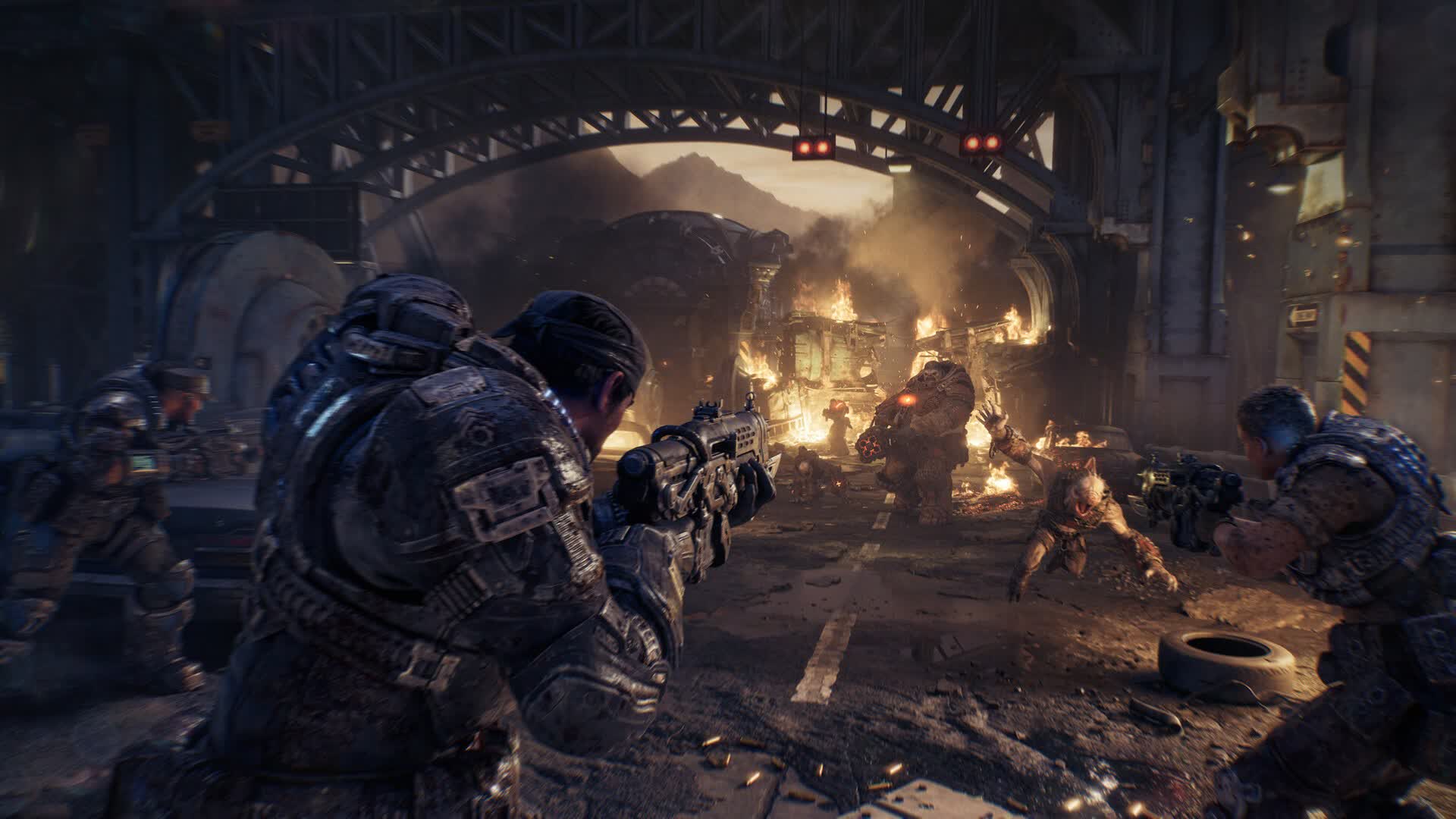
Developed by The Coalition, E-Day is a prequel set 14 years before the original Gears of War, following younger versions of Marcus Fenix and Dom Santiago as they experience the Locust invasion on Emergence Day. It's also the studio's first Gears title built from the ground up on Unreal Engine 5 and DirectX 12, with The Coalition describing it as its most technically ambitious Gears game to date.
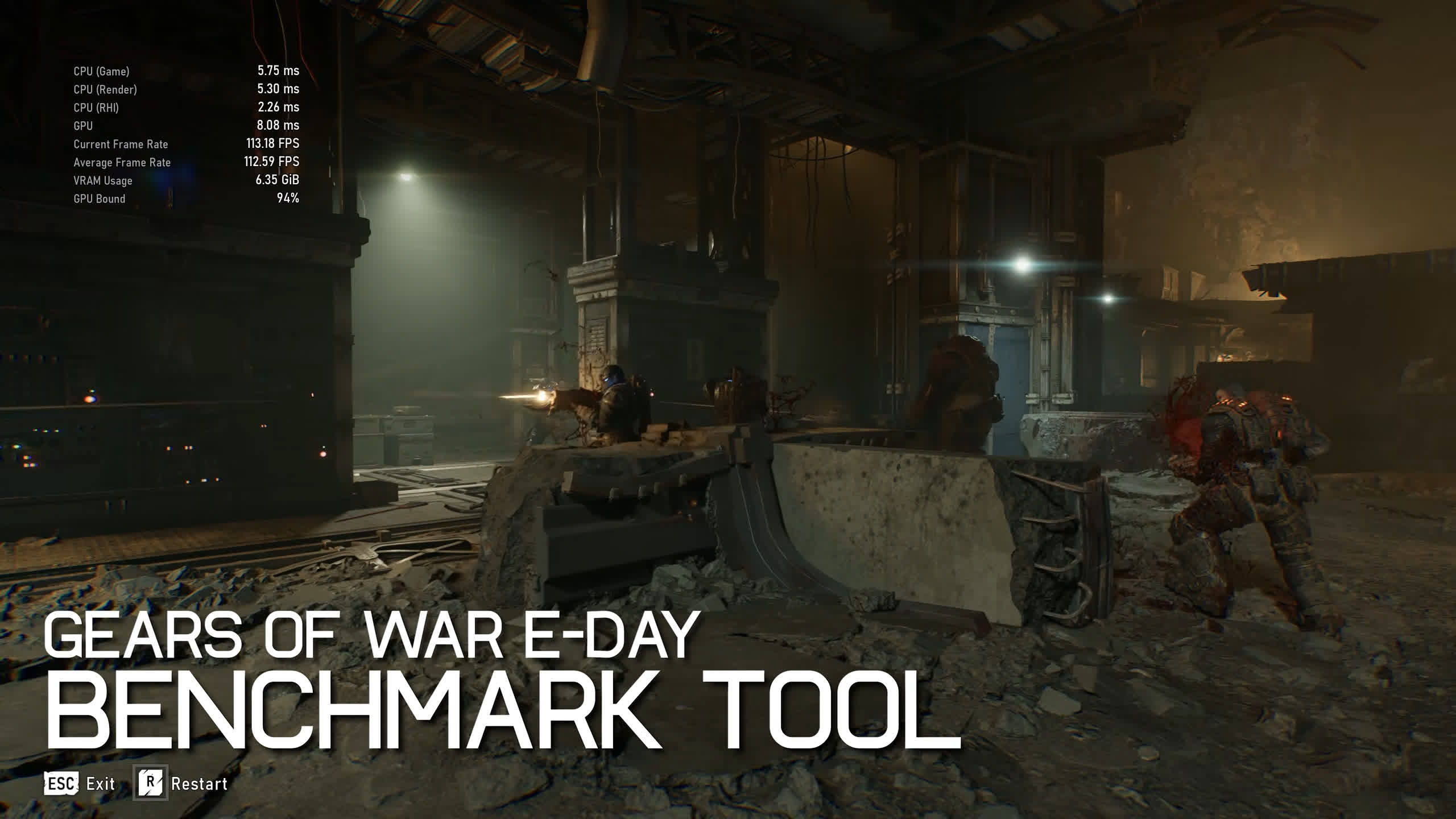
Gears of War: E-Day has a built-in benchmark which we found to be pretty good, so for ease of testing, and to let you directly compare your results with ours, we're using the benchmark tool. We did have to use separate performance-monitoring software to record 1% lows, as the game doesn't report that data.
We tested the game using the Medium and Ultra presets. We skipped Ludicrous for the bulk of our testing because performance was horrible for what amounts to a minimal visual improvement, though we have included some preset-scaling data that we'll look at first. We also tested the Ultra preset in two configurations: first at native resolution, and then with upscaling enabled, using DLSS on GeForce GPUs and FSR on Radeon and Arc GPUs.
We've applied the maximum amount of upscaling we generally recommend at each resolution: Quality at 1080p, Balanced at 1440p, and Performance at 4K. Our standard Ryzen 7 9800X3D test system was used for all testing, along with the latest available display drivers. With that, let's get into the results.
Test System Specs
| CPU | AMD Ryzen 7 9800X3D |
| Motherboard | MSI MPG X870E Carbon WiFi [BIOS 7E49v1AA7] |
| Memory | G.Skill Trident Z5 RGB DDR5-6000 32GB CL30 [CL30-38-38-96] |
| ATX Case | MSI Prospect 700R |
| Power Supply | Kolink Regulator Gold ATX 3.0 1200W |
| Storage | TeamGroup T-Force Cardea A440 M.2 PCIe Gen4 NVMe SSD 4TB |
| Operating System | Windows 11 25H2 |
| Display Driver | AMD Radeon Adrenalin 26.8.1 Nvidia GeForce Game Ready Driver 617.14 Intel Arc Graphics 32.0.101.9034 |
Benchmarks
Preset Scaling: Ludicrous Is Not Worth It
Starting with preset scaling at 1440p, comparing the Radeon RX 9070 XT and GeForce RTX 5070 Ti, we see that with the maximum Ludicrous preset enabled, the GeForce GPU takes the lead, coming in 11% faster than the Radeon GPU. However, dropping down to the Ultra preset leaves the two GPUs virtually tied, with the 9070 XT holding a negligible 1% advantage.
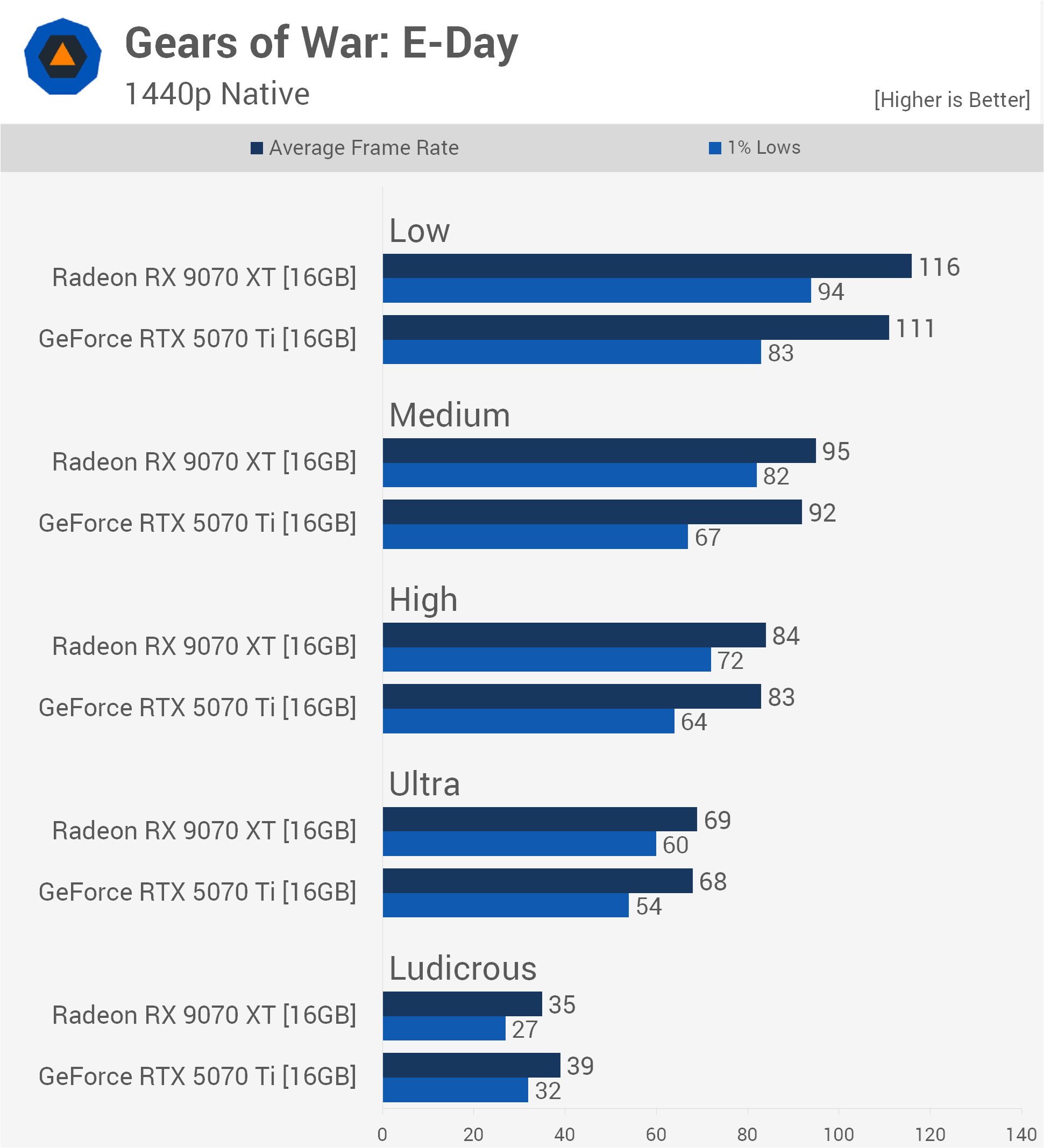
More importantly, moving from Ludicrous to Ultra delivers a massive performance improvement. Average frame rates increase by 97% on the 9070 XT and 74% on the RTX 5070 Ti.
Both GPUs see another substantial 22% performance increase when dropping from Ultra to High, where average frame rates remain neck-and-neck. Moving from High to Medium provides a further 11 – 13% boost, with the Radeon GPU beginning to pull slightly ahead with a 3% lead.
Finally, dropping from Medium to Low increases average frame rates by another 21 – 22%, with the 9070 XT extending its lead over the RTX 5070 Ti to just under 5%.
Ultra Preset
1080p
For our first full GPU comparison, we're using the Ultra preset at native resolution, starting with 1080p. The RTX 5090 rendered 139 fps, making it 29% faster than the RTX 4090, which averaged 108 fps. The RTX 5080 followed closely behind at 102 fps.
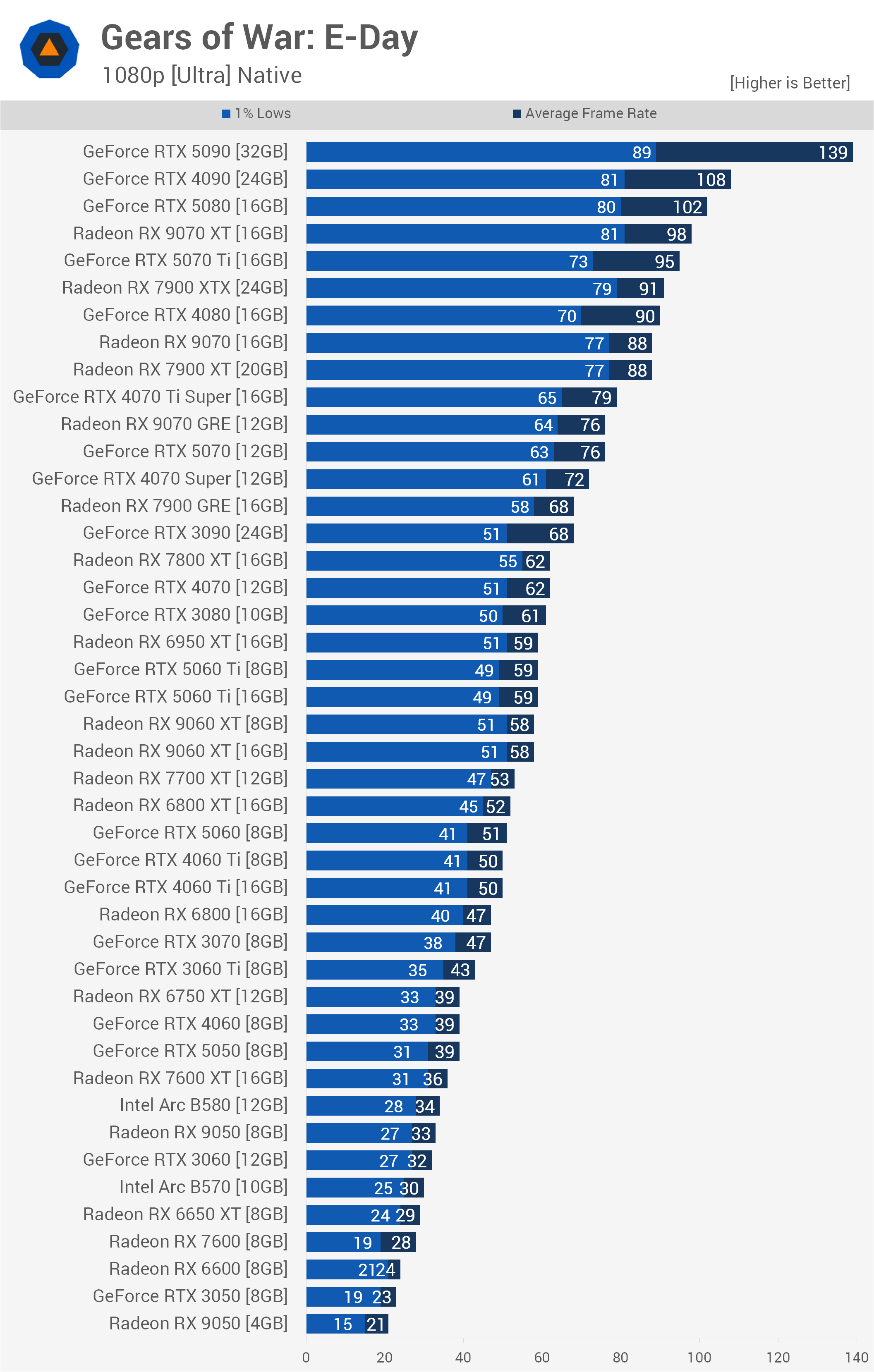
In another very tight matchup, the RX 9070 XT edged out the RTX 5070 Ti, delivering 98 fps compared with 95 fps for the Nvidia GPU.
The standard RX 9070 and RX 7900 XT both averaged 88 fps, keeping them well ahead of the RTX 5070, which tied the RX 9070 GRE at 76 fps. This means the RTX 5070 Ti maintains a substantial 25% performance advantage over the standard RTX 5070.
Interestingly, at 1080p, VRAM capacity isn't a limiting factor for most 8GB cards. The 16GB and 8GB versions of the RTX 5060 Ti, RX 9060 XT, and RTX 4060 Ti perform identically, delivering 59 fps, 58 fps, and 50 fps, respectively, regardless of memory capacity.
However, the 4GB RX 9050 managed just 21 fps compared with 33 fps for the 8GB version, demonstrating that 4GB is heavily bottlenecked even at 1080p. Well, that and the fact that AMD halved the memory bandwidth on the 4GB OEM model.
Below 30 fps, cards such as the RX 6650 XT and RTX 3050 begin to struggle, suggesting that lower quality settings will be required.
1440p
Stepping up to 1440p significantly increases the strain on the GPUs. Here, the RTX 5090 averaged 111 fps, making it 37% faster than the RTX 4090 at 81 fps.
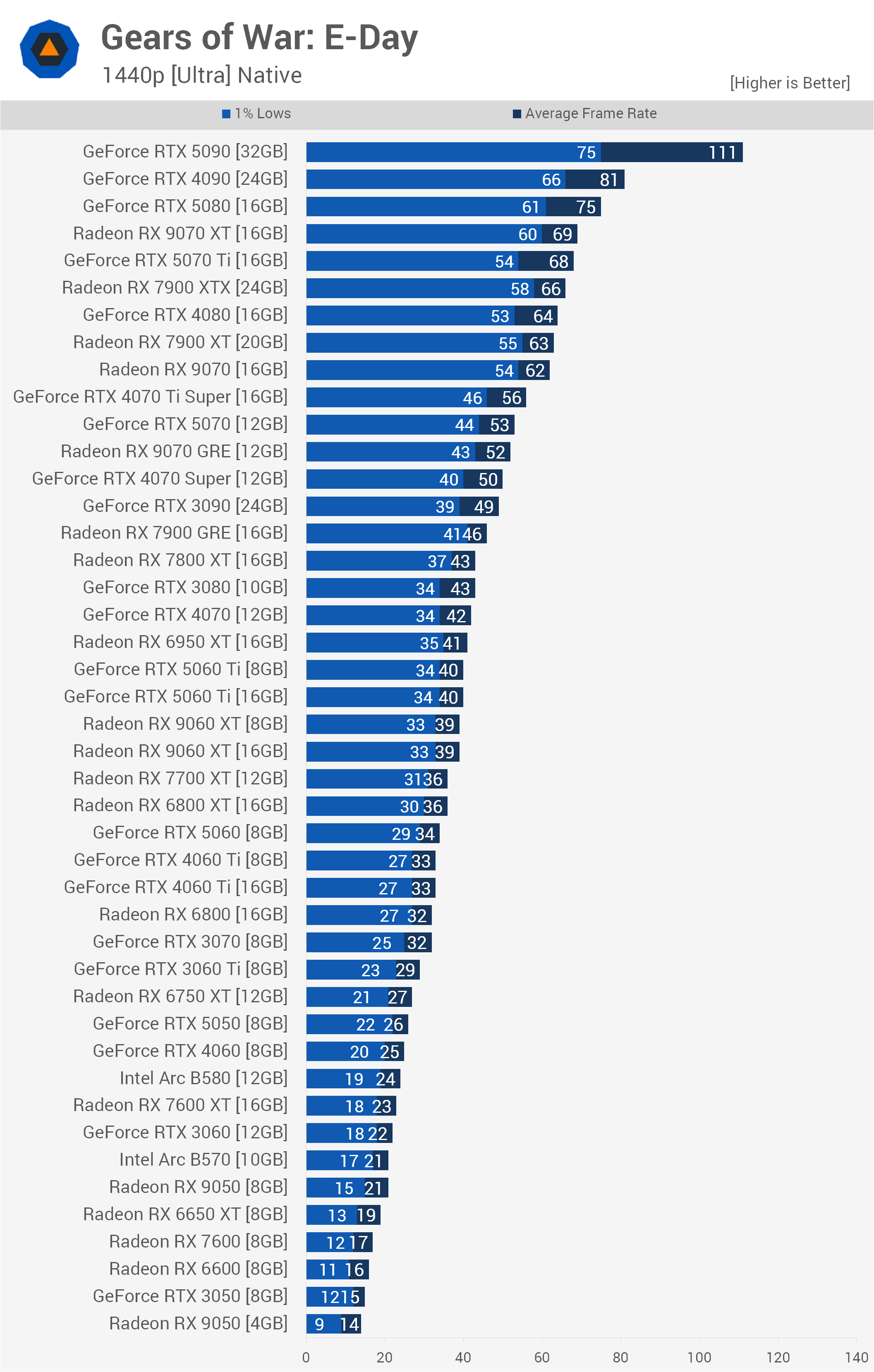
The RTX 5080 managed 75 fps, trailing the RTX 4090 by a relatively small margin. Meanwhile, the RX 9070 XT and RTX 5070 Ti were again virtually tied, delivering 69 fps and 68 fps, respectively.
Further down the stack, the standard RTX 5070 managed 53 fps, meaning the RTX 5070 Ti extends its lead over its sibling to 28%. The RX 9070 GRE sits just behind the RTX 5070 at 52 fps, while the RTX 3090 isn't far behind at 49 fps.
As at 1080p, an 8GB VRAM capacity doesn't heavily bottleneck these mid-range cards at 1440p. The 16GB and 8GB versions of the RTX 5060 Ti at 40 fps, RX 9060 XT at 39 fps, and RTX 4060 Ti at 33 fps continue to perform identically. Budget options start dropping into the 20s and teens, with the RX 9050 4GB falling to an unplayable 14 fps.
4K
Moving up to 4K, basically nothing can render the game at a high refresh rate using native resolution and the Ultra preset. The RTX 5090 stands alone as the only GPU capable of breaking the 60 fps barrier, averaging 70 fps and making it 40% faster than the RTX 4090, which managed just 50 fps.
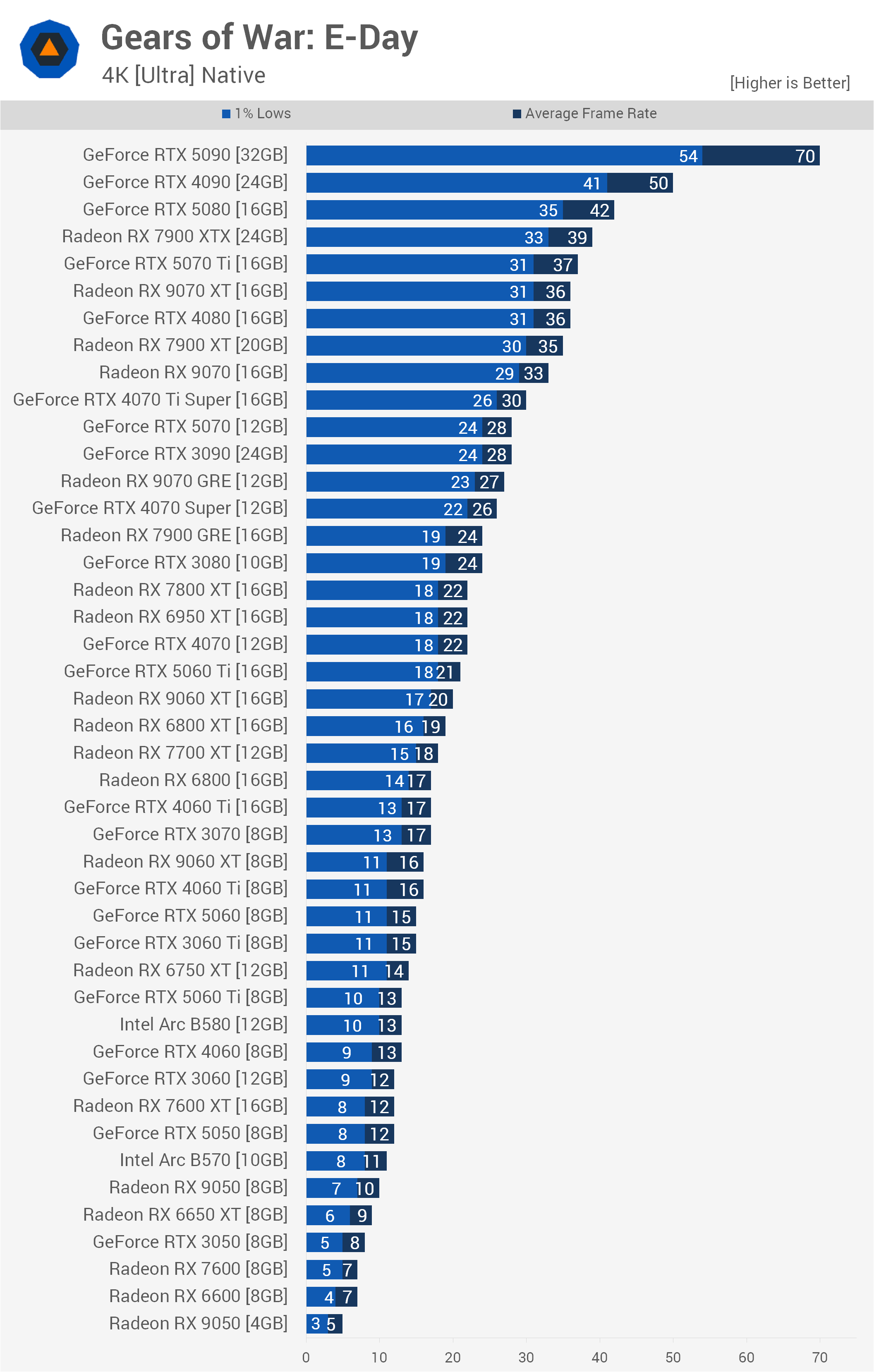
The RTX 5080 trails further behind at 42 fps, while the RX 7900 XTX manages 39 fps. The RTX 5070 Ti and RX 9070 XT remain close, averaging 37 fps and 36 fps, respectively, putting them roughly in line with the RTX 4080. The standard RTX 5070 and RTX 3090 both finish deadlocked at a modest 28 fps.
The VRAM situation changes more noticeably at 4K, where 8GB begins to become a problem, though frame rates are already extremely low even with the 16GB models.
The 16GB RTX 5060 Ti managed a meager 21 fps, while its 8GB sibling collapsed to just 13 fps, giving the 16GB model a massive 61% performance advantage. Of course, both are effectively unusable here. Similarly, the 16GB RX 9060 XT delivered 20 fps compared with 16 fps for the 8GB version, giving the higher-capacity model a 25% advantage.
Below this point, it's fair to say we've entered unplayable territory by almost any standard. Even the higher-end GPUs clearly require upscaling with the Ultra preset, especially at 4K, so that's what we'll look at next.
Ultra Preset + Upscaling
1080p: Quality Upscaling
For our 1080p testing, we paired the Ultra preset with Quality upscaling, using DLSS for GeForce GPUs and FSR for Radeon and Arc GPUs. The GeForce RTX 5090 averaged 162 fps, just outpacing the RTX 5080 at 151 fps, while the previous-generation RTX 4090 trailed both at 139 fps.
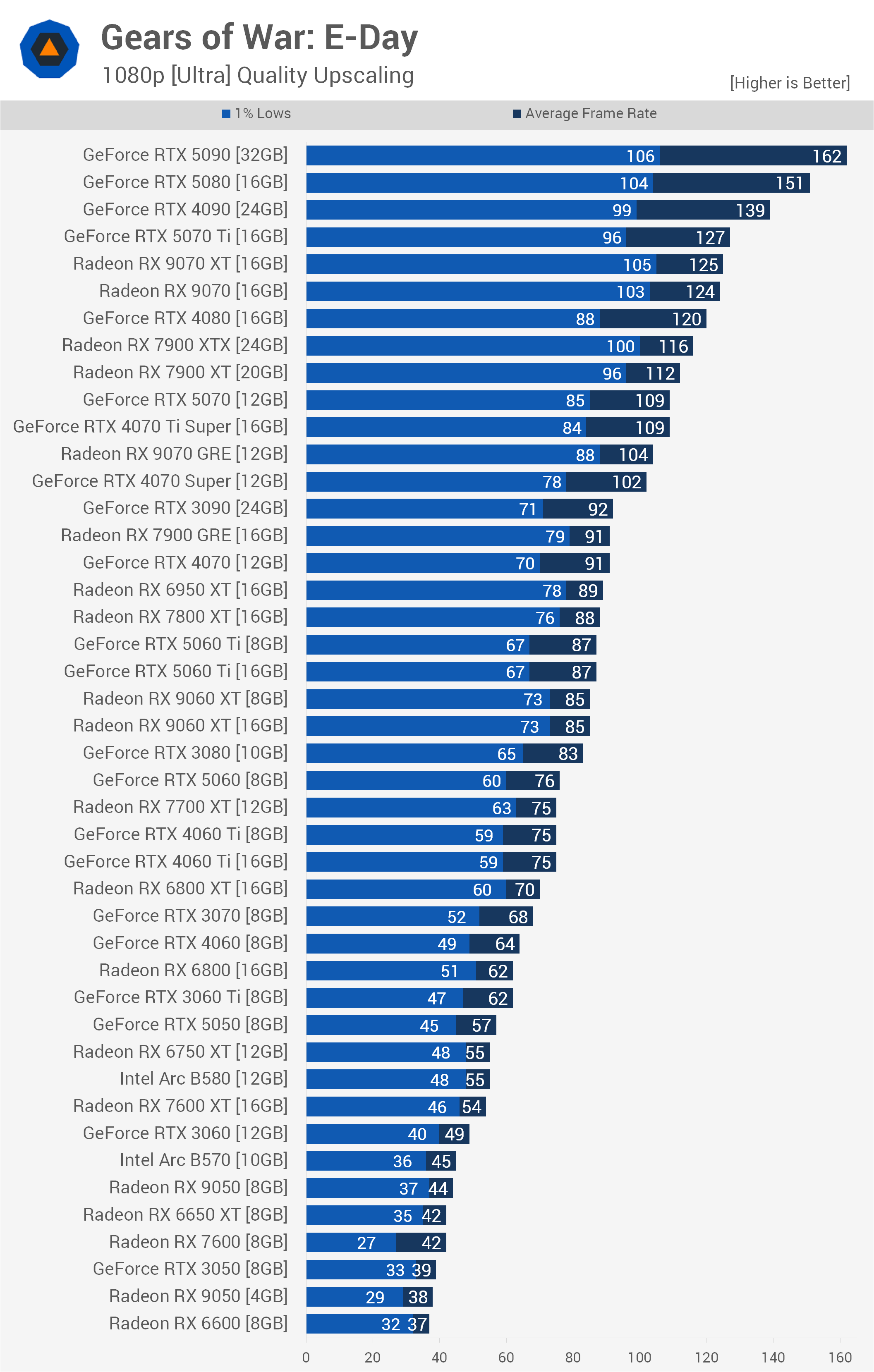
Moving down the product stack, a fiercely competitive group emerged between the RTX 5070 Ti, Radeon RX 9070 XT, and standard RX 9070. The RTX 5070 Ti edged out the competition at 127 fps, but the RX 9070 XT and RX 9070 were right on its heels at 125 fps and 124 fps, respectively. All three newer GPUs also managed to outperform the previous-generation RTX 4080, which topped out at 120 fps.
Further down the graph, the RTX 5070 averaged 109 fps, effectively tying the RTX 4070 Ti Super while sitting 15 fps behind the standard RX 9070.
As expected, 8GB of VRAM was entirely sufficient under these conditions. The 16GB and 8GB versions of the RTX 5060 Ti performed identically at 87 fps. The same was true for the Radeon RX 9060 XT models, which both delivered 85 fps, and the RTX 4060 Ti variants, which each reached 75 fps.
For around 60 fps, older hardware such as the RX 6800 or RTX 3060 Ti will do the job. Current-generation entry-level products fell a little short, with the RTX 5050 averaging 57 fps and the RX 9050 8GB managing just 44 fps. Near the very bottom of the graph, the 4GB Radeon RX 9050 struggled significantly, averaging just 38 fps with 1% lows of 29 fps.
1440p: Balanced Upscaling
Stepping up to a 1440p output resolution, we used the Ultra preset with Balanced upscaling. As you'd expect, the RTX 5090 maintained its dominant position at the top of the graph, delivering an impressive 152 fps average. In a notable shift from the 1080p results, the older RTX 4090 overtook the RTX 5080, rendering 126 fps compared with 119 fps for the newer GPU.
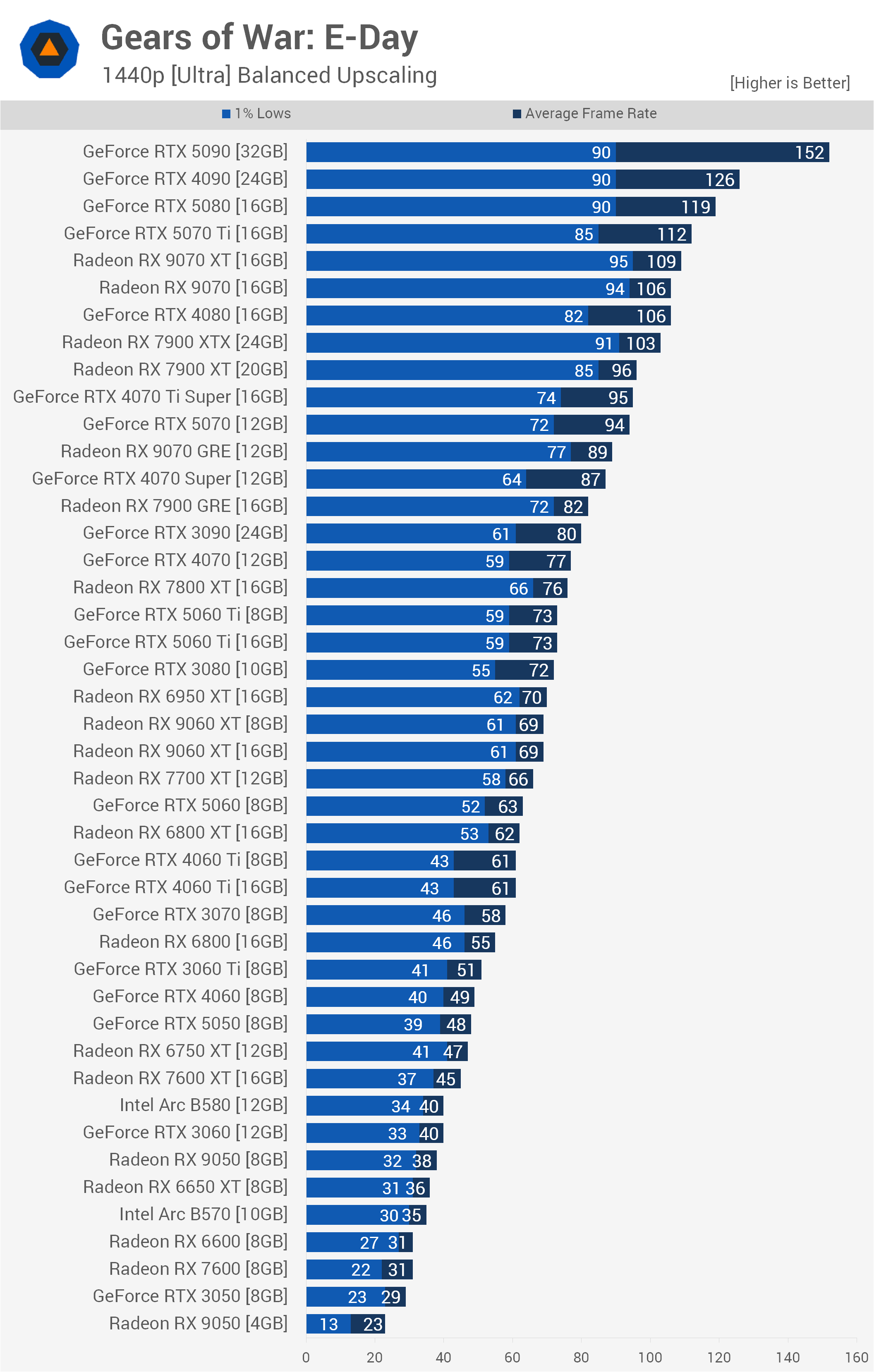
Then, in the highly contested upper mid-range or high-end segment, depending on what you want to call it these days, the RTX 5070 Ti widened its lead slightly over the AMD competition, averaging 112 fps. The RX 9070 XT followed at 109 fps, while the standard RX 9070 managed 106 fps, putting it in a dead heat with the RTX 4080.
The standard RTX 5070 dropped to 94 fps, placing it slightly behind the RTX 4070 Ti Super and RX 7900 XT. That left the RTX 5070 trailing the 5070 Ti by a substantial 18 fps.
Crucially, 8GB of VRAM remained a non-issue despite the higher 1440p output resolution. Gears of War: E-Day doesn't use a huge amount of VRAM under these settings, and the lower internal render resolution of Balanced upscaling also helps keep memory usage in check. The RTX 5060 Ti 16GB and 8GB models remained perfectly tied at 73 fps. The RX 9060 XT 16GB and 8GB variants also delivered identical performance at 69 fps, while both versions of the RTX 4060 Ti managed 61 fps.
Below the 60 fps threshold, older and budget-oriented hardware begins to struggle. The RTX 3060 and Intel Arc B580, for example, both averaged around 40 fps.
4K: Performance Upscaling
Moving to a 4K output resolution, we used the Ultra preset with Performance upscaling. Even with upscaling doing much of the heavy lifting, the RTX 5090 was the only GPU to break into triple digits, averaging an impressive 125 fps. The RTX 4090 followed at 99 fps, re-establishing a comfortable lead over the newer RTX 5080, which managed 86 fps.
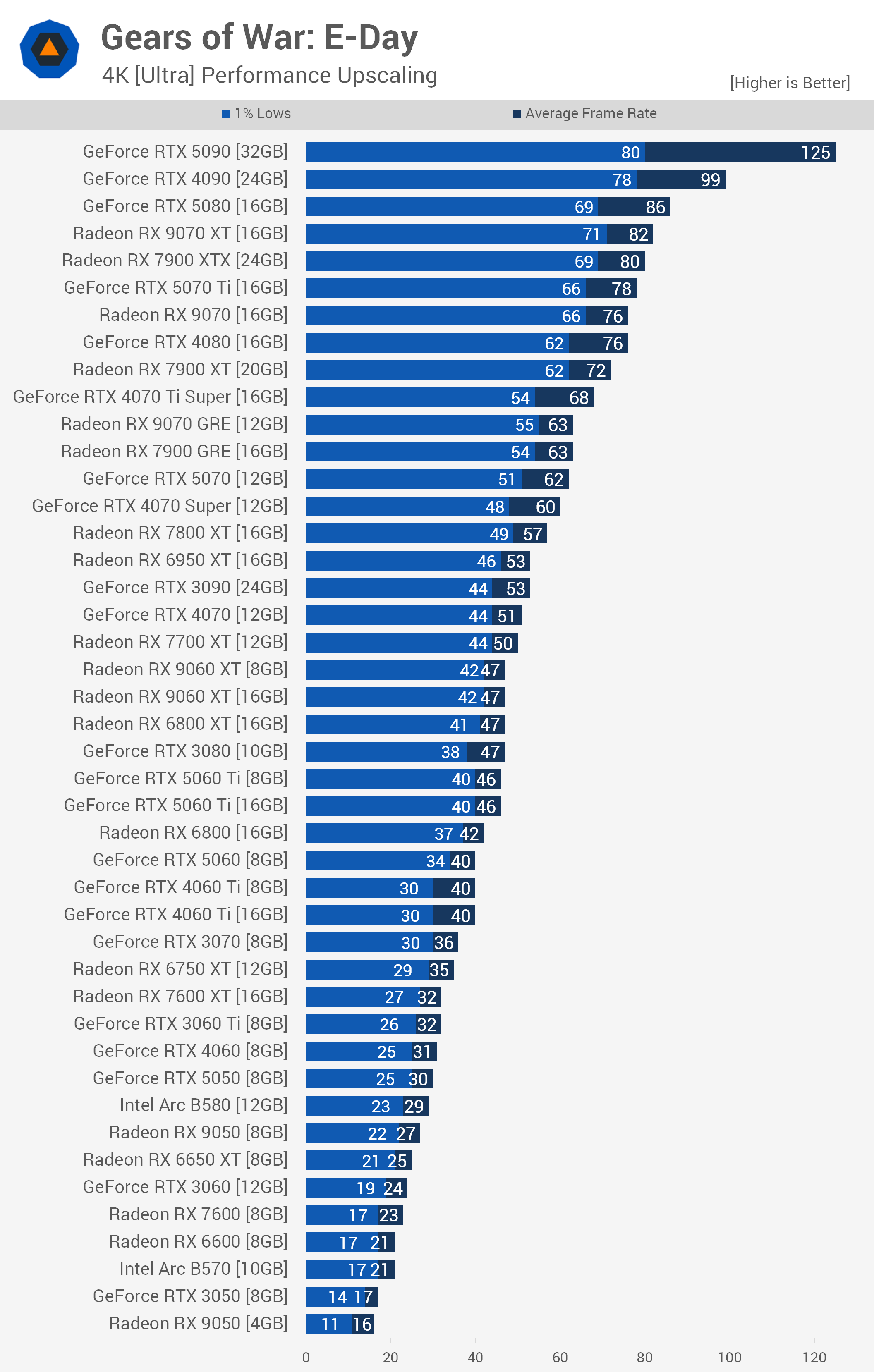
An interesting shift occurred further down the graph, where the Radeon GPUs handled this configuration particularly well. The RX 9070 XT overtook the RTX 5070 Ti, averaging 82 fps compared with 78 fps for the GeForce GPU. The standard RX 9070 also performed exceptionally well, matching the RTX 4080 at 76 fps. Meanwhile, the standard RTX 5070 struggled to keep pace with its immediate competitors, dropping to 62 fps. That placed it just behind the older RX 7900 GRE and the RX 9070 GRE, both of which averaged 63 fps.
One of the more interesting takeaways from the 4K upscaling results is how well the 8GB graphics cards hold up. Unlike native 4K rendering, where limited VRAM caused serious problems for some models, Performance upscaling uses a much lower internal render resolution, which keeps memory demands under control.
As a result, the 16GB and 8GB versions of the RX 9060 XT performed identically at 47 fps. The RTX 5060 Ti 16GB and 8GB models likewise tied at 46 fps, while both RTX 4060 Ti configurations delivered 40 fps.
Heavy upscaling therefore not only eliminates the VRAM-related performance deficits seen at native 4K, but also makes the game reasonably playable on hardware such as the RTX 5060 Ti and RX 9060 XT.
Medium Preset
1080p
Moving on to the Medium preset, we'll again start with the 1080p data. Here, the GeForce RTX 5090 averaged 173 fps while maintaining 1% lows of 103 fps. Behind the flagship, we once again see a tightly contested battle for second place. The RTX 5080 edged out the immediate competition at 136 fps, but the RTX 4090 and RX 9070 XT were right behind it, rendering 135 fps and 134 fps, respectively.
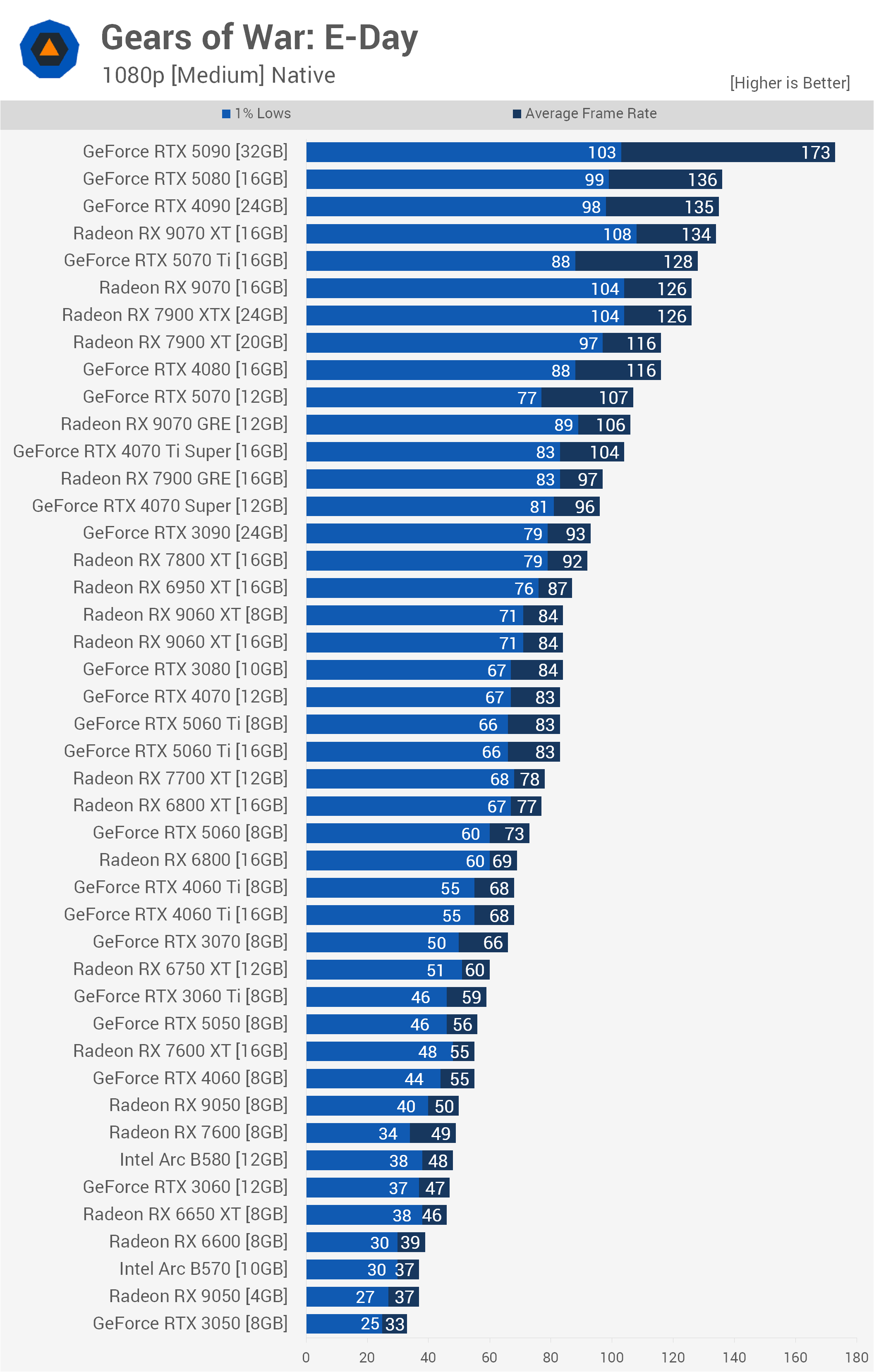
Further down the stack, the RTX 5070 Ti produced 128 fps, narrowly beating both the standard RX 9070 and older RX 7900 XTX, which tied at 126 fps. A significant performance gap emerged between Nvidia's 70-class siblings, as the standard RTX 5070 managed just 107 fps. That left it trailing the RTX 5070 Ti by 21 fps and placed it almost directly alongside the RX 9070 GRE at 106 fps.
Notably, the Medium preset at 1080p is very light on video memory, meaning 8GB graphics cards face no VRAM bottlenecks. The 16GB and 8GB versions of the RX 9060 XT performed identically at 84 fps, while both RTX 5060 Ti models delivered 83 fps. The RTX 4060 Ti variants were also tied at 68 fps.
The only obvious memory-related struggle came at the very bottom of the graph, where the 4GB RX 9050 topped out at 37 fps, falling well behind 8GB budget options such as the Radeon RX 7600 at 49 fps.
1440p
Increasing the resolution to native 1440p adds more GPU load, though the RTX 5090 still managed an average of 143 fps with a rock-solid 1% low of 100 fps. In another shift from the 1080p results, the older RTX 4090 overtook the RTX 5080, delivering 108 fps compared with 101 fps for the newer card.
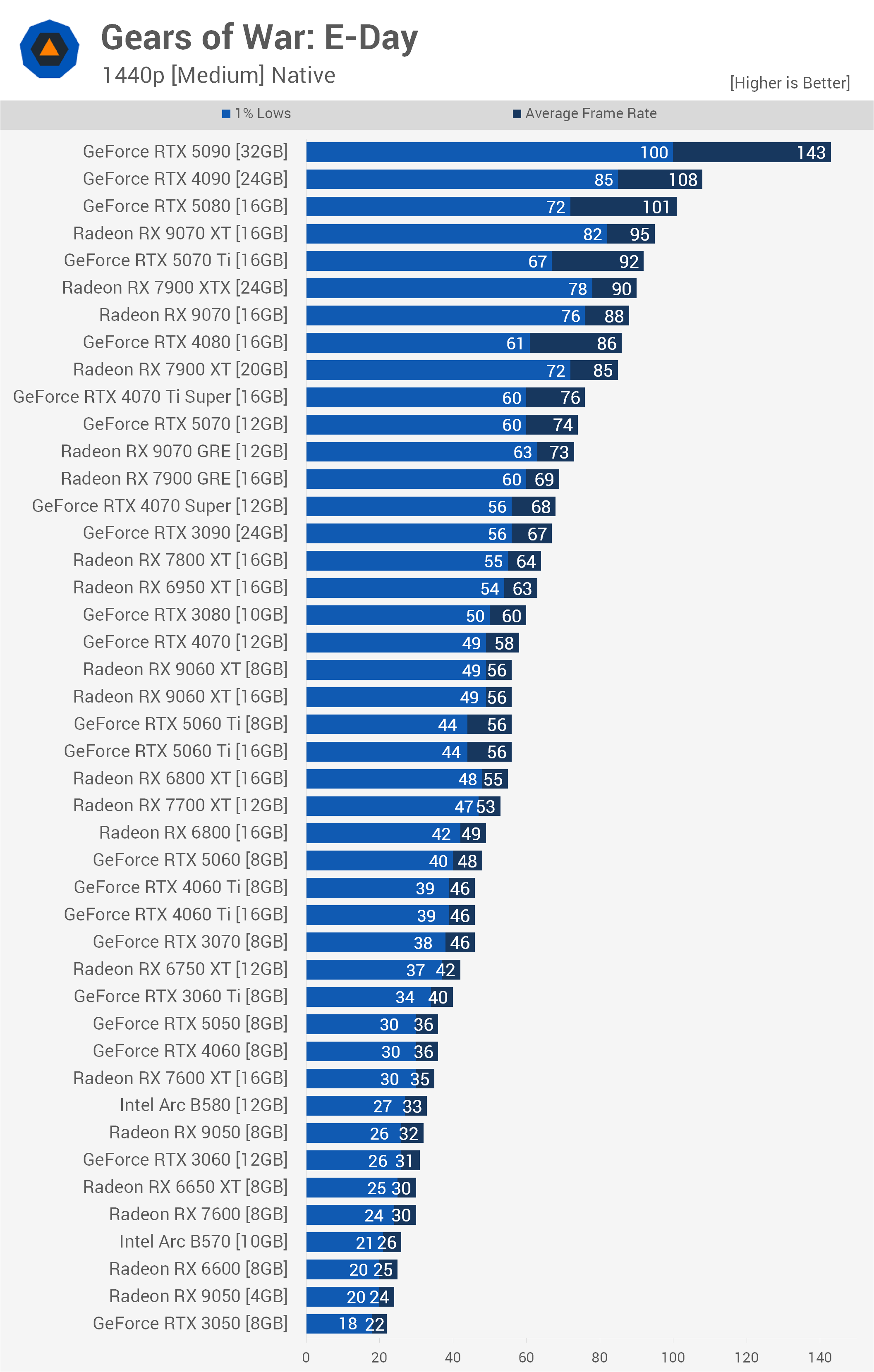
The Radeon RX 9070 XT maintained a strong position, averaging 95 fps and successfully outpacing the RTX 5070 Ti. Further down, the standard RTX 5070 found itself trading blows with the RX 9070 GRE at 73 fps and RTX 4070 Ti Super at 76 fps.
Once again, VRAM capacity proved irrelevant for the 8GB models under these settings. The RTX 5060 Ti 16GB and 8GB versions were deadlocked at 56 fps, exactly matching both RX 9060 XT variants, which also delivered 56 fps. At the bottom of the stack, budget hardware begins to crumble, with the RTX 3050 8GB falling to 22 fps and the 4GB RX 9050 managing just 24 fps.
4K
Pushing the game to native 4K using the Medium preset severely limits frame rates across the board. As a result, the RTX 5090 remains the only GPU capable of providing what we'd consider a high-refresh-rate experience.
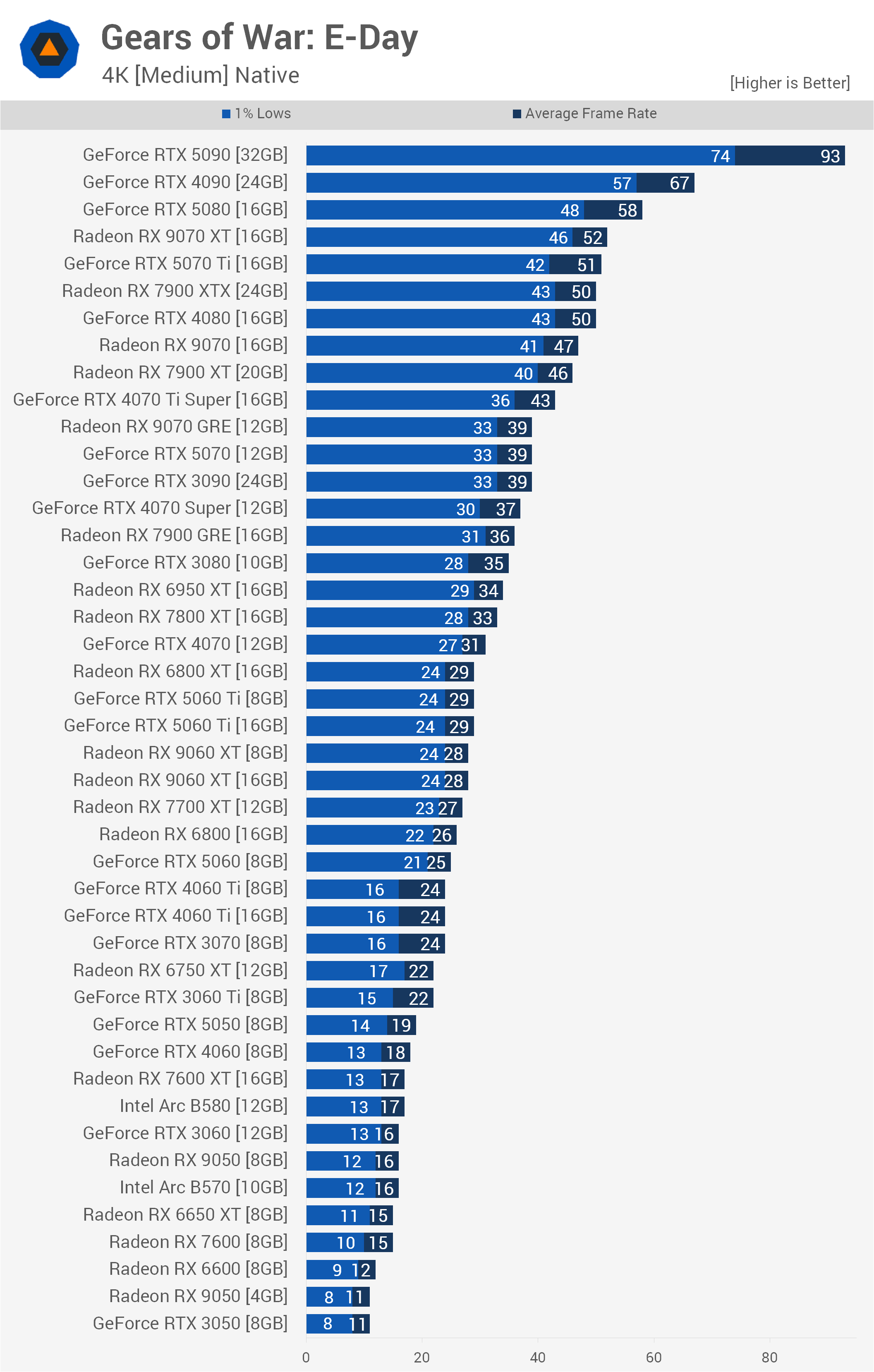
Nvidia's flagship averaged 93 fps, beating the RTX 4090 by 39%. The RTX 5080 fell further behind the 4090, averaging just 58 fps. Below that, the RX 9070 XT and RTX 5070 Ti were effectively tied at 52 fps and 51 fps, respectively. Both also performed similarly to the older RTX 4080 and RX 7900 XTX, which averaged around 50 fps. Further down the graph, the standard RTX 5070 managed just 39 fps, tying the RX 9070 GRE and RTX 3090.
One of the more surprising aspects of the 4K Medium results is the complete absence of the 8GB VRAM bottleneck seen with the Ultra preset. Medium keeps memory usage low enough that the 16GB and 8GB versions of the RTX 5060 Ti perform identically at 29 fps. Likewise, the 16GB and 8GB RX 9060 XT cards both averaged 28 fps, while the two RTX 4060 Ti configurations each delivered 24 fps.
Avoiding a VRAM bottleneck doesn't help much when the GPUs simply lack the raw horsepower for native 4K, however. All of these mid-range models remain below 30 fps, while cards such as the RTX 3050 and RX 9050 fall all the way to a measly 11 fps.
Strong Visuals, Sensible Hardware Requirements
So there you have it. Gears of War: E-Day is a great-looking game that's also relatively easy to run. Our only real criticism is the noticeable amount of ray-tracing noise when using the Ultra preset, though Tim covered a few tweaks that can improve image quality in his separate optimization guide.
For those targeting Ultra settings at 1080p, averaging around 60 fps is possible with GPUs such as the RX 9060 XT and RTX 5060 Ti, as well as older hardware including the RTX 3080, RTX 4070, and RX 7800 XT.
Native 1440p is more demanding, as you'll need something around a Radeon RX 9070, GeForce RTX 4080, or faster to reach 60 fps. That said, if you're comfortable enabling Balanced upscaling, the requirements drop considerably. Even an RTX 4060 Ti 8GB can deliver around 60 fps under those conditions.
The really good news is that the game still looks great using the Medium preset, and achieving 60 fps at native 1080p is relatively easy. Older GPUs such as the RTX 3060 Ti and RX 6750 XT work well here. Even at 1440p, previous-generation mid-range hardware can provide a solid experience, particularly if you're willing to enable upscaling.

Another positive is that VRAM capacity generally isn't a major concern in this title. The 8GB GPUs performed well throughout our testing, with little to no difference between otherwise identical 8GB and 16GB models under most settings. Even the 4GB RX 9050 wasn't always limited primarily by its small VRAM buffer, though its reduced memory bandwidth was clearly a problem. Using the lowest settings we tested, the 8GB model was still 35% faster.
Unfortunately, Intel's Arc GPUs are a different story. They currently perform very poorly in Gears of War: E-Day, with the Arc B580 often falling behind even the Radeon RX 9050. Hopefully that's something Intel can address with a future driver update.
Overall, Gears of War: E-Day strikes a good balance between visual quality and performance. Ultra can be demanding at higher resolutions, particularly without upscaling, but Medium looks surprisingly good and makes the game accessible to a much wider range of GPUs.