

Google Chrome is a fast, simple, and secure web browser, built for the modern web. Chrome combines a minimal design with sophisticated technology to make the web faster, safer, and easier.
Used by over 3 billion people worldwide, Chrome owes its dominance to a combination of speed, a vast extension ecosystem, and tight integration with Google services.
Is Chrome the fastest browser?
Chrome, Firefox, Safari, and other major browsers are updated every few weeks, making direct speed comparisons a moving target. Chrome has long had a reputation as a RAM hog, but competing browsers can be just as resource-hungry under heavy use.
In recent years Google has added built-in tools to address this. Memory Saver (Settings > Performance) suspends inactive tabs to free up RAM. Google claims up to 40% less memory usage, while Energy Saver reduces background activity when your battery is running low. Both are enabled by default.
Overall, Chrome remains among the fastest browsers for complex web apps and JavaScript-heavy sites. Web developers optimize for Chrome's engine because it is the most-used browser by a wide margin, roughly 68% of global browser share across desktop, Android, and the many other browsers built on the same Chromium engine.
Is Google Chrome safe and private?
Chrome is generally considered safe against malicious websites, phishing, and malware, thanks to features like sandboxing, safe browsing, and AI-powered scam detection. Privacy is a different story.
Everything you do in Chrome (including every character typed into the address bar) is recorded by Google and can be linked to your account and cross-referenced with other Google services. Chrome's Incognito mode does block third-party cookies by default, but it does not prevent Google from seeing your activity. More privacy-conscious users may prefer Firefox, which blocks cross-site tracking by default.
What are the best Chrome alternatives?
There are plenty of free alternatives. For more private browsing, Firefox and Brave both block cross-site tracking by default. If you want a Chrome-like experience without Google's data collection, Ungoogled Chromium removes Google's integrations entirely.
Opera, Microsoft Edge, and Vivaldi are feature-rich Chromium-based options. Edge in particular has grown in popularity and competes seriously on Windows. A new wave of AI browsers has also emerged: ChatGPT Atlas and Comet both offer agentic assistants that can summarize content and automate multi-step tasks on your behalf.
How do I sync Chrome across devices?
Chrome can keep your bookmarks, passwords, browsing history, open tabs, extensions, and settings in sync across your devices, as long as you sign into the same Google account. To enable it on desktop, click the profile icon in the top-right corner and select Turn On sync. On Android, go to Settings > Account > Sync. On iOS, signing into your Google account in Chrome enables sync automatically.
Keep in mind that syncing your data ties it to your Google account, which factors into the privacy trade-offs discussed before.
Does Chrome update automatically, and how do I check my version?
Yes, Chrome updates silently in the background, so most users never need to think about it. When an update is ready, it downloads automatically and gets applied the next time you relaunch the browser. If an update is waiting to be applied, you'll see a colored arrow icon appear next to the three-dot menu in the top-right corner: green means the update is recent, orange means it's been a couple of days, and red means it's been a week or more.
To check your current version, go to Menu > Help > About Google Chrome. Chrome will check for updates on the spot and prompt you to relaunch if one is pending. Google ships a new major version roughly every four weeks, with security patches in between, so staying current is important.
Why is Chrome using so much CPU and memory, even with only a few tabs open?
Chrome's resource appetite is a known issue, but most cases come down to a handful of causes: extension bloat, background processes, and accumulated cache and cookies. Extensions are a particularly common culprit – even idle ones can consume hundreds of megabytes of RAM.
The fastest way to diagnose the problem is Chrome's built-in Task Manager (Shift+Esc, or More Tools > Task Manager), which shows per-tab and per-extension memory and CPU usage. From there you can identify and close the worst offenders. Regularly clearing your browsing data (cache and cookies) can also help over time.
How can I prevent Chrome from automatically translating web pages?
Chrome's automatic translation feature can be frustrating. To stop this behavior, go to the Settings menu, select "Languages," and turn off the option that offers to translate pages not in a language you read. You can also manage individual language preferences there.
Features

Speed
Chrome is designed to be fast in every possible way: It's quick to start up from your desktop, loads web pages in a snap, and runs complex web applications fast. Learn more about Chrome and speed.
Stay organized with tabs
Tabs help you stay organized, keep track of multiple pages, and multi-task. You can group tabs together for better organization or pin tabs to automatically open websites you use the most.
Have Chrome read pages aloud
Chrome can now read web pages aloud. Words on the page are highlighted to help you follow along. Read aloud is best for content like news stories, articles, or even PDFs.
- To use read aloud, right-click on a page, and select Open in reading mode. This opens the side panel, which has controls you can use for read aloud.
- Click the Play button.
- You can adjust the voice , speed, and highlight style in the toolbar next to the Play button.
View two pages in one tab
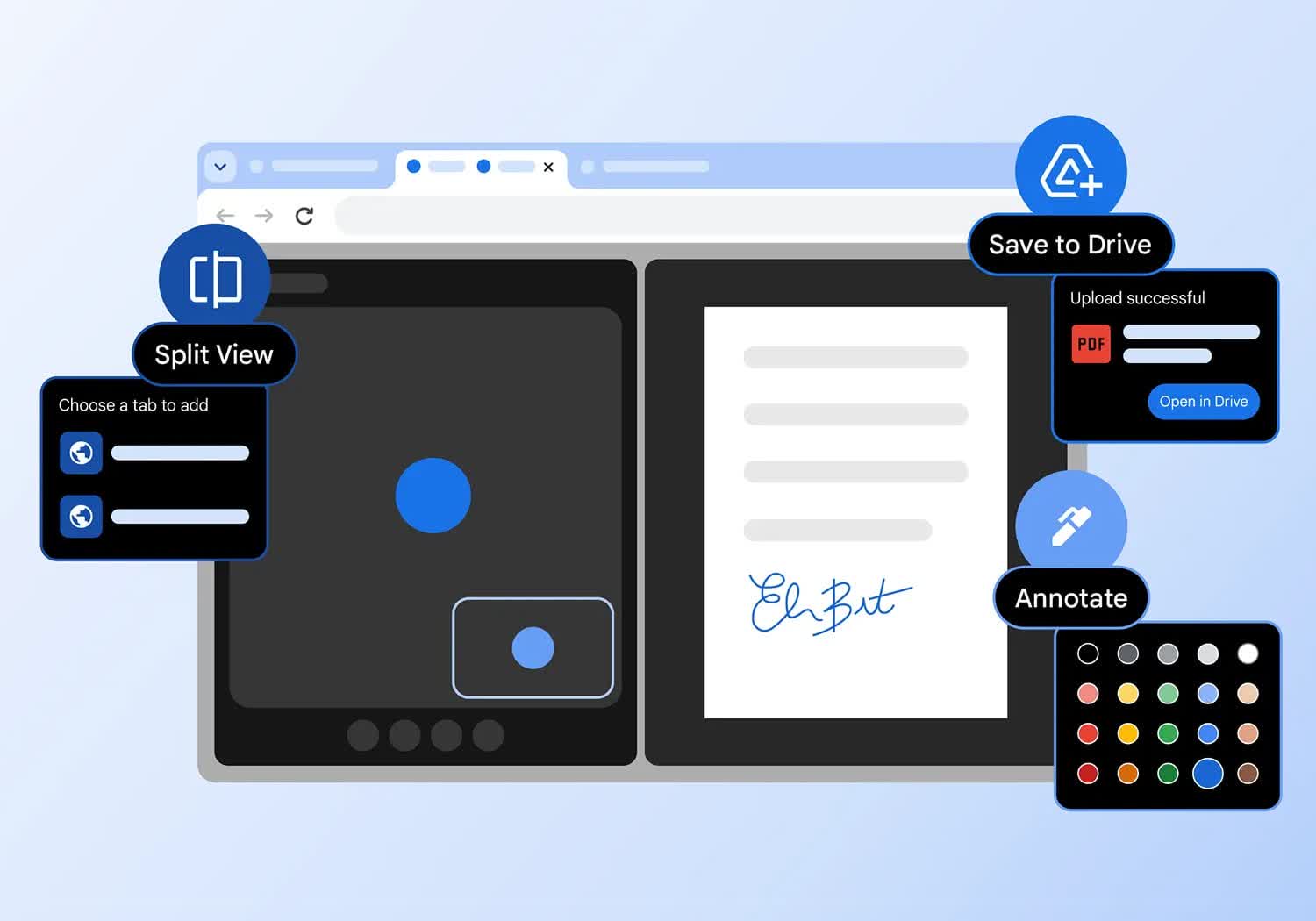
Split view puts two pages side-by-side in the same tab so you can easily compare options, watch a video while taking notes, and more.
Ways to open a split view:
- Drag another tab or link to the left or right edge of your browser window.
- You can also right-click a link and select Open link in split view.
Sign and annotate your PDFs
Skip downloading and printing when it's time to sign a PDF. Use the annotation tool to hand-draw your personal signature, complete forms, and highlight lines.
- Open a PDF and click Annotations.
- Choose your pen or highlighter style and color.
- Draw your annotation or signature, and click Save .
Tip: To make it easier to draw on a small line, Zoom the PDF.
Get your tab groups on the go
Just like your bookmarks and passwords, your tab groups are now available across all your devices. Get started on one device and pick up your project on another device.
To start seeing your tab groups across devices:
- Sign in and create a tab group on your computer or phone.
- Your tab group will automatically save to your account.
- Open your group on a different device.
- Mobile: go to your open tabs, click the tab group section .
- Desktop: click the tab group icon in your bookmarks bar (if open) or the Chrome menu.
What's New
The Chrome team is delighted to announce the promotion of Chrome 150 to the stable channel for Windows, Mac and Linux. This will roll out over the coming days/weeks.
Chrome 150.0.7871.46 (Linux) 150.0.7871.46/.47 Windows/Mac contains a number of fixes and improvements – a list of changes is available in the log. Watch out for upcoming Chrome and Chromium blog posts about new features and big efforts delivered in 150.
Security Fixes and Rewards
Note: Access to bug details and links may be kept restricted until a majority of users are updated with a fix. We will also retain restrictions if the bug exists in a third party library that other projects similarly depend on, but haven't yet fixed.
This update includes 382 security fixes. Please see the Chrome Security Page for more information.
- [N/A][506558270] Critical CVE-2026-13774: Use after free in Extensions. Reported by Google on 2026-04-26
- [N/A][511766407] Critical CVE-2026-13775: Use after free in GPU. Reported by Google on 2026-05-10
- [N/A][513012139] Critical CVE-2026-13776: Type Confusion in Dawn. Reported by Google on 2026-05-14
- [N/A][513128566] Critical CVE-2026-13777: Insufficient validation of untrusted input in iOSWeb. Reported by Google on 2026-05-14
- [N/A][513167952] Critical CVE-2026-13778: Use after free in WebUSB. Reported by Google on 2026-05-14
- [N/A][513222854] Critical CVE-2026-13779: Use after free in Chromoting. Reported by Google on 2026-05-14
- [N/A][514769383] Critical CVE-2026-13780: Insufficient validation of untrusted input in ANGLE. Reported by Google on 2026-05-19
- [N/A][516457532] Critical CVE-2026-13781: Insufficient validation of untrusted input in Skia. Reported by Google on 2026-05-25
- [N/A][516683433] Critical CVE-2026-13782: Use after free in Browser. Reported by Google on 2026-05-26
- [N/A][516962178] Critical CVE-2026-13783: Use after free in Views. Reported by Google on 2026-05-27
- [N/A][516962715] Critical CVE-2026-13784: Use after free in Views. Reported by Google on 2026-05-27
- [N/A][517021684] Critical CVE-2026-13785: Use after free in Bluetooth. Reported by Google on 2026-05-27
- [N/A][518007821] Critical CVE-2026-13786: Use after free in Ozone. Reported by Google on 2026-05-29
- [N/A][522919313] Critical CVE-2026-13787: Use after free in Chromoting. Reported by Google on 2026-06-11
- [N/A][523119897] Critical CVE-2026-13788: Use after free in Fullscreen. Reported by Google on 2026-06-12
- [$36000][493847920] High CVE-2026-13789: Use after free in GPU. Reported by 86ac1f1587b71893ed2ad792cd7dde32 on 2026-03-18
- [$10000][457771782] High CVE-2026-13790: Side-channel information leakage in Scroll. Reported by Vsevolod Kokorin (Slonser) of Solidlab and Jorian Woltjer on 2025-11-04
- [$10000][503850012] High CVE-2026-13791: Insufficient validation of untrusted input in Downloads. Reported by Ron Masas (Imperva) on 2026-04-17
- [$4000][496012368] High CVE-2026-13792: Use after free in Touchbar. Reported by Weipeng Jiang (@Krace) of VRI on 2026-03-25
- [$3000][510829679] High CVE-2026-13793: Insufficient policy enforcement in SVG. Reported by [email protected] on 2026-05-07
- [$2500][513893425] High CVE-2026-13794: Insufficient validation of untrusted input in WebAppInstalls. Reported by Daniel Rodríguez on 2026-05-16
- [$2000][476591032] High CVE-2026-13795: Insufficient policy enforcement in Chrome for iOS. Reported by maitai on 2026-01-17
- [N/A][491894115] High CVE-2026-13796: Integer overflow in Chromecast. Reported by Google on 2026-03-11
- [N/A][499025645] High CVE-2026-13797: Insufficient validation of untrusted input in Chromecast. Reported by Google on 2026-04-02
- [N/A][499048914] High CVE-2026-13798: Heap buffer overflow in Chromecast. Reported by Google on 2026-04-02
- [N/A][499252371] High CVE-2026-13799: Use after free in QUIC. Reported by Google on 2026-04-03
- [N/A][500108770] High CVE-2026-13800: Inappropriate implementation in Updater. Reported by Google on 2026-04-06
- [N/A][500587568] High CVE-2026-13801: Integer overflow in Chromecast. Reported by Google on 2026-04-08
- [N/A][501623322] High CVE-2026-13802: Use after free in Views. Reported by Google on 2026-04-11
- [N/A][501669642] High CVE-2026-13803: Type Confusion in Chrome Tabs. Reported by Google on 2026-04-11
- [N/A][501873032] High CVE-2026-13804: Use after free in Chromecast. Reported by Google on 2026-04-12
- [N/A][502282040] High CVE-2026-13805: Use after free in GFX. Reported by Google on 2026-04-13
- [N/A][503333798] High CVE-2026-13806: Insufficient validation of untrusted input in Accessibility. Reported by Google on 2026-04-16
- [N/A][504194494] High CVE-2026-13807: Use after free in Import. Reported by Google on 2026-04-19
- [N/A][504221510] High CVE-2026-13808: Insufficient data validation in Chrome for iOS. Reported by Google on 2026-04-19
- [N/A][504222227] High CVE-2026-13809: Side-channel information leakage in Safe Browsing. eported by Google on 2026-04-19
- [TBD][504600482] High CVE-2026-13810: Inappropriate implementation in Input. Reported by [email protected] on 2026-04-20
- [N/A][506149253] High CVE-2026-13811: Use after free in IME. Reported by Google on 2026-04-24
- [N/A][508293203] High CVE-2026-13812: Insufficient validation of untrusted input in Chrome for iOS. Reported by Google on 2026-04-30
- [N/A][508462149] High CVE-2026-13813: Insufficient validation of untrusted input in Chrome for iOS. Reported by Google on 2026-05-01
- [N/A][511712766] High CVE-2026-13814: Use after free in Views. Reported by Google on 2026-05-10
- [N/A][511722207] High CVE-2026-13815: Use after free in Blink. Reported by Google on 2026-05-10
- [N/A][511735715] High CVE-2026-13816: Insufficient validation of untrusted input in File Input. Reported by Google on 2026-05-10
- [N/A][511739631] High CVE-2026-13817: Insufficient validation of untrusted input in Glic. Reported by Google on 2026-05-10
- [N/A][511823182] High CVE-2026-13818: Inappropriate implementation in Passwords. Reported by Google on 2026-05-10
- [N/A][512962749] High CVE-2026-13819: Out of bounds read in ANGLE. Reported by Google on 2026-05-13
- [N/A][512986879] High CVE-2026-13820: Out of bounds read in Skia. Reported by Google on 2026-05-13
- [N/A][513142445] High CVE-2026-13821: Use after free in Canvas. Reported by Google on 2026-05-14
- [N/A][513148038] High CVE-2026-13822: Inappropriate implementation in Extensions. Reported by Google on 2026-05-14
- [N/A][513163011] High CVE-2026-13823: Use after free in Glic. Reported by Google on 2026-05-14
- [N/A][513177497] High CVE-2026-13824: Insufficient validation of untrusted input in Extensions. Reported by Google on 2026-05-14
- [N/A][513209610] High CVE-2026-13825: Uninitialized Use in Dawn. Reported by Google on 2026-05-14
- [N/A][513237800] High CVE-2026-13826: Inappropriate implementation in Autofill. Reported by Google on 2026-05-14
- [N/A][513371963] High CVE-2026-13827: Use after free in Updater. Reported by Google on 2026-05-15
- [N/A][513399832] High CVE-2026-13828: Inappropriate implementation in Enterprise. Reported by Google on 2026-05-15
- [N/A][513490996] High CVE-2026-13829: Insufficient validation of untrusted input in Settings. Reported by Google on 2026-05-15
- [N/A][513727494] High CVE-2026-13830: Use after free in Chromoting. Reported by Google on 2026-05-16
- [N/A][513781328] High CVE-2026-13831: Use after free in GPU. Reported by Google on 2026-05-16
- [N/A][513822378] High CVE-2026-13832: Use after free in Headless. Reported by Google on 2026-05-16
- [N/A][513920082] High CVE-2026-13833: Uninitialized Use in ANGLE. Reported by Google on 2026-05-17
- [N/A][513925114] High CVE-2026-13834: Insufficient validation of untrusted input in ANGLE. Reported by Google on 2026-05-17
- [N/A][514338102] High CVE-2026-13835: Inappropriate implementation in XML. Reported by Google on 2026-05-18
- [N/A][514420555] High CVE-2026-13836: Inappropriate implementation in CSS. Reported by Google on 2026-05-18
- [N/A][514429130] High CVE-2026-13837: Inappropriate implementation in CSS. Reported by Google on 2026-05-18
- [N/A][514445398] High CVE-2026-13838: Inappropriate implementation in CSS. Reported by Google on 2026-05-18
- [N/A][514449396] High CVE-2026-13839: Inappropriate implementation in CSS. Reported by Google on 2026-05-18
- [TBD][514609778] High CVE-2026-13840: Insufficient policy enforcement in Canvas. Reported by Binglin Song on 2026-05-19
- [N/A][515467789] High CVE-2026-13841: Integer overflow in Skia. Reported by Google on 2026-05-21
- [TBD][516836297] High CVE-2026-13842: Incorrect security UI in Chrome for iOS. Reported by Azza Tegar Naufal Ataullah on 2026-05-26
- [N/A][516869032] High CVE-2026-13843: Insufficient validation of untrusted input in Chrome for iOS. Reported by Google on 2026-05-26
- [N/A][516926115] High CVE-2026-13844: Use after free in Updater. Reported by Google on 2026-05-27
- [N/A][516936863] High CVE-2026-13845: Use after free in DOM. Reported by Google on 2026-05-27
- [N/A][516999424] High CVE-2026-13846: Use after free in USB. Reported by Google on 2026-05-27
- [N/A][517073397] High CVE-2026-13847: Insufficient validation of untrusted input in Chrome for iOS. Reported by Google on 2026-05-27
- [N/A][517345069] High CVE-2026-13848: Use after free in Forms. Reported by Google on 2026-05-28
- [N/A][517351411] High CVE-2026-13849: Insufficient validation of untrusted input in Chromoting. Reported by Google on 2026-05-28
- [N/A][517610676] High CVE-2026-13850: Insufficient validation of untrusted input in Chrome for iOS. Reported by Google on 2026-05-28
- [N/A][519692255] High CVE-2026-13851: Insufficient validation of untrusted input in WebAppInstalls. Reported by Google on 2026-06-03
- [N/A][522560124] High CVE-2026-13852: Insufficient validation of untrusted input in WebAppInstalls. Reported by Google on 2026-06-11
- [N/A][523224019] High CVE-2026-13853: Use after free in Journeys. Reported by Google on 2026-06-12
- [N/A][523690961] High CVE-2026-13854: Use after free in Ozone. Reported by Google on 2026-06-13
- [N/A][524395469] High CVE-2026-13855: Use after free in Ozone. Reported by Google on 2026-06-16
- [$8000][508092634] Medium CVE-2026-13856: Insufficient validation of untrusted input in Speech. Reported by c6eed09fc8b174b0f3eebedcceb1e792 on 2026-04-30
- [$5000][479203484] Medium CVE-2026-13857: Inappropriate implementation in Geometry. Reported by Luan Herrera (@lbherrera_) on 2026-01-27
- [$3000][507090179] Medium CVE-2026-13858: Out of bounds read in FFmpeg. Reported by Wongi Lee (@_qwerty_po) of Theori with Xint Code, Jungwoo Lee (@physicube) on 2026-04-27
- [$2000][484756087] Medium CVE-2026-13859: Inappropriate implementation in ANGLE. Reported by Jason Villaluna on 2026-02-15
- [$1000][417052041] Medium CVE-2026-13860: Incorrect security UI in Autofill. Reported by Khalil Zhani on 2025-05-12
- [N/A][495456765] Medium CVE-2026-13861: Use after free in Core. Reported by Google on 2026-03-23
- [N/A][495897416] Medium CVE-2026-13862: Insufficient policy enforcement in Web Authentication (Passkeys & Security Keys). Reported by Google on 2026-03-24
- [N/A][496012495] Medium CVE-2026-13863: Insufficient validation of untrusted input in CustomTabs. Reported by Google on 2026-03-25
- [N/A][496399913] Medium CVE-2026-13864: Insufficient policy enforcement in WebHID. Reported by Google on 2026-03-26
- [N/A][497090912] Medium CVE-2026-13865: Insufficient validation of untrusted input in Enterprise. Reported by Google on 2026-03-28
- [N/A][497207698] Medium CVE-2026-13866: Insufficient validation of untrusted input in Input. Reported by Google on 2026-03-28
- [N/A][497345177] Medium CVE-2026-13867: Inappropriate implementation in Geolocation. Reported by Google on 2026-03-29
- [N/A][497453475] Medium CVE-2026-13868: Inappropriate implementation in Network. Reported by Google on 2026-03-29
- [N/A][497610642] Medium CVE-2026-13869: Use after free in Device. Reported by Google on 2026-03-30
- [N/A][497634837] Medium CVE-2026-13870: Use after free in WebView. Reported by Google on 2026-03-30
- [N/A][497961376] Medium CVE-2026-13871: Insufficient data validation in GuestView. Reported by Google on 2026-03-30
- [N/A][497977983] Medium CVE-2026-13872: Insufficient validation of untrusted input in WebAppInstalls. Reported by Google on 2026-03-31
- [N/A][498085466] Medium CVE-2026-13873: Out of bounds memory access in Layout. Reported by Google on 2026-03-31
- [N/A][498411773] Medium CVE-2026-13874: Inappropriate implementation in DataTransfer. Reported by Google on 2026-04-01
- [N/A][498721671] Medium CVE-2026-13875: Insufficient validation of untrusted input in GPU. Reported by Google on 2026-04-01
- [N/A][498722200] Medium CVE-2026-13876: Inappropriate implementation in Network. Reported by Google on 2026-04-01
- [N/A][498820206] Medium CVE-2026-13877: Insufficient validation of untrusted input in ANGLE. Reported by Google on 2026-04-02
- [N/A][499007266] Medium CVE-2026-13878: Use after free in Bluetooth. Reported by Google on 2026-04-02
- [N/A][499022239] Medium CVE-2026-13879: Use after free in Bluetooth. Reported by Google on 2026-04-02
- [N/A][499025880] Medium CVE-2026-13880: Use after free in USB. Reported by Google on 2026-04-02
- [N/A][499100491] Medium CVE-2026-13881: Insufficient data validation in WebAppInstalls. Reported by Google on 2026-04-03
- [N/A][499162550] Medium CVE-2026-13882: Inappropriate implementation in USB. Reported by Google on 2026-04-03
- [N/A][500030250] Medium CVE-2026-13883: Type Confusion in ANGLE. Reported by Google on 2026-04-06
- [N/A][500077014] Medium CVE-2026-13884: Heap buffer overflow in Chromecast. Reported by Google on 2026-04-06
- [N/A][500474409] Medium CVE-2026-13885: Use after free in Skia. Reported by Google on 2026-04-07
- [N/A][500475136] Medium CVE-2026-13886: Policy bypass in Isolated Web Apps. Reported by Google on 2026-04-07
- [N/A][500508524] Medium CVE-2026-13887: Insufficient policy enforcement in NFC. Reported by Google on 2026-04-08
- [N/A][500566906] Medium CVE-2026-13888: Use after free in Extensions. Reported by Google on 2026-04-08
- [N/A][500588580] Medium CVE-2026-13889: Insufficient validation of untrusted input in WebAuthentication. Reported by Google on 2026-04-08
- [N/A][500601345] Medium CVE-2026-13890: Out of bounds read in Chromecast. Reported by Google on 2026-04-08
- [N/A][501631475] Medium CVE-2026-13891: Insufficient validation of untrusted input in Extensions. Reported by Google on 2026-04-11
- [N/A][501674841] Medium CVE-2026-13892: Inappropriate implementation in Chrome for iOS. Reported by Google on 2026-04-11
- [N/A][501729582] Medium CVE-2026-13893: Insufficient validation of untrusted input in WebUI. Reported by Google on 2026-04-11
- [N/A][501741117] Medium CVE-2026-13894: Insufficient policy enforcement in Network. Reported by Google on 2026-04-11
- [N/A][501770542] Medium CVE-2026-13895: Inappropriate implementation in Autofill. Reported by Google on 2026-04-12
- [N/A][501820076] Medium CVE-2026-13896: Insufficient policy enforcement in Glic. Reported by Google on 2026-04-12
- [N/A][501877896] Medium CVE-2026-13897: Insufficient policy enforcement in Chromecast. Reported by Google on 2026-04-12
- [N/A][501925480] Medium CVE-2026-13898: Use after free in Cast Receiver. Reported by Google on 2026-04-12
- [N/A][502109002] Medium CVE-2026-13899: Use after free in HTML. Reported by Google on 2026-04-13
- [N/A][502374993] Medium CVE-2026-13900: Insufficient validation of untrusted input in Chromecast. Reported by Google on 2026-04-14
- [N/A][503585173] Medium CVE-2026-13901: Insufficient validation of untrusted input in Serial. Reported by Google on 2026-04-17
- [N/A][503725717] Medium CVE-2026-13902: Inappropriate implementation in Chrome for iOS. Reported by Google on 2026-04-17
- [N/A][503912196] Medium CVE-2026-13903: Insufficient policy enforcement in Bluetooth. Reported by Google on 2026-04-18
- [N/A][504185807] Medium CVE-2026-13904: Incorrect security UI in Safe Browsing. Reported by Google on 2026-04-19
- [N/A][504192688] Medium CVE-2026-13905: Incorrect security UI in Chrome for iOS. Reported by Google on 2026-04-19
- [N/A][504613867] Medium CVE-2026-13906: Out of bounds read in Codecs. Reported by Google on 2026-04-20
- [N/A][505156685] Medium CVE-2026-13907: Inappropriate implementation in iOSWeb. Reported by Google on 2026-04-22
- [N/A][505242189] Medium CVE-2026-13908: Insufficient validation of untrusted input in Omnibox. Reported by Google on 2026-04-22
- [N/A][505933538] Medium CVE-2026-13909: Insufficient policy enforcement in DevTools. Reported by Google on 2026-04-24
- [N/A][507231605] Medium CVE-2026-13910: Insufficient policy enforcement in WebXR. Reported by Google on 2026-04-28
- [N/A][507239830] Medium CVE-2026-13911: Insufficient data validation in Spellcheck. Reported by Google on 2026-04-28
- [N/A][508259433] Medium CVE-2026-13912: Incorrect security UI in Safe Browsing. Reported by Google on 2026-04-30
- [N/A][508260619] Medium CVE-2026-13913: Insufficient policy enforcement in Autofill. Reported by Google on 2026-04-30
- [N/A][508273690] Medium CVE-2026-13914: Inappropriate implementation in Passwords. Reported by Google on 2026-04-30
- [N/A][508275293] Medium CVE-2026-13915: Use after free in Chrome for iOS. Reported by Google on 2026-04-30
- [N/A][508283108] Medium CVE-2026-13916: Inappropriate implementation in Chrome for iOS. Reported by Google on 2026-04-30
- [N/A][508286935] Medium CVE-2026-13917: Insufficient validation of untrusted input in Chrome for iOS. Reported by Google on 2026-04-30
- [N/A][509712284] Medium CVE-2026-13918: Use after free in Chrome for iOS. Reported by Google on 2026-05-05
- [N/A][511249430] Medium CVE-2026-13919: Insufficient data validation in Extensions. Reported by Google on 2026-05-08
- [N/A][511722559] Medium CVE-2026-13920: Insufficient validation of untrusted input in Media. Reported by Google on 2026-05-10
- [N/A][511738175] Medium CVE-2026-13921: Insufficient validation of untrusted input in DeviceBoundSessionCredentials. Reported by Google on 2026-05-10
- [N/A][511748106] Medium CVE-2026-13922: Side-channel information leakage in Paint. Reported by Google on 2026-05-10
- [N/A][511772034] Medium CVE-2026-13923: Uninitialized Use in GPU. Reported by Google on 2026-05-10
- [N/A][511784747] Medium CVE-2026-13924: Insufficient validation of untrusted input in WebView. Reported by Google on 2026-05-10
- [N/A][511802911] Medium CVE-2026-13925: Inappropriate implementation in Downloads. Reported by Google on 2026-05-10
- [N/A][511814550] Medium CVE-2026-13926: Insufficient validation of untrusted input in Network. Reported by Google on 2026-05-10
- [N/A][511826446] Medium CVE-2026-13927: Insufficient validation of untrusted input in UI. Reported by Google on 2026-05-10
- [N/A][512162479] Medium CVE-2026-13928: Insufficient validation of untrusted input in Enterprise. Reported by Google on 2026-05-11
- [TBD][512249559] Medium CVE-2026-13929: Insufficient validation of untrusted input in DevTools. Reported by LegioSec on 2026-05-12
- [N/A][512937764] Medium CVE-2026-13930: Insufficient policy enforcement in Actor. Reported by Google on 2026-05-13
- [N/A][512997441] Medium CVE-2026-13931: Inappropriate implementation in Media. Reported by Google on 2026-05-13
- [N/A][513001690] Medium CVE-2026-13932: Inappropriate implementation in Sharing. Reported by Google on 2026-05-14
- [N/A][513002625] Medium CVE-2026-13933: Insufficient policy enforcement in Passwords. Reported by Google on 2026-05-14
- [N/A][513006636] Medium CVE-2026-13934: Insufficient validation of untrusted input in Dawn. Reported by Google on 2026-05-14
- [N/A][513009005] Medium CVE-2026-13935: Side-channel information leakage in ComputePressure. Reported by Google on 2026-05-14
- [N/A][513044658] Medium CVE-2026-13936: Inappropriate implementation in Passwords. Reported by Google on 2026-05-14
- [N/A][513046494] Medium CVE-2026-13937: Insufficient policy enforcement in Passwords. Reported by Google on 2026-05-14
- [N/A][513143921] Medium CVE-2026-13938: Integer overflow in Fonts. Reported by Google on 2026-05-14
- [N/A][513149760] Medium CVE-2026-13939: Insufficient validation of untrusted input in WebShare. Reported by Google on 2026-05-14
- [N/A][513158425] Medium CVE-2026-13940: Uninitialized Use in Cast. Reported by Google on 2026-05-14
- [N/A][513183855] Medium CVE-2026-13941: Inappropriate implementation in SiteSettings. Reported by Google on 2026-05-14
- [N/A][513186670] Medium CVE-2026-13942: Insufficient validation of untrusted input in Video Capture. Reported by Google on 2026-05-14
- [N/A][513204116] Medium CVE-2026-13943: Uninitialized Use in CSS. Reported by Google on 2026-05-14
- [N/A][513224212] Medium CVE-2026-13944: Inappropriate implementation in DataTransfer. Reported by Google on 2026-05-14
- [N/A][513226551] Medium CVE-2026-13945: Insufficient policy enforcement in Extensions. Reported by Google on 2026-05-14
- [N/A][513274039] Medium CVE-2026-13946: Inappropriate implementation in ScriptInjections. Reported by Google on 2026-05-14
- [N/A][513280648] Medium CVE-2026-13947: Uninitialized Use in XR. Reported by Google on 2026-05-14
- [N/A][513286820] Medium CVE-2026-13948: Insufficient policy enforcement in Extensions. Reported by Google on 2026-05-14
- [N/A][513311569] Medium CVE-2026-13949: Insufficient policy enforcement in Payments. Reported by Google on 2026-05-14
- [N/A][513360781] Medium CVE-2026-13950: Uninitialized Use in GPU. Reported by Google on 2026-05-15
- [N/A][513394321] Medium CVE-2026-13951: Policy bypass in USB. Reported by Google on 2026-05-15
- [N/A][513401808] Medium CVE-2026-13952: Inappropriate implementation in PerformanceAPIs. Reported by Google on 2026-05-15
- [N/A][513459192] Medium CVE-2026-13953: Inappropriate implementation in SplitView. Reported by Google on 2026-05-15
- [N/A][513504934] Medium CVE-2026-13954: Insufficient policy enforcement in XML. Reported by Google on 2026-05-15
- [N/A][513508305] Medium CVE-2026-13955: Insufficient validation of untrusted input in CustomTabs. Reported by Google on 2026-05-15
- [N/A][513515168] Medium CVE-2026-13956: Incorrect security UI in PageInfo. Reported by Google on 2026-05-15
- [N/A][513553557] Medium CVE-2026-13957: Incorrect security UI in Extensions. Reported by Google on 2026-05-15
- [N/A][513567306] Medium CVE-2026-13958: Uninitialized Use in Codecs. Reported by Google on 2026-05-15
- [N/A][513609249] Medium CVE-2026-13959: Insufficient validation of untrusted input in Blink. Reported by Google on 2026-05-15
- [N/A][513714023] Medium CVE-2026-13960: Inappropriate implementation in Passwords. Reported by Google on 2026-05-16
- [N/A][513719481] Medium CVE-2026-13961: Insufficient validation of untrusted input in DevTools. Reported by Google on 2026-05-16
- [N/A][513721370] Medium CVE-2026-13962: Insufficient data validation in PDF. Reported by Google on 2026-05-16
- [N/A][513727626] Medium CVE-2026-13963: Inappropriate implementation in DevTools. Reported by Google on 2026-05-16
- [N/A][513735096] Medium CVE-2026-13964: Insufficient policy enforcement in WebView. Reported by Google on 2026-05-16
- [N/A][513737952] Medium CVE-2026-13965: Use after free in Oilpan. Reported by Google on 2026-05-16
- [N/A][513741393] Medium CVE-2026-13966: Inappropriate implementation in History. Reported by Google on 2026-05-16
- [N/A][513751951] Medium CVE-2026-13967: Type Confusion in V8. Reported by Google on 2026-05-16
- [N/A][513762145] Medium CVE-2026-13968: Insufficient validation of untrusted input in DevTools. Reported by Google on 2026-05-16
- [N/A][513762962] Medium CVE-2026-13969: Uninitialized Use in UI. Reported by Google on 2026-05-16
- [N/A][513779283] Medium CVE-2026-13970: Uninitialized Use in Media. Reported by Google on 2026-05-16
- [N/A][513780208] Medium CVE-2026-13971: Uninitialized Use in Skia. Reported by Google on 2026-05-16
- [N/A][513792140] Medium CVE-2026-13972: Inappropriate implementation in Paint. Reported by Google on 2026-05-16
- [N/A][513832989] Medium CVE-2026-13973: Inappropriate implementation in UI. Reported by Google on 2026-05-16
- [N/A][513850475] Medium CVE-2026-13974: Integer overflow in Safe Browsing. Reported by Google on 2026-05-16
- [N/A][513857658] Medium CVE-2026-13975: Out of bounds read in ANGLE. Reported by Google on 2026-05-16
- [N/A][513858286] Medium CVE-2026-13976: Heap buffer overflow in Storage. Reported by Google on 2026-05-16
- [N/A][513859894] Medium CVE-2026-13977: Inappropriate implementation in HTMLParser. Reported by Google on 2026-05-16
- [N/A][513866949] Medium CVE-2026-13978: Insufficient policy enforcement in PageInfo. Reported by Google on 2026-05-16
- [N/A][513988889] Medium CVE-2026-13979: Inappropriate implementation in Paint. Reported by Google on 2026-05-17
- [N/A][513989973] Medium CVE-2026-13980: Incorrect security UI in Chrome for iOS. Reported by Google on 2026-05-17
- [N/A][513990408] Medium CVE-2026-13981: Inappropriate implementation in Chrome for iOS. Reported by Google on 2026-05-17
- [N/A][514006829] Medium CVE-2026-13982: Incorrect security UI in Passwords. Reported by Google on 2026-05-17
- [N/A][514009910] Medium CVE-2026-13983: Incorrect security UI in Chrome for iOS. Reported by Google on 2026-05-17
- [N/A][514010404] Medium CVE-2026-13984: Incorrect security UI in TabStrip. Reported by Google on 2026-05-17
- [N/A][514013849] Medium CVE-2026-13985: Inappropriate implementation in MediaCapture. Reported by Google on 2026-05-17
- [N/A][514020959] Medium CVE-2026-13986: Inappropriate implementation in Media UI. Reported by Google on 2026-05-17
- [N/A][514039122] Medium CVE-2026-13987: Incorrect security UI in Mobile. Reported by Google on 2026-05-17
- [N/A][514040614] Medium CVE-2026-13988: Inappropriate implementation in Paint. Reported by Google on 2026-05-17
- [N/A][514056221] Medium CVE-2026-13989: Insufficient policy enforcement in PageInfo. Reported by Google on 2026-05-17
- [N/A][514058439] Medium CVE-2026-13990: Insufficient validation of untrusted input in DataTransfer. Reported by Google on 2026-05-17
- [N/A][514061117] Medium CVE-2026-13991: Insufficient validation of untrusted input in Chrome for iOS. Reported by Google on 2026-05-17
- [N/A][514063409] Medium CVE-2026-13992: Inappropriate implementation in UI. Reported by Google on 2026-05-17
- [N/A][514064139] Medium CVE-2026-13993: Incorrect security UI in WebAppInstalls. Reported by Google on 2026-05-17
- [N/A][514067416] Medium CVE-2026-13994: Inappropriate implementation in Credential Management. Reported by Google on 2026-05-17
- [N/A][514067524] Medium CVE-2026-13995: Insufficient validation of untrusted input in Autofill. Reported by Google on 2026-05-17
- [N/A][514068972] Medium CVE-2026-13996: Incorrect security UI in Permissions. Reported by Google on 2026-05-17
- [N/A][514069689] Medium CVE-2026-13997: Incorrect security UI in Extensions. Reported by Google on 2026-05-17
- [N/A][514070501] Medium CVE-2026-13998: Incorrect security UI in File Input. Reported by Google on 2026-05-17
- [N/A][514071697] Medium CVE-2026-13999: Inappropriate implementation in Extensions. Reported by Google on 2026-05-17
- [N/A][514461552] Medium CVE-2026-14000: Inappropriate implementation in XML. Reported by Google on 2026-05-19
- [N/A][514481943] Medium CVE-2026-14001: Inappropriate implementation in Network. Reported by Google on 2026-05-19
- [N/A][514489361] Medium CVE-2026-14002: Inappropriate implementation in Geolocation. Reported by Google on 2026-05-19
- [N/A][514503077] Medium CVE-2026-14003: Insufficient policy enforcement in Extensions. Reported by Google on 2026-05-19
- [N/A][514538751] Medium CVE-2026-14004: Inappropriate implementation in CSS. Reported by Google on 2026-05-19
- [N/A][514740273] Medium CVE-2026-14005: Use after free in Omnibox. Reported by Google on 2026-05-19
- [N/A][515423596] Medium CVE-2026-14006: Use after free in Navigation. Reported by Google on 2026-05-21
- [N/A][516425999] Medium CVE-2026-14007: Insufficient policy enforcement in PermissionsPolicy. Reported by Google on 2026-05-25
- [N/A][516781007] Medium CVE-2026-14008: Uninitialized Use in WebXR. Reported by Google on 2026-05-26
- [N/A][516819850] Medium CVE-2026-14009: Insufficient data validation in Passwords. Reported by Google on 2026-05-26
- [N/A][516924151] Medium CVE-2026-14010: Uninitialized Use in Codecs. Reported by Google on 2026-05-27
- [N/A][516944556] Medium CVE-2026-14011: Out of bounds read in SurfaceCapture. Reported by Google on 2026-05-27
- [N/A][517110749] Medium CVE-2026-14012: Side-channel information leakage in CSS. Reported by Google on 2026-05-27
- [N/A][517114175] Medium CVE-2026-14013: Inappropriate implementation in SVG. Reported by Google on 2026-05-27
- [N/A][517155893] Medium CVE-2026-14014: Inappropriate implementation in Paint. Reported by Google on 2026-05-27
- [N/A][517207235] Medium CVE-2026-14015: Inappropriate implementation in WebRTC. Reported by Google on 2026-05-27
- [N/A][517234388] Medium CVE-2026-14016: Insufficient policy enforcement in SVG. Reported by Google on 2026-05-27
- [N/A][517241992] Medium CVE-2026-14017: Inappropriate implementation in Navigation. Reported by Google on 2026-05-27
- [N/A][517350251] Medium CVE-2026-14018: Use after free in Updater. Reported by Google on 2026-05-28
- [N/A][517455455] Medium CVE-2026-14019: Inappropriate implementation in Passwords. Reported by Google on 2026-05-28
- [N/A][517598518] Medium CVE-2026-14020: Insufficient validation of untrusted input in WebXR. Reported by Google on 2026-05-28
- [N/A][517731924] Medium CVE-2026-14021: Insufficient validation of untrusted input in StorageAccessAPI. Reported by Google on 2026-05-29
- [N/A][517791835] Medium CVE-2026-14022: Insufficient validation of untrusted input in Network. Reported by Google on 2026-05-29
- [N/A][518063436] Medium CVE-2026-14023: Insufficient validation of untrusted input in SanitizerAPI. Reported by Google on 2026-05-30
- [N/A][518245882] Medium CVE-2026-14024: Use after free in Ozone. Reported by Google on 2026-05-30
- [$2000][506482786] Low CVE-2026-14025: Use after free in Views. Reported by asjidkalam on 2026-04-26
- [$1000][507263861] Low CVE-2026-14026: Incorrect security UI in SplitView. Reported by [email protected] on 2026-04-28
- [TBD][361375787] Low CVE-2026-14027: Use after free in SignIn. Reported by Sven Dysthe (@svn-dys) on 2024-08-21
- [TBD][401816601] Low CVE-2026-14028: Incorrect security UI in Chrome for iOS. Reported by Ameen Basha M K on 2025-03-09
- [TBD][488762971] Low CVE-2026-14030: Incorrect security UI in SplitView. Reported by Khalil Zhani on 2026-03-01
- [N/A][495459838] Low CVE-2026-14031: Incorrect security UI in File Input. Reported by Google on 2026-03-23
- [N/A][495783474] Low CVE-2026-14032: Use after free in Bluetooth. Reported by Google on 2026-03-24
- [N/A][495848160] Low CVE-2026-14033: Insufficient policy enforcement in Media. Reported by Google on 2026-03-24
- [N/A][496368832] Low CVE-2026-14034: Inappropriate implementation in WebXR. Reported by Google on 2026-03-26
- [N/A][496371586] Low CVE-2026-14035: Insufficient policy enforcement in Bluetooth. Reported by Google on 2026-03-26
- [N/A][496411061] Low CVE-2026-14036: Insufficient policy enforcement in Bluetooth. Reported by Google on 2026-03-26
- [N/A][496522611] Low CVE-2026-14037: Insufficient policy enforcement in GPU. Reported by Google on 2026-03-26
- [N/A][497241148] Low CVE-2026-14038: Insufficient validation of untrusted input in New Tab Page. Reported by Google on 2026-03-28
- [N/A][497358012] Low CVE-2026-14039: Insufficient policy enforcement in GetUserMedia. Reported by Google on 2026-03-29
- [N/A][497488593] Low CVE-2026-14040: Use after free in BrowserTag. Reported by Google on 2026-03-29
- [N/A][497544822] Low CVE-2026-14041: Insufficient policy enforcement in Serial. Reported by Google on 2026-03-29
- [N/A][497558336] Low CVE-2026-14042: Inappropriate implementation in Isolated Web Apps. Reported by Google on 2026-03-29
- [N/A][497632232] Low CVE-2026-14043: Use after free in GetUserMedia. Reported by Google on 2026-03-30
- [N/A][497670996] Low CVE-2026-14044: Use after free in ANGLE. Reported by Google on 2026-03-30
- [N/A][497723649] Low CVE-2026-14045: Insufficient validation of untrusted input in Network. Reported by Google on 2026-03-30
- [N/A][497959724] Low CVE-2026-14046: Inappropriate implementation in CustomTabs. Reported by Google on 2026-03-30
- [N/A][498864176] Low CVE-2026-14047: Insufficient policy enforcement in Extensions. Reported by Google on 2026-04-02
- [N/A][499189601] Low CVE-2026-14048: Use after free in Chromecast. Reported by Google on 2026-04-03
- [N/A][501659888] Low CVE-2026-14049: Inappropriate implementation in GPU. Reported by Google on 2026-04-11
- [N/A][501708647] Low CVE-2026-14050: Insufficient policy enforcement in Passwords. Reported by Google on 2026-04-11
- [N/A][501747804] Low CVE-2026-14051: Uninitialized Use in GamepadAPI. Reported by Google on 2026-04-11
- [N/A][501810874] Low CVE-2026-14052: Insufficient policy enforcement in FileSystem. Reported by Google on 2026-04-12
- [N/A][501836539] Low CVE-2026-14053: Insufficient policy enforcement in Extensions. Reported by Google on 2026-04-12
- [N/A][501851312] Low CVE-2026-14054: Insufficient policy enforcement in Network. Reported by Google on 2026-04-12
- [N/A][501857663] Low CVE-2026-14055: Insufficient validation of untrusted input in Device Trust. Reported by Google on 2026-04-12
- [N/A][501888426] Low CVE-2026-14056: Insufficient validation of untrusted input in Media. Reported by Google on 2026-04-12
- [N/A][502212647] Low CVE-2026-14057: Insufficient policy enforcement in FedCM. Reported by Google on 2026-04-13
- [N/A][502354038] Low CVE-2026-14058: Policy bypass in Parser. Reported by Google on 2026-04-14
- [N/A][502363986] Low CVE-2026-14059: Insufficient policy enforcement in Related-Website-Sets. Reported by Google on 2026-04-14
- [N/A][502372527] Low CVE-2026-14060: Insufficient validation of untrusted input in Chromoting. Reported by Google on 2026-04-14
- [N/A][502434484] Low CVE-2026-14061: Inappropriate implementation in Dawn. Reported by Google on 2026-04-14
- [N/A][502448128] Low CVE-2026-14062: Inappropriate implementation in Views. Reported by Google on 2026-04-14
- [N/A][502473563] Low CVE-2026-14063: Out of bounds memory access in Chromecast. Reported by Google on 2026-04-14
- [N/A][502714977] Low CVE-2026-14064: Use after free in PageInfo. Reported by Google on 2026-04-15
- [N/A][503617508] Low CVE-2026-14065: Insufficient validation of untrusted input in PageInfo. Reported by Google on 2026-04-17
- [N/A][503779807] Low CVE-2026-14066: Insufficient validation of untrusted input in Chrome for iOS. Reported by Google on 2026-04-17
- [N/A][504069465] Low CVE-2026-14067: Use after free in Chrome for iOS. Reported by Google on 2026-04-18
- [N/A][504210171] Low CVE-2026-14068: Inappropriate implementation in Omnibox. Reported by Google on 2026-04-19
- [N/A][505136542] Low CVE-2026-14069: Integer overflow in WebNN. Reported by Google on 2026-04-21
- [N/A][505137978] Low CVE-2026-14070: Uninitialized Use in WebNN. Reported by Google on 2026-04-21
- [N/A][506143724] Low CVE-2026-14071: Side-channel information leakage in WebAudio. Reported by Google on 2026-04-24
- [N/A][507099867] Low CVE-2026-14072: Incorrect security UI in SplitView. Reported by FARISSAL B on 2026-04-28
- [N/A][507237563] Low CVE-2026-14073: Insufficient policy enforcement in WebXR. Reported by Google on 2026-04-28
- [N/A][511743480] Low CVE-2026-14074: Side-channel information leakage in WebAuthentication. Reported by Google on 2026-05-10
- [N/A][511808800] Low CVE-2026-14075: Policy bypass in Chrome for iOS. Reported by Google on 2026-05-10
- [N/A][511815165] Low CVE-2026-14076: Policy bypass in Network. Reported by Google on 2026-05-10
- [TBD][511869411] Low CVE-2026-14077: Incorrect security UI in Select. Reported by pwn.ai on 2026-05-11
- [N/A][512953564] Low CVE-2026-14078: Policy bypass in WebRTC. Reported by Google on 2026-05-13
- [N/A][512971938] Low CVE-2026-14079: Policy bypass in Network. Reported by Google on 2026-05-13
- [N/A][512997517] Low CVE-2026-14080: Insufficient validation of untrusted input in TabSwitcher. Reported by Google on 2026-05-13
- [N/A][513030698] Low CVE-2026-14081: Insufficient policy enforcement in DevTools. Reported by Google on 2026-05-14
- [N/A][513049578] Low CVE-2026-14082: Race in Storage. Reported by Google on 2026-05-14
- [N/A][513128322] Low CVE-2026-14083: Insufficient validation of untrusted input in HTML. Reported by Google on 2026-05-14
- [N/A][513138148] Low CVE-2026-14084: Insufficient validation of untrusted input in Chromoting. Reported by Google on 2026-05-14
- [N/A][513155863] Low CVE-2026-14085: Side-channel information leakage in CSS. Reported by Google on 2026-05-14
- [N/A][513169718] Low CVE-2026-14086: Insufficient policy enforcement in HID. Reported by Google on 2026-05-14
- [N/A][513177237] Low CVE-2026-14087: Insufficient validation of untrusted input in WebNN. Reported by Google on 2026-05-14
- [N/A][513178869] Low CVE-2026-14088: Uninitialized Use in Canvas. Reported by Google on 2026-05-14
- [N/A][513188254] Low CVE-2026-14089: Insufficient validation of untrusted input in PopupBlocker. Reported by Google on 2026-05-14
- [N/A][513194241] Low CVE-2026-14090: Out of bounds read in CameraCapture. Reported by Google on 2026-05-14
- [N/A][513208773] Low CVE-2026-14091: Use after free in DevTools. Reported by Google on 2026-05-14
- [N/A][513212892] Low CVE-2026-14092: Insufficient policy enforcement in Privacy. Reported by Google on 2026-05-14
- [N/A][513240099] Low CVE-2026-14093: Use after free in Cast. Reported by Google on 2026-05-14
- [N/A][513264273] Low CVE-2026-14094: Use after free in Installer. Reported by Google on 2026-05-14
- [N/A][513271007] Low CVE-2026-14095: Insufficient validation of untrusted input in Browser. Reported by Google on 2026-05-14
- [N/A][513310821] Low CVE-2026-14096: Object lifecycle issue in Input. Reported by Google on 2026-05-14
- [N/A][513333529] Low CVE-2026-14097: Inappropriate implementation in WebAppInstalls. Reported by Google on 2026-05-14
- [N/A][513375767] Low CVE-2026-14098: Inappropriate implementation in CSS. Reported by Google on 2026-05-15
- [N/A][513382161] Low CVE-2026-14099: Use after free in Chrome for iOS. Reported by Google on 2026-05-15
- [N/A][513383891] Low CVE-2026-14100: Insufficient data validation in NetworkCache. Reported by Google on 2026-05-15
- [N/A][513454805] Low CVE-2026-14101: Insufficient policy enforcement in Sandbox. Reported by Google on 2026-05-15
- [N/A][513455047] Low CVE-2026-14102: Use after free in Passwords. Reported by Google on 2026-05-15
- [N/A][513465245] Low CVE-2026-14103: Use after free in SSL. Reported by Google on 2026-05-15
- [N/A][513484193] Low CVE-2026-14104: Insufficient validation of untrusted input in WebAppInstalls. Reported by Google on 2026-05-15
- [N/A][513528117] Low CVE-2026-14105: Insufficient policy enforcement in Speech. Reported by Google on 2026-05-15
- [N/A][513532778] Low CVE-2026-14106: Insufficient validation of untrusted input in Text. Reported by Google on 2026-05-15
- [N/A][513544566] Low CVE-2026-14107: Use after free in Scheduling. Reported by Google on 2026-05-15
- [N/A][513689974] Low CVE-2026-14108: Use after free in PDFium. Reported by Google on 2026-05-15
- [N/A][513694957] Low CVE-2026-14109: Insufficient policy enforcement in Mojo. Reported by Google on 2026-05-16
- [N/A][513698452] Low CVE-2026-14110: Inappropriate implementation in DarkMode. Reported by Google on 2026-05-16
- [N/A][513710926] Low CVE-2026-14111: Use after free in WebProtect. Reported by Google on 2026-05-16
- [N/A][513713946] Low CVE-2026-14112: Inappropriate implementation in Enterprise. Reported by Google on 2026-05-16
- [N/A][513737335] Low CVE-2026-14113: Use after free in Updater. Reported by Google on 2026-05-16
- [N/A][513743129] Low CVE-2026-14114: Inappropriate implementation in WebAppInstalls. Reported by Google on 2026-05-16
- [N/A][513745699] Low CVE-2026-14115: Insufficient validation of untrusted input in Cast. Reported by Google on 2026-05-16
- [N/A][513747800] Low CVE-2026-14116: Insufficient validation of untrusted input in DevTools. Reported by Google on 2026-05-16
- [N/A][513751020] Low CVE-2026-14117: Insufficient validation of untrusted input in DevTools. Reported by Google on 2026-05-16
- [N/A][513772764] Low CVE-2026-14118: Insufficient data validation in DevTools. Reported by Google on 2026-05-16
- [N/A][513775483] Low CVE-2026-14119: Type Confusion in Bluetooth. Reported by Google on 2026-05-16
- [N/A][513777411] Low CVE-2026-14120: Inappropriate implementation in DevTools. Reported by Google on 2026-05-16
- [N/A][513789382] Low CVE-2026-14121: Use after free in Chromoting. Reported by Google on 2026-05-16
- [N/A][513824891] Low CVE-2026-14122: Insufficient validation of untrusted input in WebAppInstalls. Reported by Google on 2026-05-16
- [N/A][513856644] Low CVE-2026-14123: Incorrect security UI in Chrome for iOS. Reported by Google on 2026-05-16
- [N/A][513867710] Low CVE-2026-14124: Inappropriate implementation in CredentialProvider. Reported by Google on 2026-05-16
- [N/A][513918431] Low CVE-2026-14125: Uninitialized Use in ANGLE. Reported by Google on 2026-05-17
- [N/A][513992796] Low CVE-2026-14126: Incorrect security UI in UI. Reported by Google on 2026-05-17
- [N/A][514009654] Low CVE-2026-14127: Inappropriate implementation in Printing. Reported by Google on 2026-05-17
- [N/A][514015836] Low CVE-2026-14128: Insufficient data validation in Chrome for iOS. Reported by Google on 2026-05-17
- [N/A][514018024] Low CVE-2026-14129: Incorrect security UI in PreviewTab. Reported by Google on 2026-05-17
- [N/A][514019522] Low CVE-2026-14130: Incorrect security UI in Omnibox. Reported by Google on 2026-05-17
- [N/A][514020982] Low CVE-2026-14131: Insufficient validation of untrusted input in WebAppInstalls. Reported by Google on 2026-05-17
- [N/A][514039492] Low CVE-2026-14132: Inappropriate implementation in WebXR. Reported by Google on 2026-05-17
- [N/A][514039947] Low CVE-2026-14133: Race in History Embeddings. Reported by Google on 2026-05-17
- [N/A][514055973] Low CVE-2026-14134: Inappropriate implementation in Autofill. Reported by Google on 2026-05-17
- [N/A][514058566] Low CVE-2026-14135: Insufficient validation of untrusted input in Network. Reported by Google on 2026-05-17
- [N/A][514068611] Low CVE-2026-14136: Incorrect security UI in Chrome for iOS. Reported by Google on 2026-05-17
- [N/A][514070067] Low CVE-2026-14137: Insufficient validation of untrusted input in Chrome for iOS. Reported by Google on 2026-05-17
- [N/A][514071775] Low CVE-2026-14138: Inappropriate implementation in WebAppInstalls. Reported by Google on 2026-05-17
- [N/A][514072495] Low CVE-2026-14139: Inappropriate implementation in TabStrip. Reported by Google on 2026-05-17
- [N/A][514072607] Low CVE-2026-14140: Insufficient validation of untrusted input in Input. Reported by Google on 2026-05-17
- [N/A][514072867] Low CVE-2026-14141: Incorrect security UI in Document Picture-in-Picture. Reported by Google on 2026-05-17
- [N/A][514073460] Low CVE-2026-14142: Inappropriate implementation in Extensions. Reported by Google on 2026-05-17
- [N/A][514075028] Low CVE-2026-14143: Incorrect security UI in Passwords. Reported by Google on 2026-05-17
- [N/A][514079793] Low CVE-2026-14144: Incorrect security UI in Views. Reported by Google on 2026-05-17
- [N/A][514485825] Low CVE-2026-14145: Inappropriate implementation in CSS. Reported by Google on 2026-05-19
- [N/A][514550047] Low CVE-2026-14146: Inappropriate implementation in CSS. Reported by Google on 2026-05-19
- [N/A][514632767] Low CVE-2026-14147: Inappropriate implementation in CSS. Reported by Google on 2026-05-19
- [N/A][515426873] Low CVE-2026-14148: Type Confusion in CSS. Reported by Google on 2026-05-21
- [N/A][515427046] Low CVE-2026-14149: Use after free in Audio. Reported by Google on 2026-05-21
- [N/A][517376041] Low CVE-2026-14150: Insufficient validation of untrusted input in Speech. Reported by Google on 2026-05-28
- [N/A][517381770] Low CVE-2026-14151: Inappropriate implementation in AI. Reported by Google on 2026-05-28
- [N/A][517534944] Low CVE-2026-14152: Out of bounds write in ANGLE. Reported by Google on 2026-05-28
- [N/A][517684077] Low CVE-2026-14153: Inappropriate implementation in Glic. Reported by Google on 2026-05-29
- [N/A][517741170] Low CVE-2026-14154: Inappropriate implementation in DevTools. Reported by Google on 2026-05-29
- [N/A][518246925] Low CVE-2026-14155: Insufficient policy enforcement in StorageAccessAPI. Reported by Google on 2026-05-30
- [N/A][518247789] Low CVE-2026-14156: Policy bypass in StorageAccessAPI. Reported by Google on 2026-05-30
We would also like to thank all security researchers that worked with us during the development cycle to prevent security bugs from ever reaching the stable channel.
Google Chrome adds split view, PDF annotations, and Drive saves
Google is making Chrome a little more work-friendly with a trio of productivity upgrades that are now rolling out on the desktop. The browser's new built-in split view lets you run two tabs side by side without juggling windows, while its PDF viewer can now handle highlights, notes, and even signatures.
There's also a smarter Save to Google Drive option that sends PDFs straight into a dedicated "Saved from Chrome" folder, cutting out the download-and-reupload dance. If you live in your browser all day, the latest Chrome update is worth grabbing.
The Stable channel has been updated to 145.0.7632.109/110 for Windows/Mac and 144.0.7559.109 for Linux, which will roll out over the coming days/weeks. A full list of changes in this build is available in the Log.

