WhatsApp is a cross-platform messaging service that uses the same internet data plan you use for email and web browsing, there is no cost to message and stay in touch with your friends. In addition to basic messaging WhatsApp users can create groups, send each other unlimited images, video and audio media messages.
If you are into trying new features you can also download the latest WhatsApp Beta version for Android.
Can WhatsApp read my messages?
No, WhatsApp cannot read your messages because it uses end-to-end encryption, meaning only you and the recipient can access the content of your chats. However, WhatsApp does collect metadata such as your phone number, device info, and usage patterns.
Is WhatsApp free?
Yes, WhatsApp is free to use. There are no subscription fees for messaging, voice calls, or video calls. You only need an internet connection (Wi-Fi or mobile data) to use the app. Your mobile carrier may charge for data usage if you're not on Wi-Fi.
Can I use WhatsApp on a PC without my phone?
WhatsApp Web and the desktop app require an initial connection to your phone for setup. After linking, they can function independently for a limited time. However, for full functionality and to maintain end-to-end encryption, periodic reconnection with your phone is necessary.
How can I format text in WhatsApp messages?
WhatsApp supports text formatting using specific characters:
- Bold: Wrap text with asterisks (*).
- Italic: Wrap text with underscores (_).
- Strikethrough: Wrap text with tildes (~).
- Monospace: Wrap text with backticks (').
Features
- No hidden costs: Once you and your friends download the application, you can use it to chat as much as you want. Send a million messages a day to your friends for free! WhatsApp uses your Internet connection: 3G/EDGE or Wi-Fi when available.
- Multimedia: Send Video, Images, and Voice notes to your friends and contacts.
- Group Chat: Enjoy group conversations with your contacts. Add or Remove group participants, change group subject and set a group icon.
- Personal: Set a profile photo which will be shown to all your contacts
- No international charges: Just like there is no added cost to send an international email, there is no cost to send WhatsApp messages internationally. Chat with your friends all over the world as long as they have WhatsApp Messenger installed and avoid those pesky international SMS costs.
- Say no to pins and usernames: Why even bother having to remember yet another PIN or username? WhatsApp works with your phone number, just like SMS would, and integrates flawlessly with your existing phone address book.
- No need to log in/out: No more confusion about getting logged off from another computer or device. With push notifications WhatsApp is always on and always connected.
- No need to add buddies: Your Address Book is used to automatically connect you with your contacts. Your contacts who already have WhatsApp Messenger will be automatically displayed under Favorites, similar to a buddy list.
- Offline Messages: Even if you miss your push notifications or turn off your iPhone, WhatsApp will save your messages offline until you retrieve them during the next application use.
- And much more: Share location and places, Exchange contacts, Custom wallpaper, Custom notification sounds, Landscape mode, Message timestamps, Email chat history, Broadcast messages and media to many contacts at once, and much much more.
About new privacy policy
We've heard from so many people how much confusion there is around our recent update. There's been a lot of misinformation causing concern and we want to help everyone understand our principles and the facts.
WhatsApp was built on a simple idea: what you share with your friends and family stays between you. This means we will always protect your personal conversations with end-to-end encryption, so that neither WhatsApp nor Facebook can see these private messages. It's why we don't keep logs of who everyone's messaging or calling. We also can't see your shared location and we don't share your contacts with Facebook.
With these updates, none of that is changing. Instead, the update includes new options people will have to message a business on WhatsApp, and provides further transparency about how we collect and use data. While not everyone shops with a business on WhatsApp today, we think that more people will choose to do so in the future and it's important people are aware of these services. This update does not expand our ability to share data with Facebook.
We're now moving back the date on which people will be asked to review and accept the terms. No one will have their account suspended or deleted on February 8. We're also going to do a lot more to clear up the misinformation around how privacy and security works on WhatsApp. We'll then go to people gradually to review the policy at their own pace before new business options are available on May 15.
WhatsApp helped bring end-to-end encryption to people across the world and we are committed to defending this security technology now and in the future. Thank you to everyone who has reached out to us and to so many who have helped spread facts and stop rumors. We will continue to put everything we have into making WhatsApp the best way to communicate privately.
What's New
WhatsApp Events Brings People Together Beyond the Group Chat
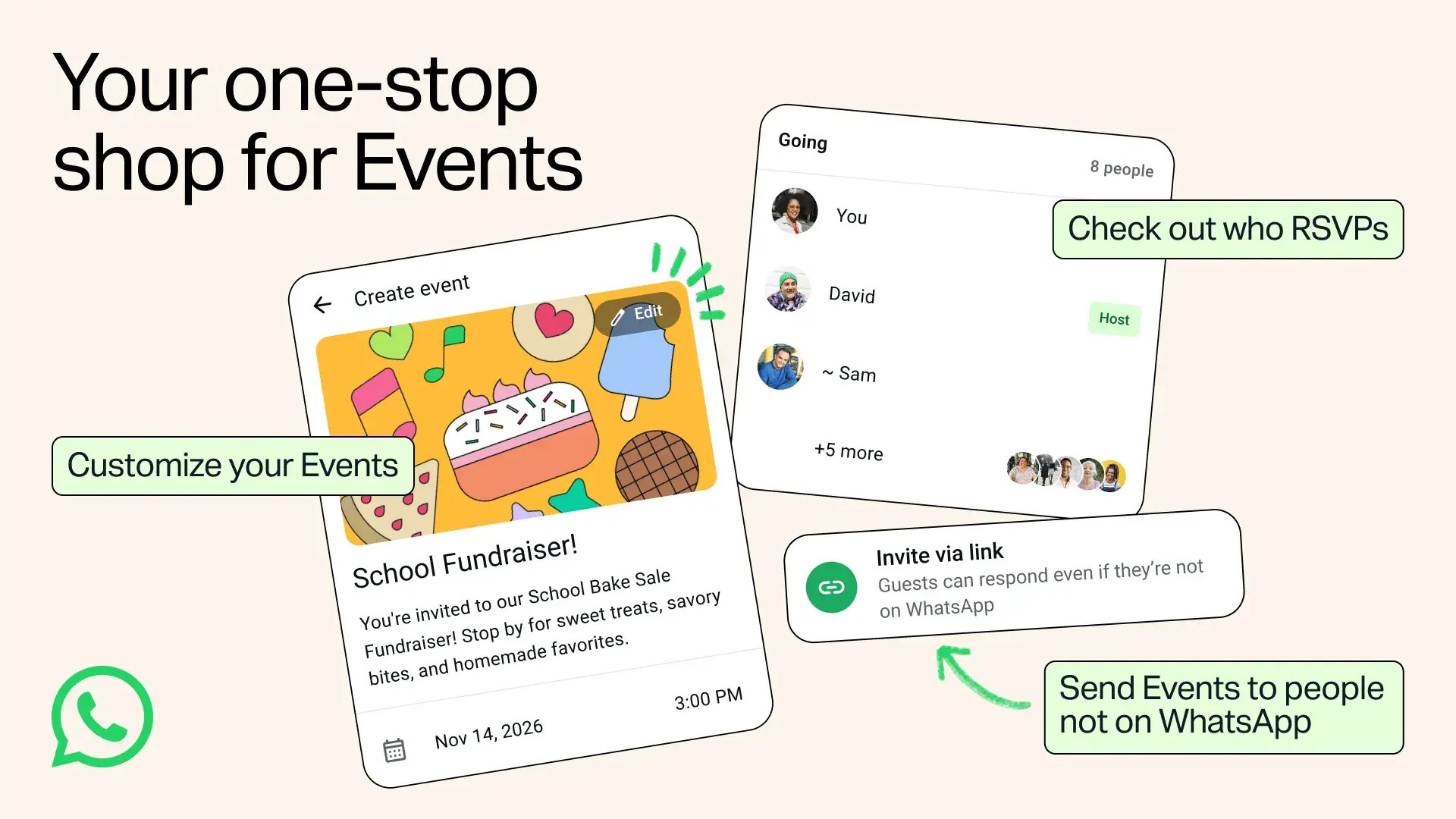
We heard from people that they want a one-stop shop to create and coordinate events, including inviting friends who aren't on WhatsApp. Whether it's family, new friends, or your closest circle, the best moments happen when you're together in person. We're rolling out updates to help you more easily plan your next meetup.
With Events on WhatsApp, your invite can now reach everyone, even friends who don't have a WhatsApp account – just in time for holiday meetups. Create an event, add a cover photo, share the link, and they can see details and RSVP without downloading the app.
We are also introducing a new Events Home that will be your one-stop to create and send customized invites and manage RSVPs. Keep everyone on the same page with custom reminders and the option to add a plus one. Navigate to Settings and select Events to see a complete list of past and upcoming events, including the ones you have created or been invited to all in one place.
We built Event invites with privacy in mind: your phone number is not shown to guests you don't know, and guests without a WhatsApp account will only see the event address after they RSVP. As always, your personal messages and calls remain private and end-to-end encrypted.
The updated Events is rolling out to everyone over the following weeks.
Now You Can Invite Anyone to a WhatsApp Call: No Account Needed, No Cost, No Time Limit

Today we're making WhatsApp calling more open than ever. With guest calling, you can now invite anyone to join a WhatsApp call – even if they don't have a WhatsApp account. That means free, end-to-end encrypted calls for everyone with no time limits, so there are no abrupt cutoffs, scrambling to restart the call, or waiting for everyone to rejoin.
Anyone joining as a guest always needs the call host's approval. Guests will enter a waiting room until the host lets them in and guests can be removed from the call at any time. Guests can't see other participants' phone numbers, send messages, or add anyone else directly to the call.
To get started, navigate to the Calls tab in WhatsApp, select the "+" icon, create a call link, and send it to the people you want to talk to – colleagues, classmates, or tutor – without having to worry about what apps they have. Guests can open the link in their computer browser, type in their name, and join 1:1 and group calls with up to 32 people once admitted by the host. Only people with a WhatsApp account can create a call link.
Guests can use the same essential in-call features like sharing their computer screen to collaborate and review materials, reacting with a thumbs up or heart emoji, or raising their hand to jump in.
Later this year we'll be rolling out new calendar integrations so you can create a WhatsApp call right from your Google or Outlook calendar. Simply install the WhatsApp plugin, connect your account, and add a WhatsApp call link to your invite. Everyone you invite can join with or without a WhatsApp account.
Guest calling and calendar integrations are the latest in a series of calling updates we've made this year. We believe WhatsApp calling should always work wherever you are and with whoever you need, with the privacy you can count on.
New Controls to Help Parents Guide Their Teens on WhatsApp
As teens grow up, so does the way they communicate. Parents have told us they want to be there to guide them without reading over their shoulder.
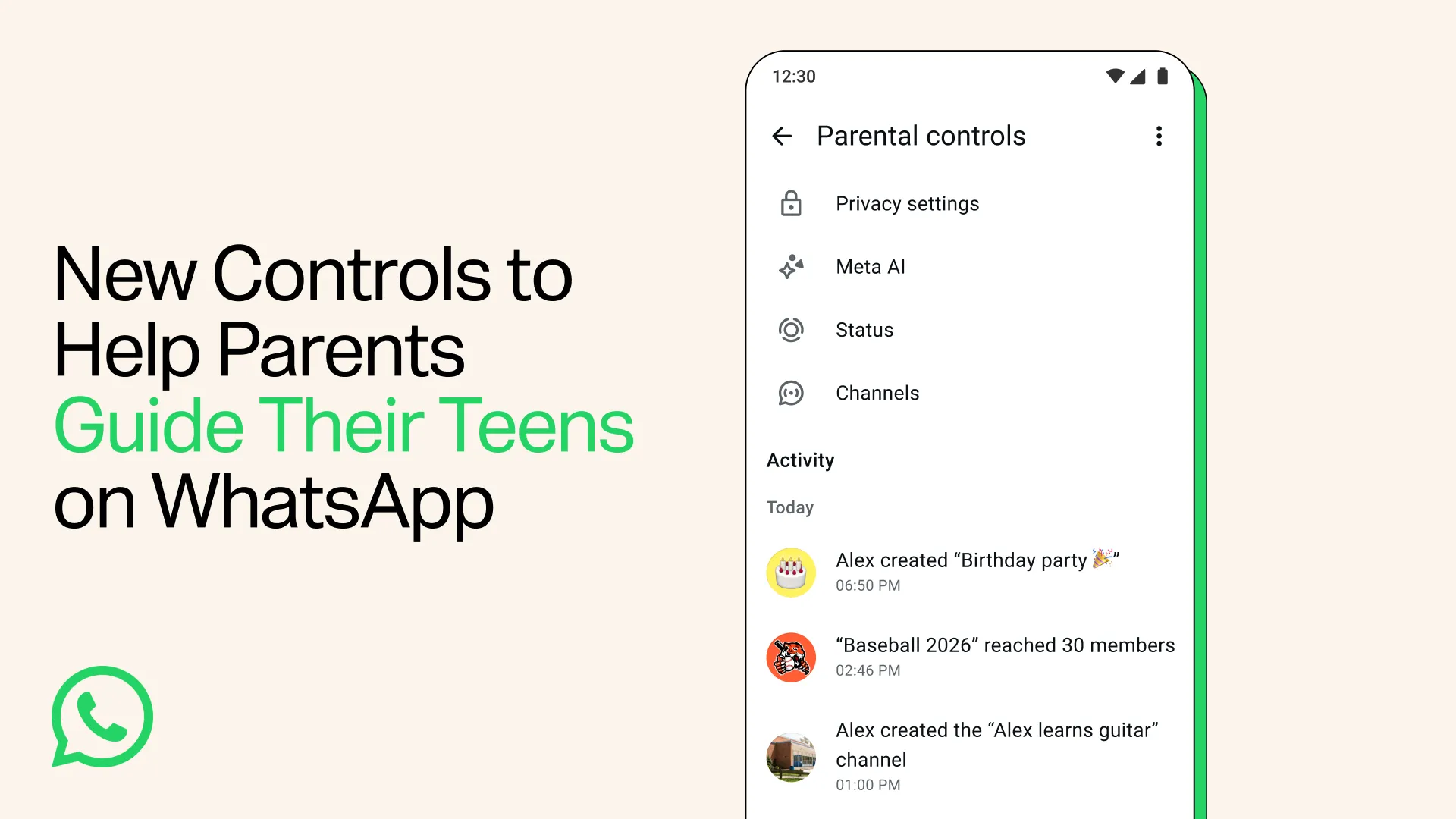
Today we're introducing parental controls for teens - a set of flexible, optional tools that parents and teens can set up together to help families choose the WhatsApp experience that's right for them.
Parents will be able to choose the right privacy settings for their teen, like who can see their profile photo or add them to groups. If a teen wants to relax any of those settings, they'll need their parent's approval via a parent-set PIN.
To stay on top of who their teen is connecting with, parents are notified when their teen joins or leaves a group, or when a group their teen is in grows meaningfully in size. Parents will be able to choose how their teen can use Channels, whose Status updates they can see, and who can see theirs. Parents can also now decide on the Meta AI experience that's right for their teen, which includes choosing between the default 13+ setting and a stricter 'Limited Content' option.
This is just the start. We're building these controls step by step, based on what families tell us they need. All of these controls are being designed to support open conversations about how to use WhatsApp between parents and teens, while keeping everyone's personal messages private.
They're straightforward to set up, with a single PIN and clear alerts to keep parents in the loop. And because every family is different, parental controls for teens are entirely optional. Parents choose how much support their teen needs, and can adjust or switch the controls off at any time. Even with controls turned on, your teen's personal messages and calls stay private and protected by end-to-end encryption. No one outside of the chat, not even WhatsApp, can see or hear them.
To learn more about setting up parental controls for teens and other ways for parents to support their family's experience on WhatsApp, visit our Help Center.