
Is the Radeon RX 9070 XT really faster than the GeForce RTX 5090? It's a strange question, we know, but it's one we've been asked quite consistently for a while, so we figured it was time to address it.
Now, you might be thinking that's a pretty dumb question. Why would anyone ask it, and why are we even entertaining the idea? Well, hear us out. Sometimes the RX 9070 XT actually is faster than the RTX 5090, but that doesn't mean it's really the faster GPU. It depends on the circumstances, and as we'll explain, things can get a little complicated.
Understanding Driver Overhead and CPU Bottlenecks
About five years ago, we investigated an issue that saw Radeon GPUs performing up to 30% faster, and sometimes even more, in CPU-limited gaming scenarios. This primarily affected lower-end processors, which were more likely to encounter CPU bottlenecks when gaming. As it turns out, Radeon GPUs generally place less demand on the CPU in these situations, providing additional performance headroom.
In the second part of our Nvidia driver overhead investigation, we demonstrated real examples where the Radeon RX 5600 XT was faster than the RTX 3080. That's pretty alarming considering the RTX 3080 is, on average, around 130% faster than the RX 5600 XT.
Now, to demonstrate this, we had to use an incredibly slow processor, the Ryzen 5 1400. But the point wasn't necessarily to test a realistic hardware configuration. Rather, we wanted to test a theory and determine just how significant the issue could be.
So what exactly is driver overhead? In simple terms, it's the amount of CPU processing power required by the graphics driver to translate game engine instructions into commands the GPU can execute. Although all graphics drivers require some CPU time, Nvidia's drivers have historically demanded significantly more in certain CPU-limited scenarios.
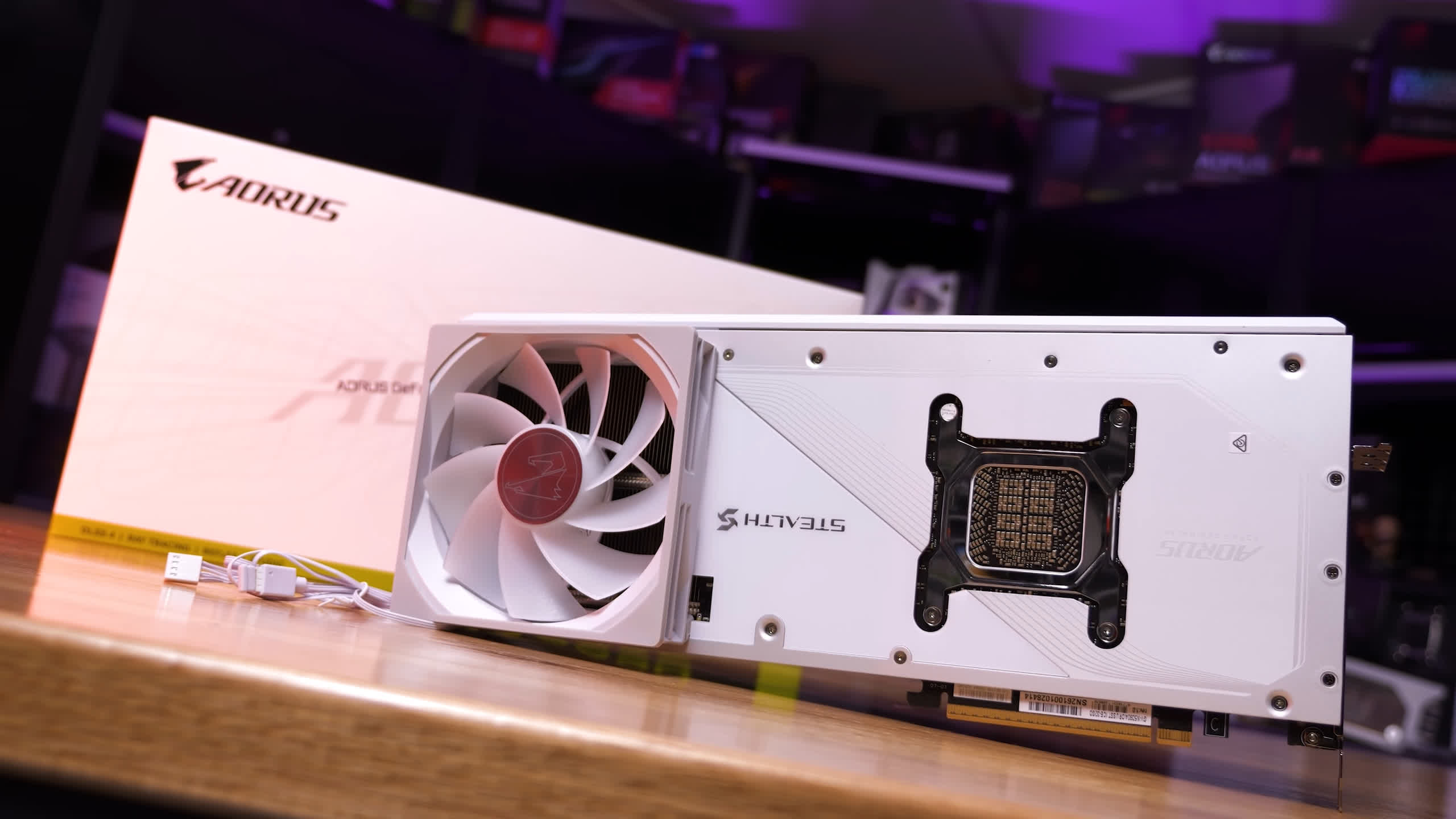
It's important to make clear that Nvidia's driver overhead isn't always responsible for the slim margins we sometimes see between the Radeon RX 9070 XT and GeForce RTX 5090. Those results can simply be caused by a good old-fashioned CPU bottleneck, limiting both GPUs to roughly the same performance.
Recently, some have suggested that while the RTX 5090 looks glorious in reviews and benchmarks, in reality it's nowhere near as impressive, often performing slower than, or at best not much faster than, the considerably cheaper RX 9070 XT, particularly when targeting high frame rates.
The theory seems to be that when aiming for 200+ fps, considerably more is demanded of the CPU, and Nvidia's additional driver overhead becomes a problem for the RTX 5090.
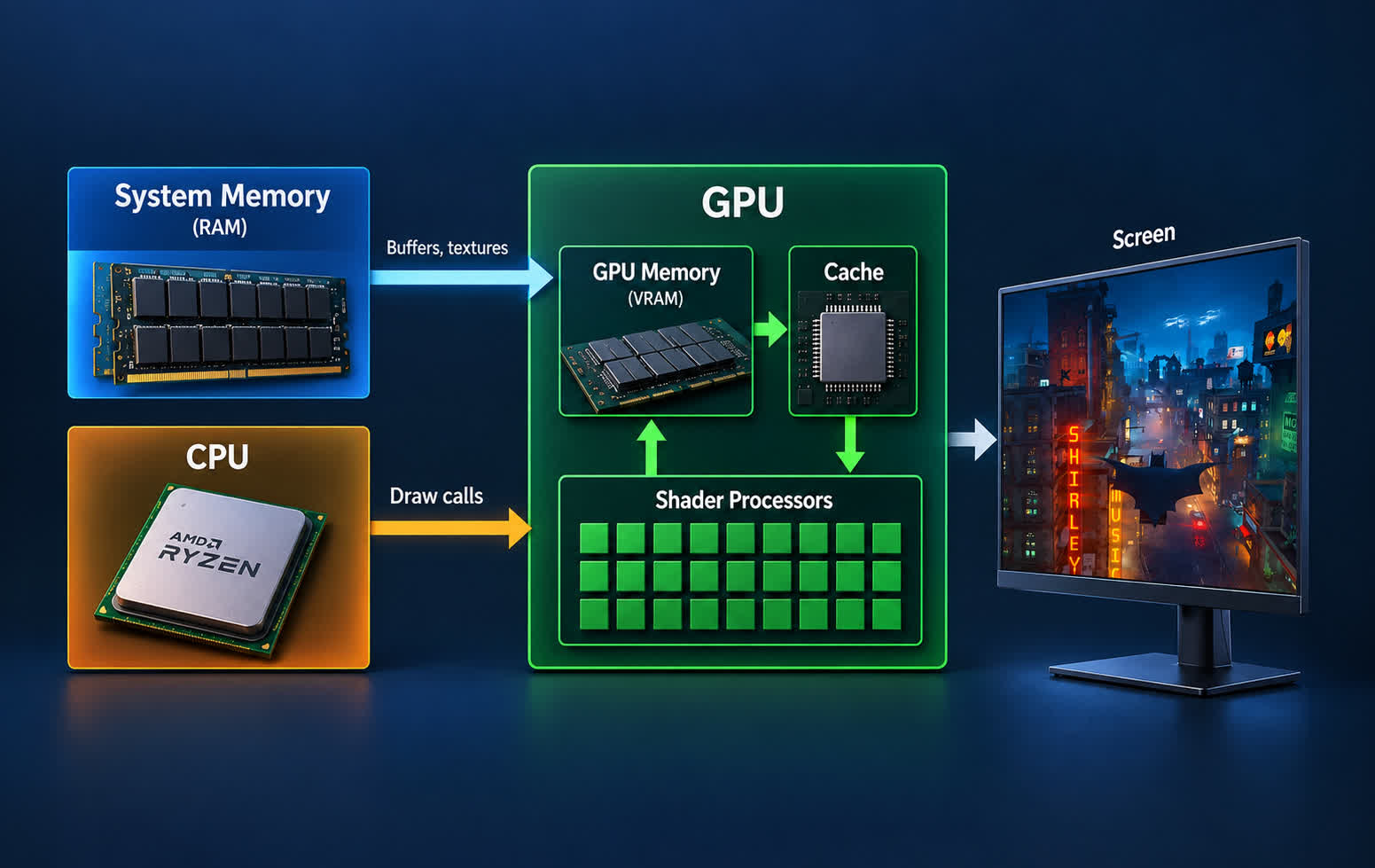
For those unfamiliar with how this works, before your graphics card can render a frame, the CPU has to prepare the necessary data. This includes processing game logic, player inputs, physics, AI movement, and collision detection. The CPU also prepares rendering commands, including what's known as "draw calls," which tell the GPU what to render.
Because this pipeline takes place sequentially, higher frame rates place greater demands on the CPU. At 60 fps, the CPU must prepare 60 frames every second, while at 240 fps it needs to do so 240 times per second. That's four times as many frames to process, potentially requiring substantially more CPU performance.
So if your CPU can only deliver 240 fps in a given game, but your GPU is capable of rendering 300 fps, you'll still be limited to 240 fps. That's a classic and old-fashioned CPU bottleneck at work.
All that said, the only way the RX 9070 XT could realistically match or even beat the RTX 5090 is when performance is CPU-limited. With a slow processor, that might happen at sub-100 fps. But the claim we're investigating is that when targeting 200 fps or more, the RX 9070 XT is often the better choice, either delivering superior performance or simply offering much better value.
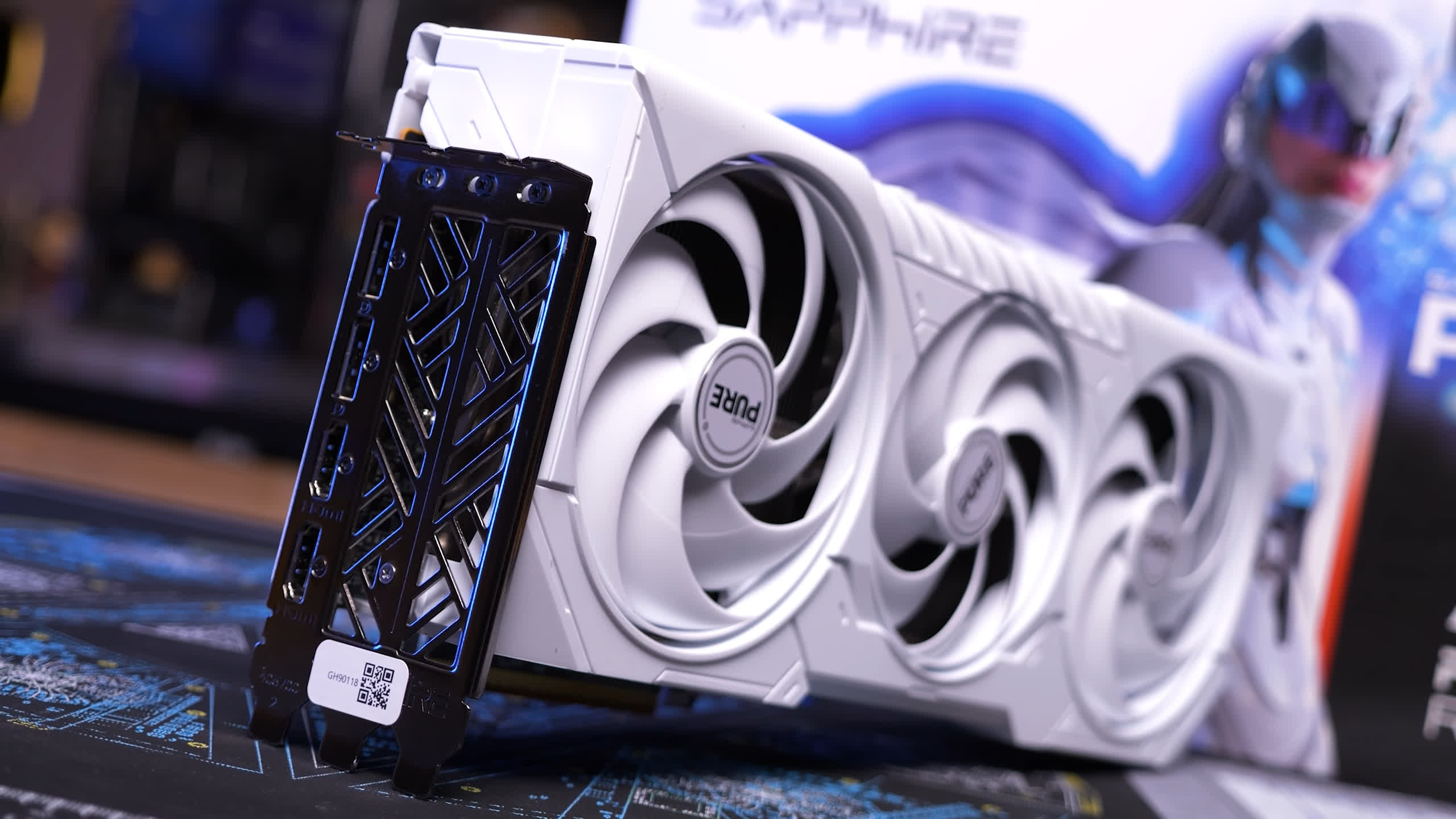
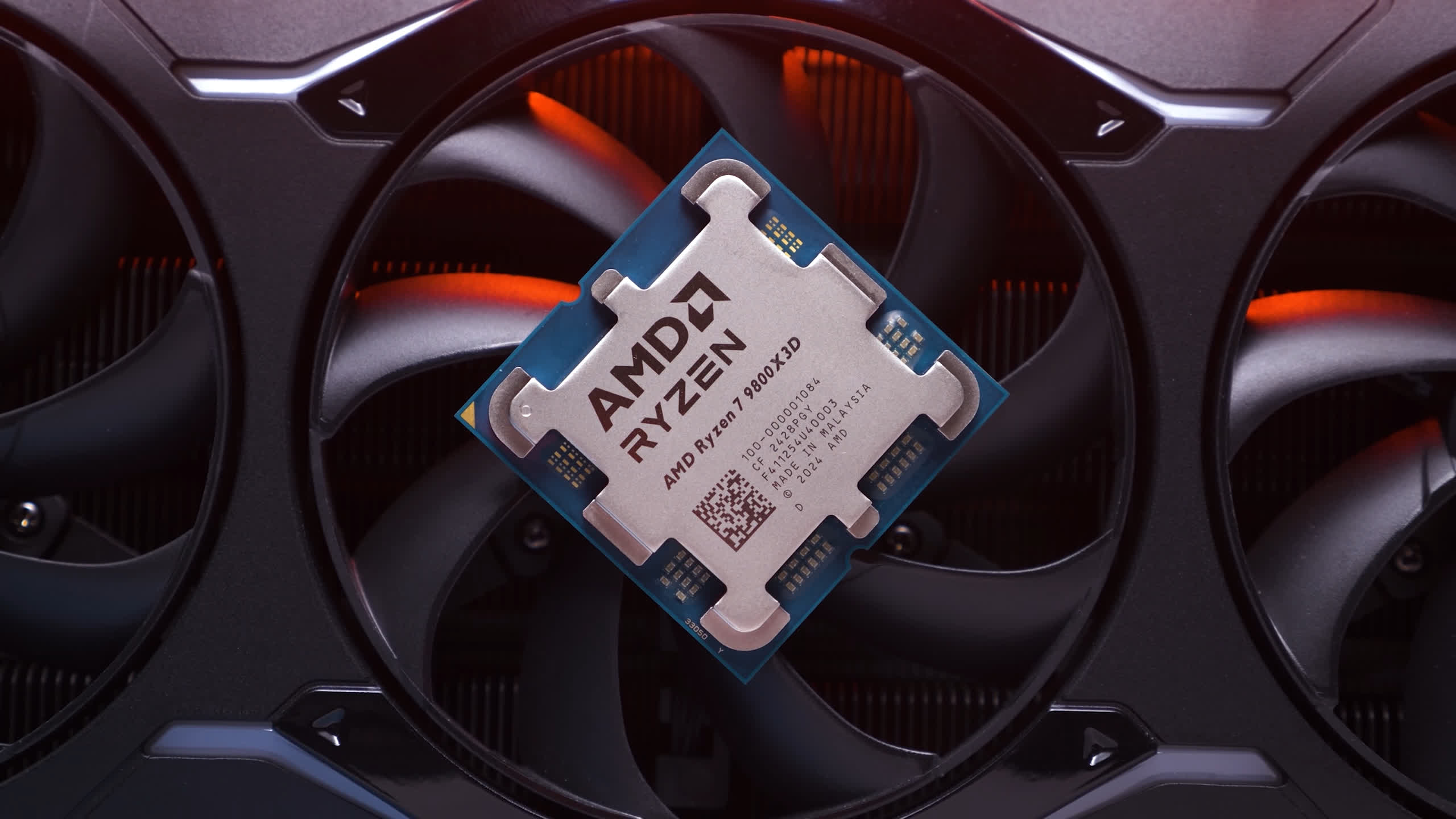
So, is there any truth to that? To find out, we're comparing both GPUs at 1440p and 4K, with and without upscaling, using a range of quality settings. All testing was conducted using the Ryzen 7 9800X3D, as it makes sense to pair a graphics card like the RTX 5090 with one of the fastest gaming CPUs available.
Test System Specs
| CPU | AMD Ryzen 7 9800X3D |
| Motherboard | MSI MPG X870E Carbon WiFi [BIOS 7E49v1AA7] |
| Memory | G.Skill Trident Z5 RGB DDR5-6000 CL30 [CL30-38-38-96] |
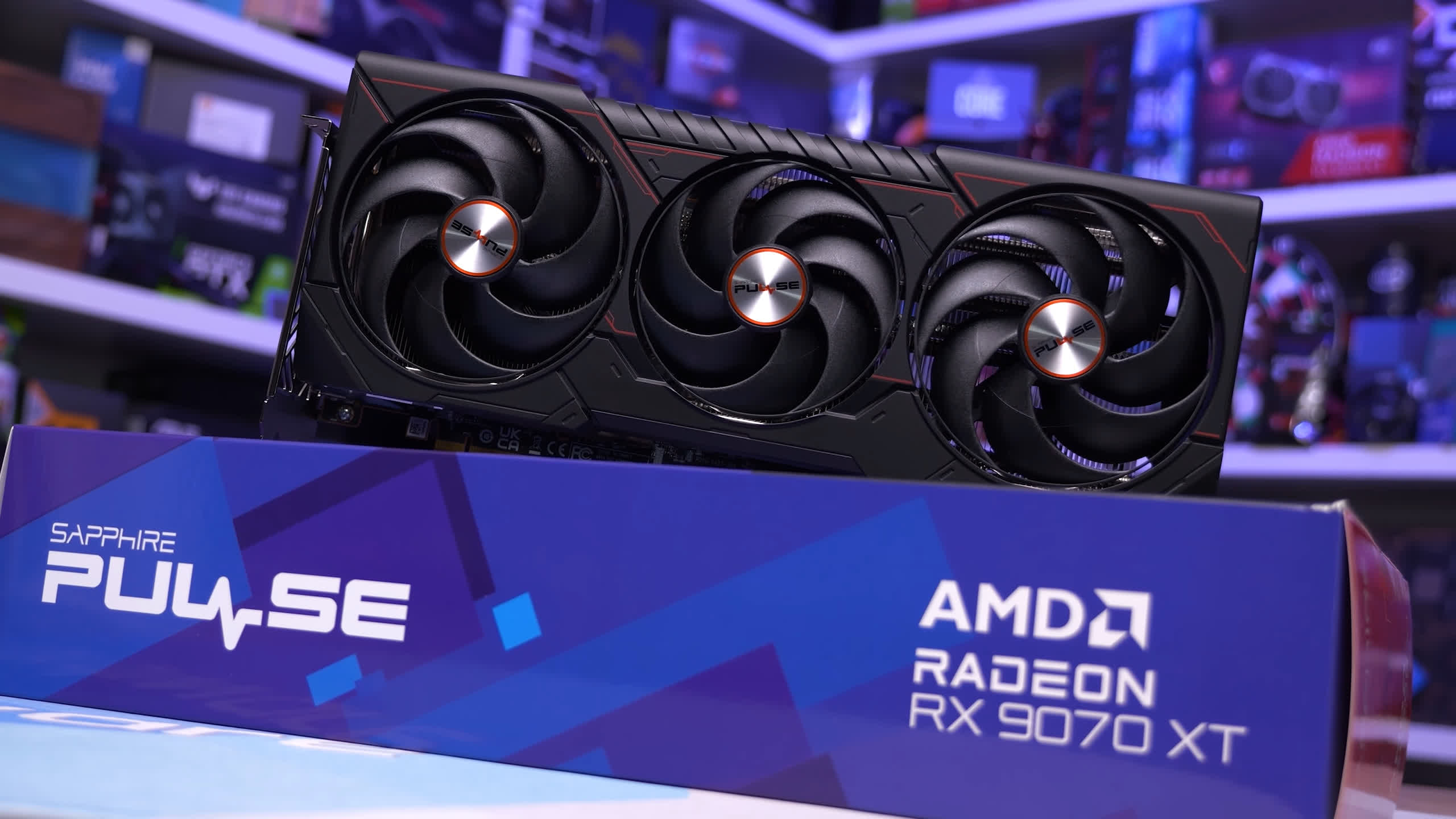
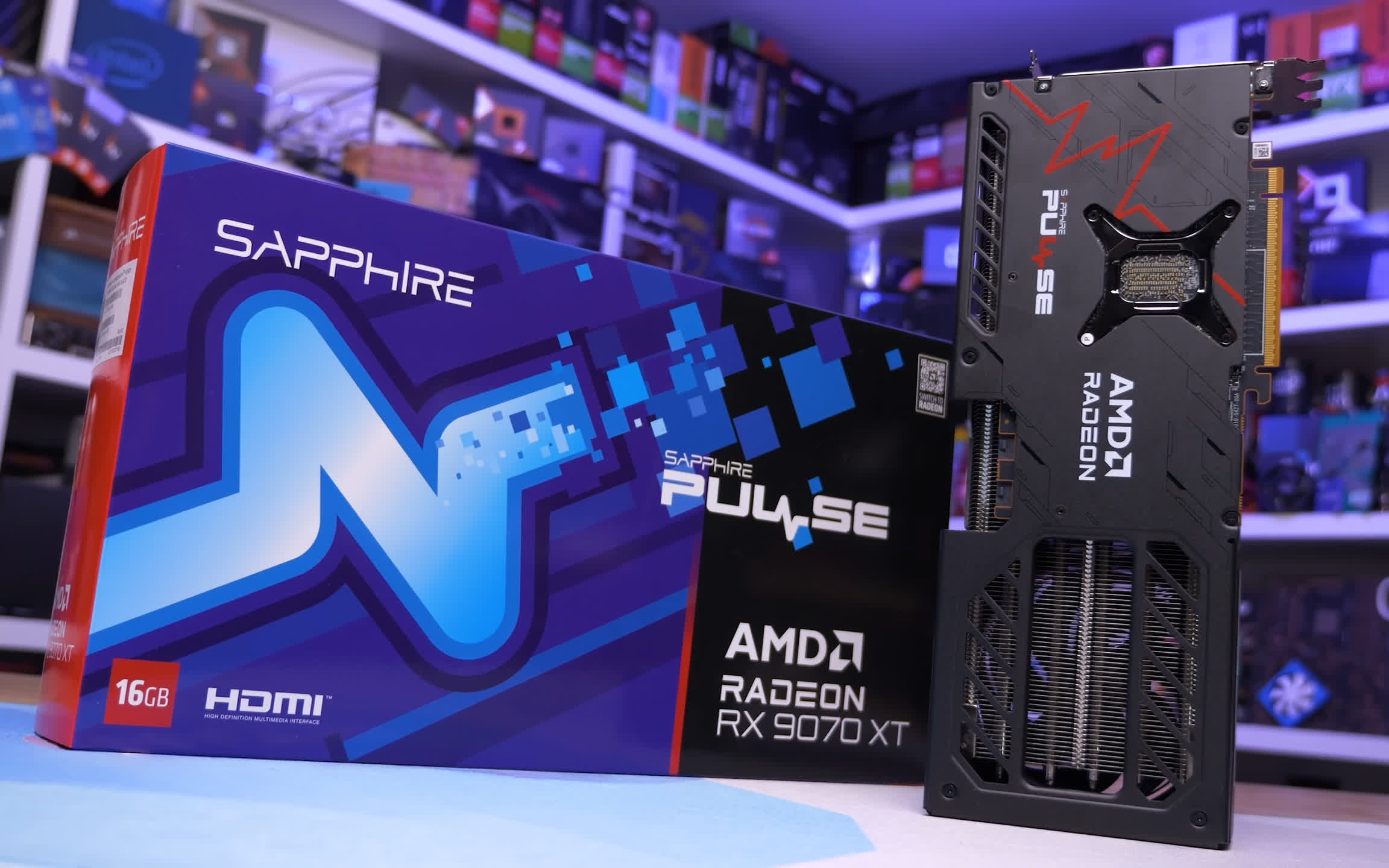
| Graphics Card | Sapphire Radeon RX 9070 XT Pure Asus ROG Astral GeForce RTX 5090 |
| ATX Case | MSI Prospect 700R |
| Power Supply | Kolink Regulator Gold ATX 3.0 1200W |
| Storage | TeamGroup T-Force Cardea A440 M.2 PCIe Gen4 NVMe SSD 4TB |
| Operating System | Windows 11 25H2 |
| Display Driver | AMD Radeon Adrenalin 26.8.1 GeForce Game Ready Driver 616.92 |
Benchmarks
Warhammer 40,000: Space Marine 2
Ultra Quality
We'll start with Space Marine 2, as we know this game can expose Nvidia's driver overhead issue. Looking at native rendering first, using the Ultra preset, we see that at 4K the RTX 5090 is a massive 96% faster than the RX 9070 XT, going from just 67 fps to an impressive 131 fps.
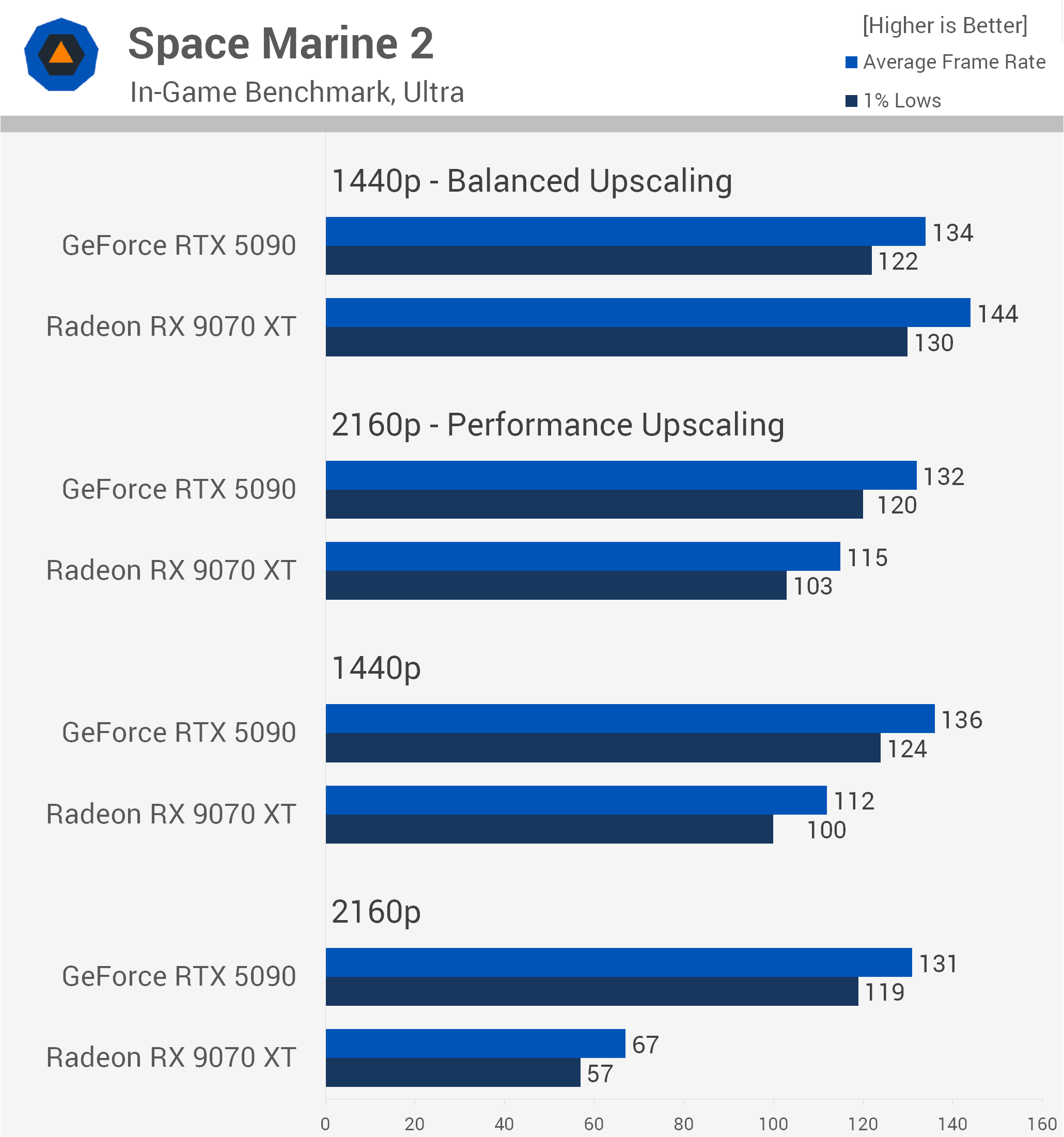
However, at 1440p that margin is heavily reduced to just 21%. While some of that difference can be attributed to Nvidia's additional CPU overhead, it's largely the result of a plain old CPU bottleneck.
So there's nothing particularly unusual about this data. Space Marine 2 is an extremely CPU-heavy game, which makes pushing frame rates beyond 100 fps in our demanding horde battle test very difficult.
For those playing at 4K with Performance upscaling enabled, using DLSS on the RTX 5090 or FSR on the RX 9070 XT, the GeForce GPU is a mere 15% faster. However, at 1440p, in the more CPU-demanding sections of the game, the Radeon GPU actually ends up slightly faster, by 7% in this example. This is where Nvidia's additional CPU overhead becomes a factor.
So if you've bought the RTX 5090 specifically to play Space Marine 2 at anything other than native 4K using maximum quality settings, you've arguably wasted your money, at least when it comes to achieving higher frame rates. Though we suspect this won't be the case for many gamers.
Low Quality
Out of interest, we ran these tests again, this time using the Low preset. This doesn't necessarily place more load on the CPU. In fact, when you set a game to its lowest possible settings, you aren't just reducing visual quality. Depending on the settings, you're also reducing the complexity of the scene.
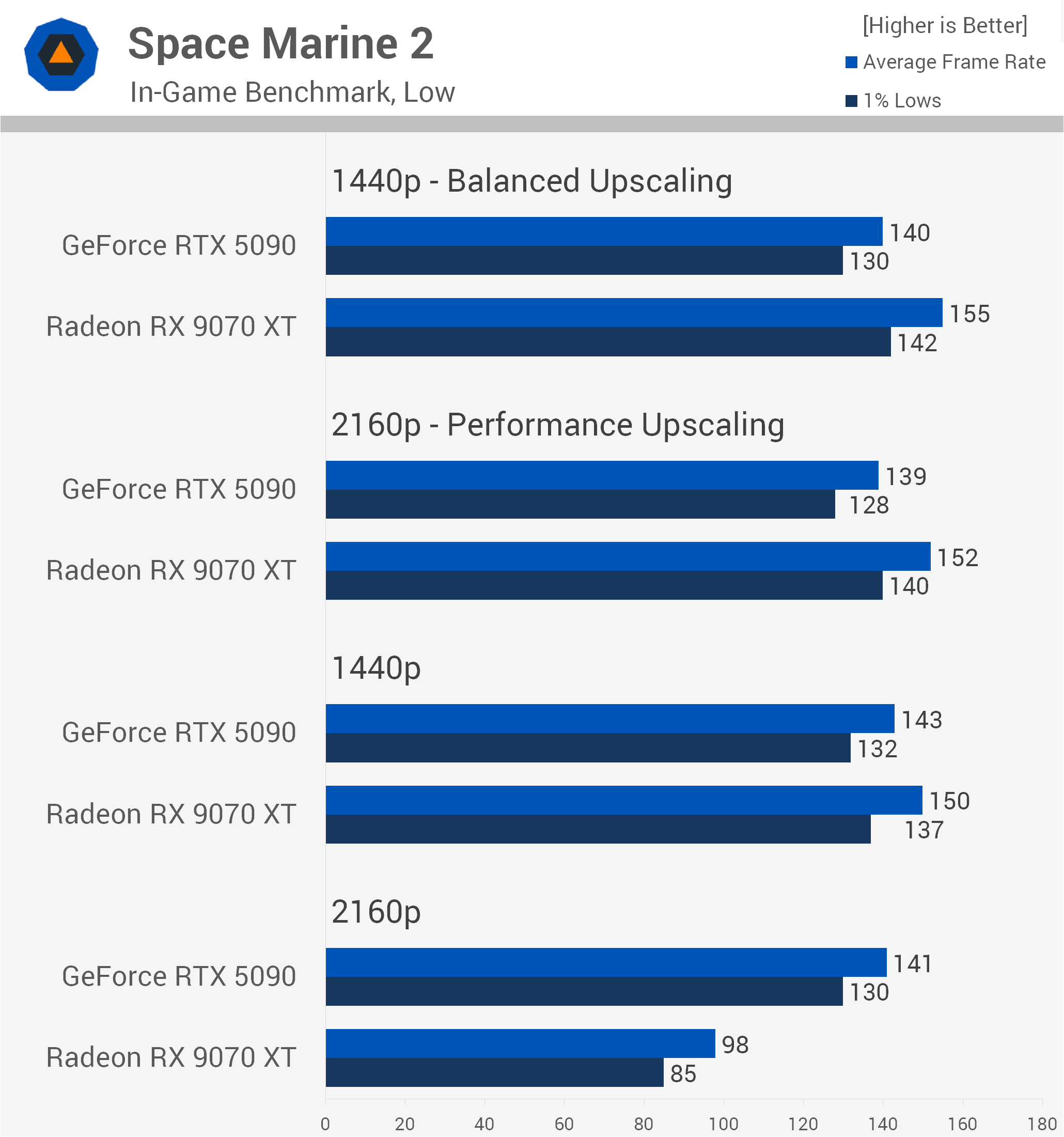
Testing a CPU at Low settings can essentially mean testing how quickly it can run a visually barren, relatively empty world. That doesn't necessarily reveal how well the processor will handle the intense logic and physics calculations of a complex AAA game.
For example, settings such as draw distance and level of detail can place significant demands on the CPU. The processor has to manage the geometry and issue additional draw calls to the GPU for all those distant objects. Reducing these settings can therefore ease some of the CPU workload. Still, this is more of a throughput test, and it further highlights Nvidia's overhead problem.
The RX 9070 XT is now able to deliver higher frame rates at native 1440p, along with all of the upscaled configurations, providing up to 11% greater performance at 1440p with Balanced upscaling.
Even so, at native 4K the RTX 5090 was still 44% faster, less than half the margin seen with Ultra settings. Of course, this is because we're now CPU-limited to around 140 fps with the RTX 5090.
Star Wars Zero Company
Ultra Quality
Next up we have Star Wars Zero Company, a turn-based strategy game that's also quite heavy on the CPU. Testing with the Ultra preset, we see that at native 4K the RTX 5090 is 63% faster than the RX 9070 XT, so a pretty substantial margin. That advantage is almost cut in half at native 1440p, dropping to 31%.
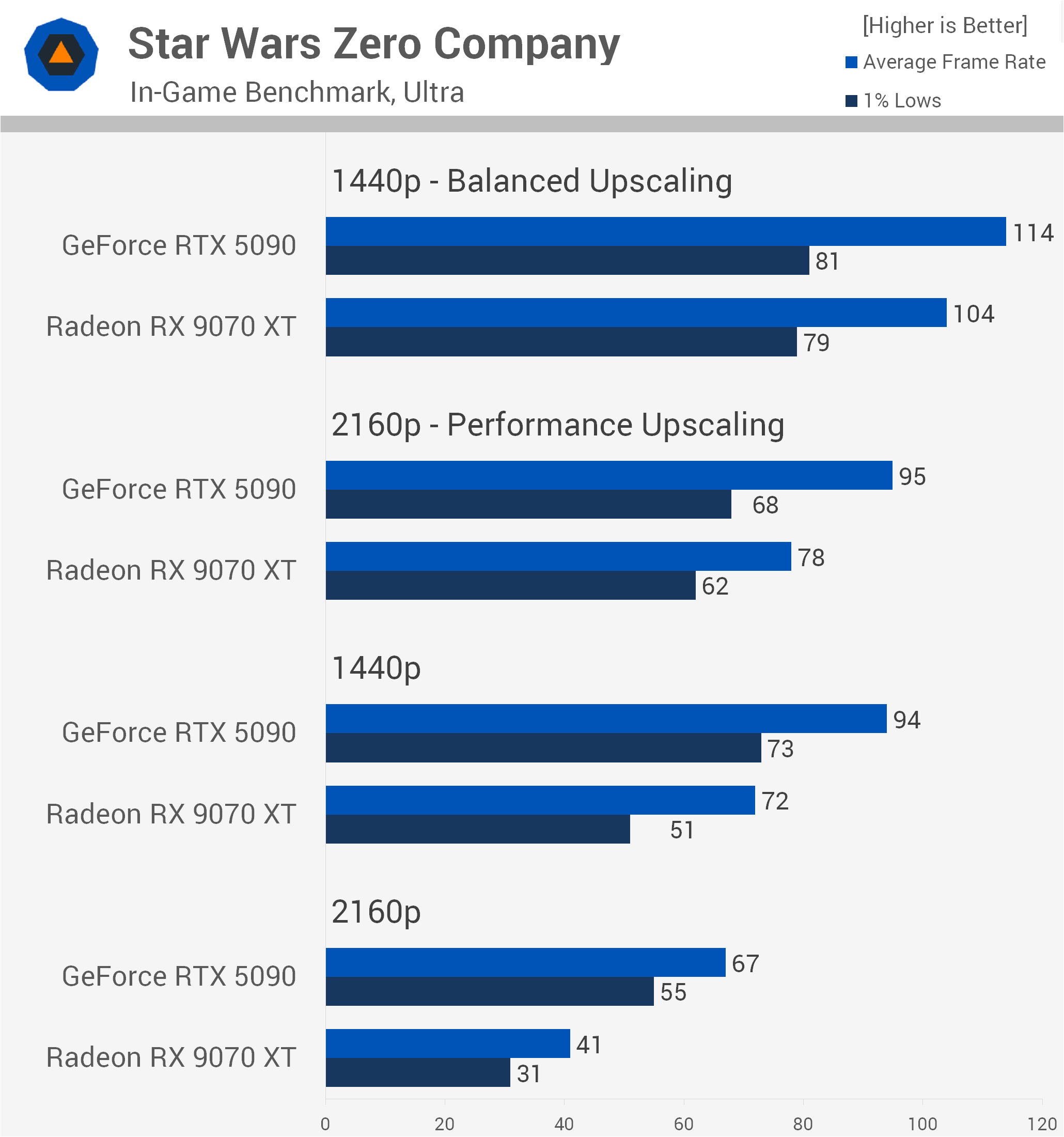
However, enabling upscaling reduces the margins further. At 4K with Performance upscaling, the RTX 5090 is now just 22% faster on average. Perhaps more notable are the 1% lows, where the GeForce GPU was only 10% faster.
Then, at 1440p with Balanced upscaling, the RTX 5090 was just 10% faster on average, with that margin shrinking to a mere 3% for the 1% lows.
Still, these results aren't particularly unusual. For the most part, you can chalk this up to a good old-fashioned CPU bottleneck, because that's really what we're dealing with here. We're not pushing especially high frame rates in Zero Company, and frankly, you don't need to.
Low Quality
Switching to the Low preset reveals some slightly more interesting results. At native 4K, the RTX 5090 remained much faster, delivering 48% greater average frame rate performance. However, at 1440p it was now just 23% faster, with comparable 1% low performance.
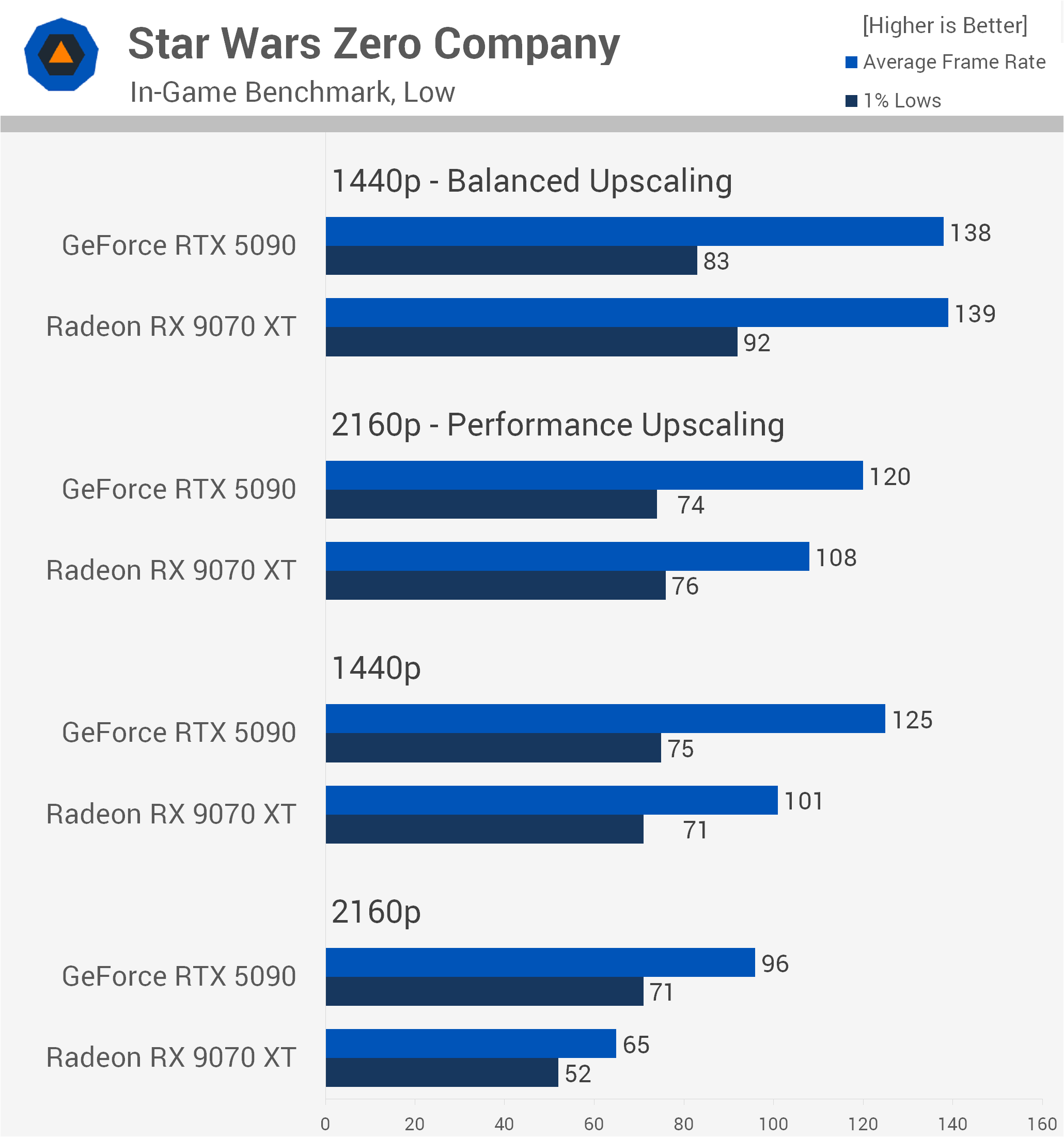
Enabling upscaling at 4K reduces those margins further. The RTX 5090 is now just 11% faster on average, but actually 3% slower when looking at the 1% lows.
Then, at 1440p with Balanced upscaling, we hit the CPU limits, with both GPUs averaging just shy of 140 fps. Interestingly, the 1% lows were 12% stronger with the Radeon GPU.
Doom: The Dark Ages
Ultra Nightmare (Path Tracing)
Of course, not every game is going to be as CPU-limited as Space Marine 2 or Star Wars Zero Company. In fact, most aren't, and Doom: The Dark Ages is a good example of this. Granted, we have path tracing enabled in this particular set of results, which is extremely demanding on the GPU, but the RTX 5090 is still able to destroy the humble RX 9070 XT.
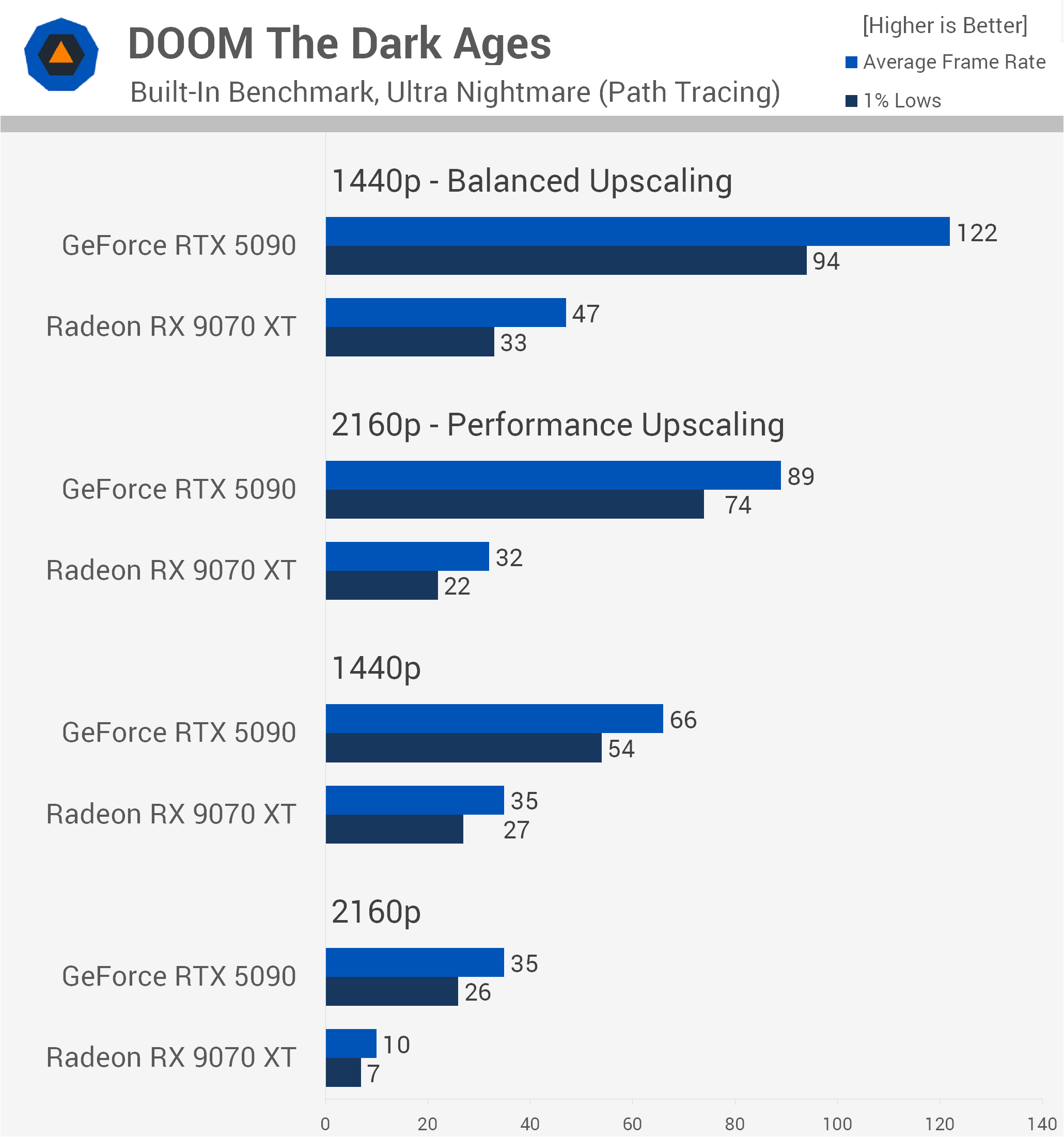
At native 4K, the RTX 5090 might have delivered an unimpressive 35 fps average, but that made it 250% faster than the RX 9070 XT. The native 1440p data is a little more realistic, but even here the RTX 5090 was still 89% faster.
With upscaling enabled, the GeForce GPU thrives, smashing the RX 9070 XT by a massive 178% margin at 4K with Performance upscaling. Then, at 1440p using Balanced upscaling, the GeForce GPU was an impressive 160% faster, rendering 122 fps compared to just 47 fps.
Ultra Quality
Given how high frame rates are with the Ultra preset in this game, which is the third-highest preset, we decided not to test a lower quality setting. We're also not enabling path tracing here. The RTX 5090 averaged 100 fps at native 4K, which seems pretty good, making it almost 80% faster than the RX 9070 XT.
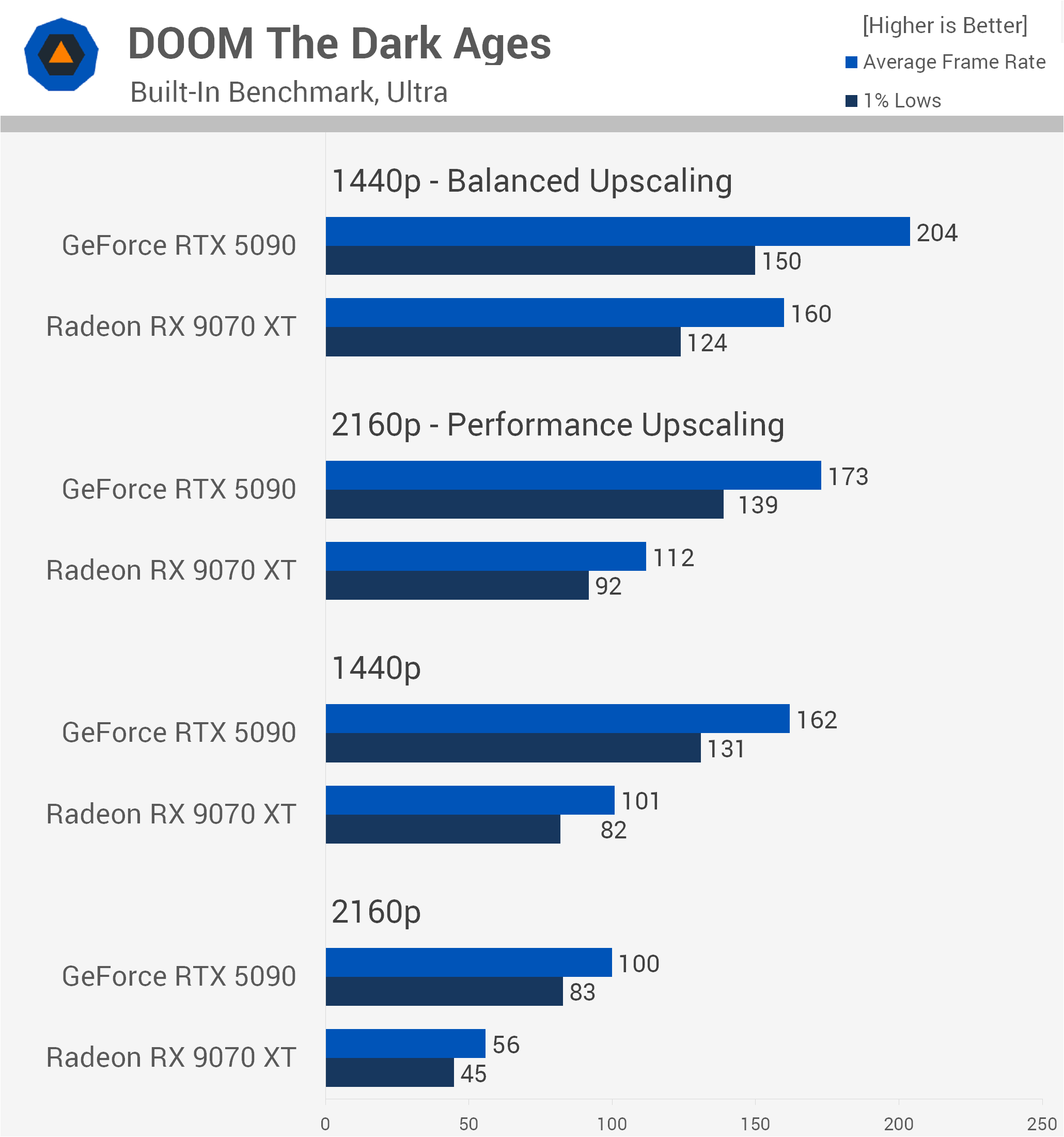
Decreasing the resolution to native 1440p also reduced the margin, but even so, the RTX 5090 remained 60% faster, delivering 162 fps versus 101 fps. Then, at 4K with Performance upscaling enabled, the RTX 5090 was 54% faster than the RX 9070 XT, with that margin dropping to just 28% at 1440p using Balanced upscaling.
So the margins did come down, as you'd expect, but the RTX 5090 was also averaging over 200 fps.
Forza Horizon 6
Extreme + Ray Tracing
Next up we have Forza Horizon 6, and here the RTX 5090, using the Extreme+RT preset at 4K, is 90% faster than the RX 9070 XT, rendering 74 fps compared to just 39 fps. At native 1440p, the GeForce GPU remained much faster, though the margin did come down quite a bit to 62%.
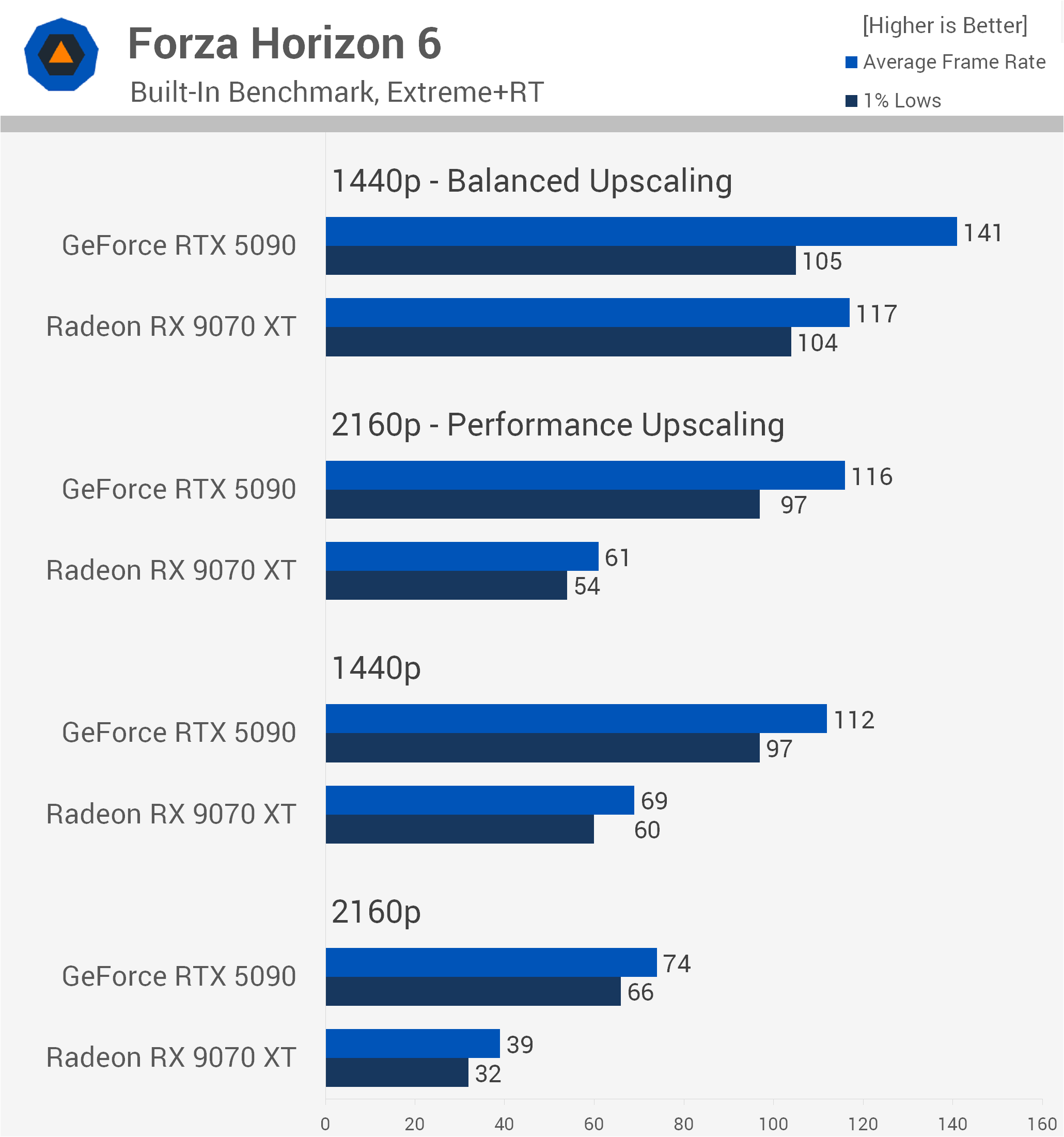
At 4K with Performance upscaling enabled, the RTX 5090 was again 90% faster, so a massive margin there.
But if you're going to game at 1440p with Balanced upscaling, the RTX 5090 really isn't much faster than the RX 9070 XT, rendering just 21% more frames on average with identical 1% low performance.
Medium Quality
Now, if you were buying the RTX 5090 to play Forza Horizon 6 using the Medium preset, which we can't imagine anyone has, things get a bit messy compared to the RX 9070 XT.
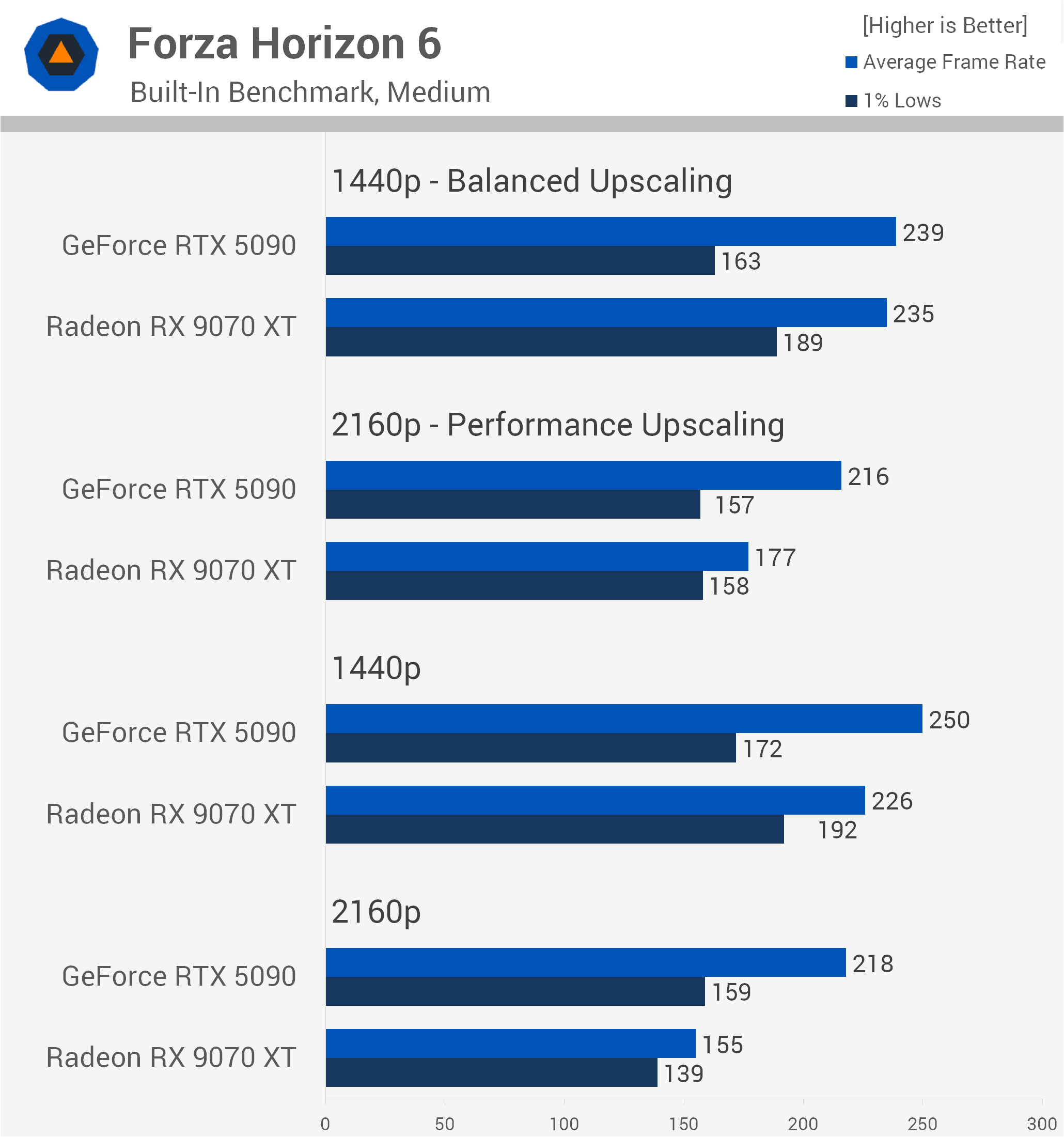
The GeForce GPU is still 41% faster at native 4K, but at native 1440p that margin was reduced to just 11%. In fact, the RX 9070 XT was 12% faster when comparing 1% lows, and that's a result of Nvidia's overhead issue.
Then, at 4K with Performance upscaling, the RX 9070 XT and RTX 5090 delivered the same 1% low performance, despite the average frame rate of the GeForce GPU being 22% higher. At 1440p using Balanced upscaling, the 1% lows of the RX 9070 XT were 16% higher, though average frame rates were much the same.
Fortnite
Epic Quality (DX12)
Moving on to Fortnite, we're testing using the DX12 Epic preset, which leverages Unreal Engine 5's Lumen and Nanite. Looking at the native data first, at 4K the RTX 5090 is a massive 93% faster than the RX 9070 XT, delivering 87 fps compared to just 45 fps, alongside a 60% lead in 1% lows.
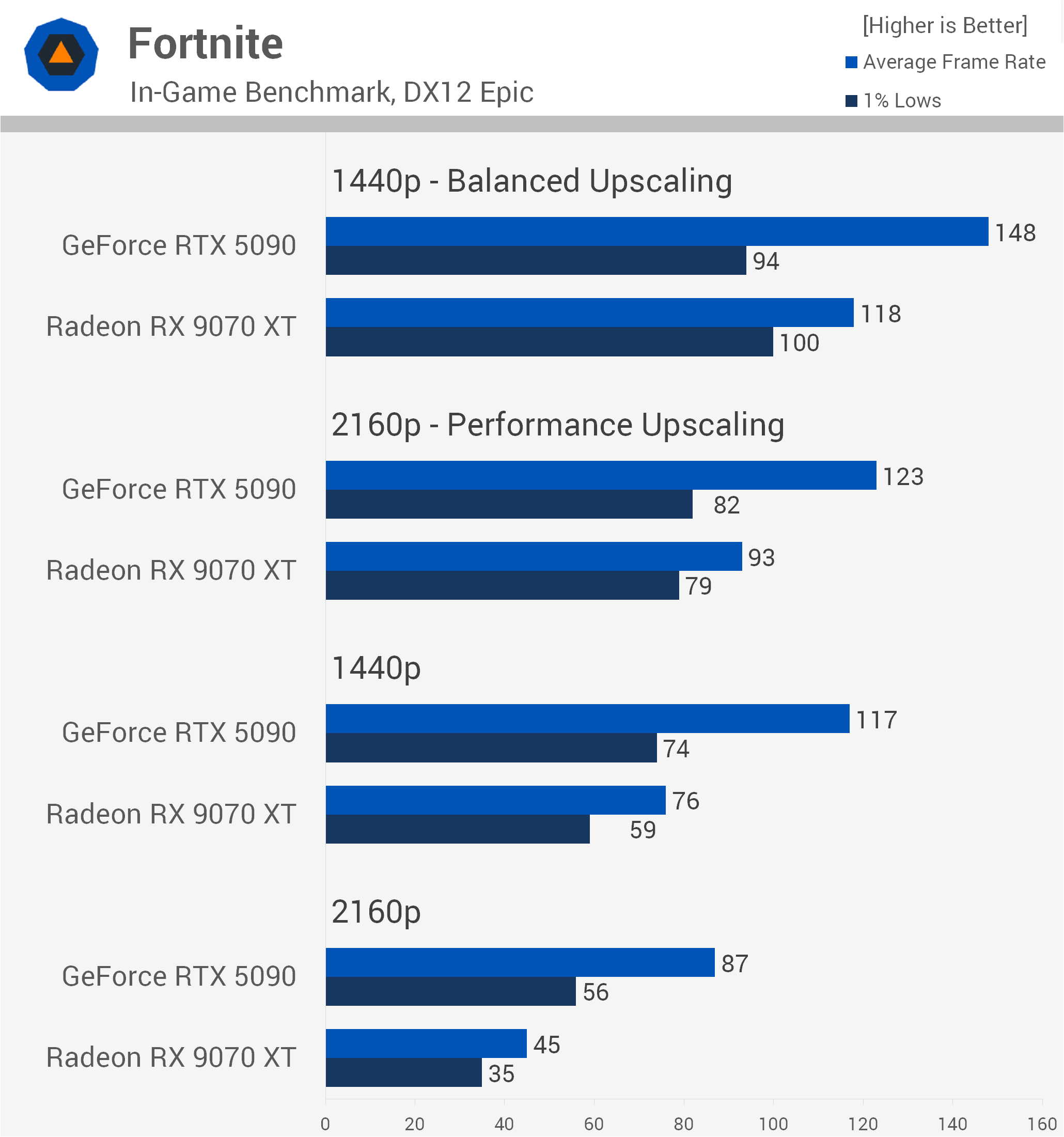
Dropping down to native 1440p sees that advantage reduced to 54%, with the RTX 5090 averaging 117 fps versus 76 fps. Once Performance upscaling is enabled at 4K, the GeForce lead narrows further to 32% on average, while the 1% lows are virtually neck-and-neck, with the RTX 5090 just 4% faster.
At 1440p with Balanced upscaling, we run directly into CPU limits and Nvidia's driver overhead issue. While the RTX 5090 still manages a 25% higher average frame rate, the RX 9070 XT actually pulls ahead in the 1% lows by 6%, delivering 100 fps against 94 fps from the GeForce GPU.
Performance Mode
Switching over to Fortnite's competitive Performance Mode produces some very interesting results. Upscaling wasn't tested here as it's unsupported in this mode, but with frame rates soaring well into the hundreds, it wouldn't be needed anyway.
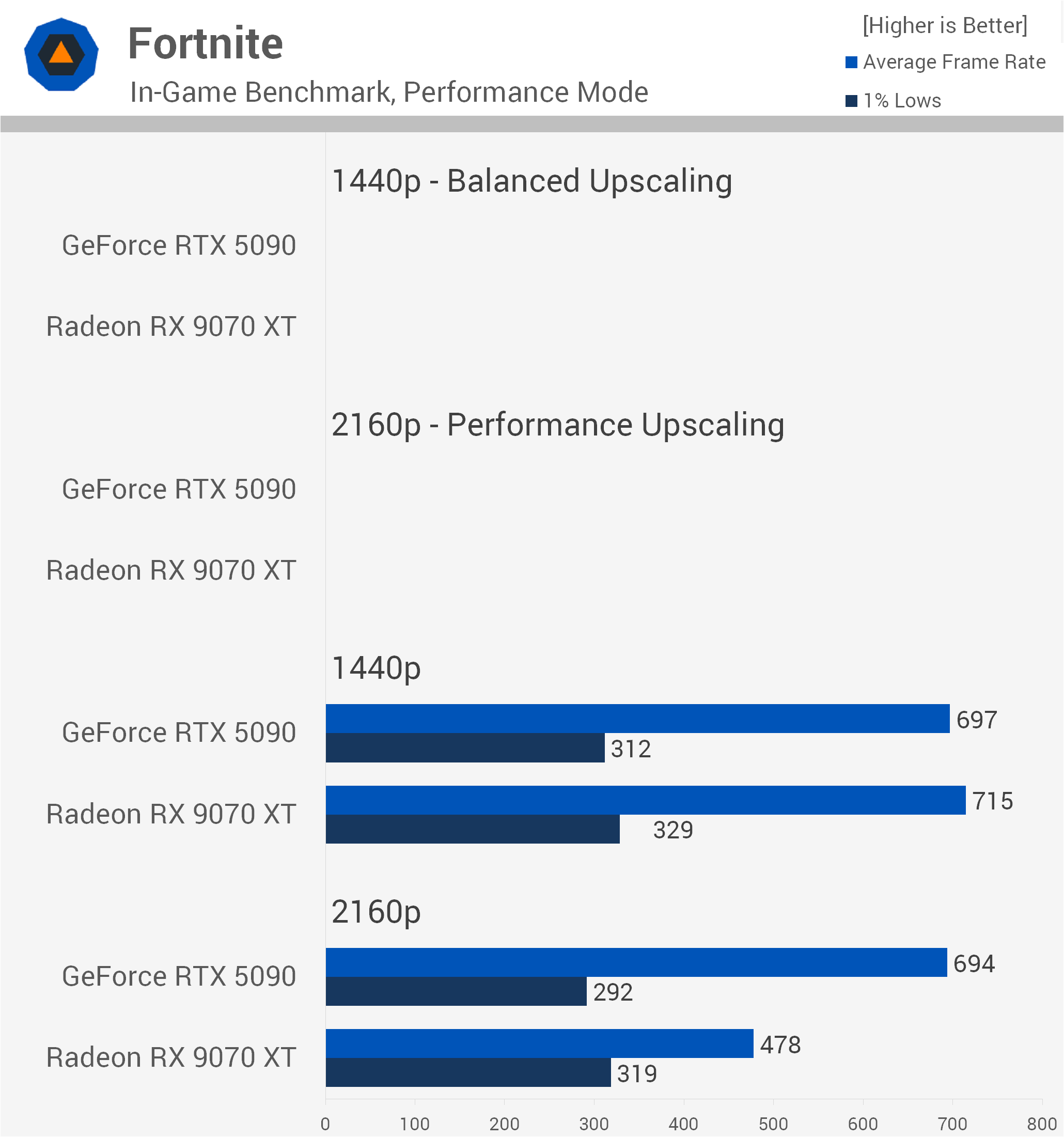
At native 4K, the RTX 5090 is still GPU-bound enough to command a 45% lead in average frame rate over the RX 9070 XT, rendering 694 fps versus 478 fps. However, despite trailing significantly in averages, the RX 9070 XT delivers 9% higher 1% lows, a clear indicator of Nvidia's CPU overhead kicking in at extreme frame rate throughput.
Then, at native 1440p, we slam right into a system-wide CPU bottleneck around the 700 fps mark. Here, the overhead penalty leaves the RTX 5090 completely unrewarded. The RX 9070 XT matches and slightly edges it out by 3% on average, while offering 5% stronger 1% lows.
If you're purchasing an RTX 5090 strictly for low-detail competitive play, you're wasting your money. But this has been a well-known fact for a very long time, so it shouldn't come as news to anyone.
Spider-Man 2
Very High Quality + Ultimate Ray Tracing
Next we have Spider-Man 2, and with ray tracing cranked up using the Very High preset with Ultimate RT, the RTX 5090 dominates at native 4K. Delivering 76 fps versus just 29 fps for the RX 9070 XT makes the GeForce GPU a massive 162% faster, with nearly triple the 1% low performance.
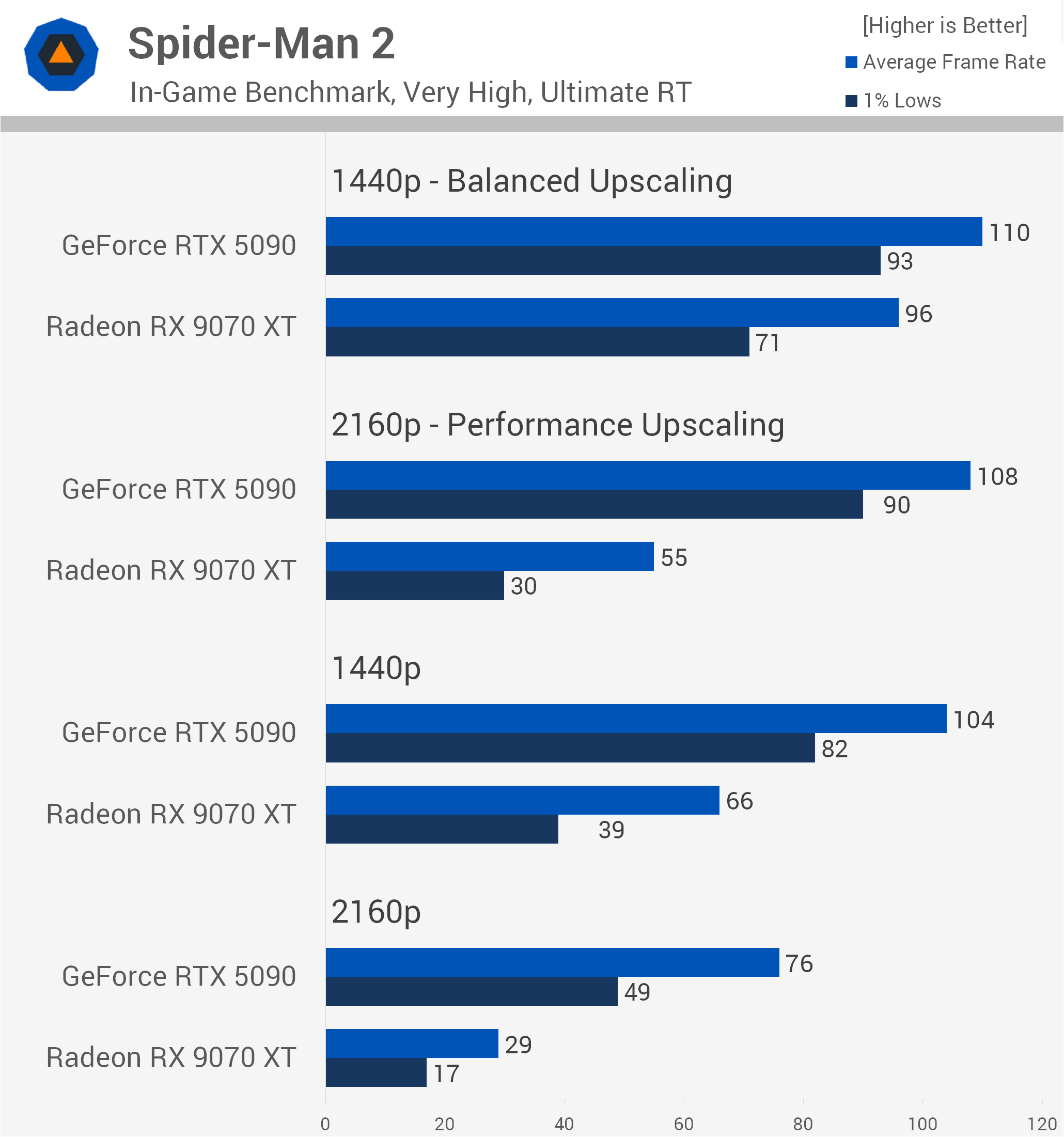
Dropping the resolution or enabling upscaling rapidly introduces CPU constraints. At native 1440p, the RTX 5090's lead is cut to 58%, though it bounces back to a 96% advantage at 4K using Performance upscaling.
However, at 1440p with Balanced upscaling, we hit a hard CPU ceiling near 110 fps on the GeForce GPU, shrinking its average lead to just 15%.
Medium Quality
Dropping to the Medium preset strips away the ray tracing workload, completely changing the dynamic. At native 4K, the RTX 5090 remains a solid 74% faster than the RX 9070 XT, averaging 183 fps versus 105 fps.
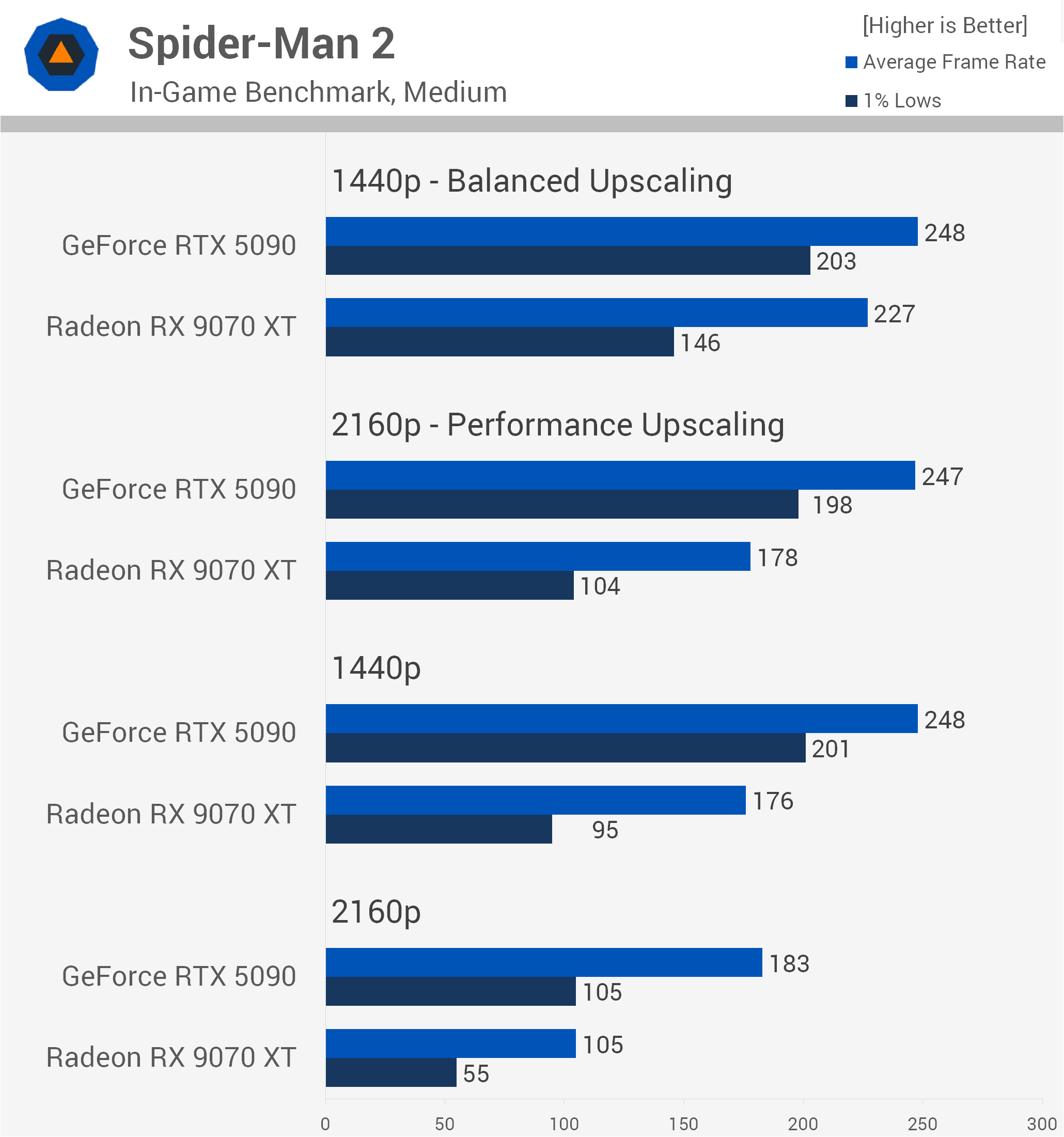
Past this point, the RTX 5090 hits a brick wall, flatlining at 248 fps across native 1440p and both upscaled configurations due to severe CPU limitations.
At 1440p using Balanced upscaling, the RX 9070 XT closes the gap to within 9% on average, though unlike other titles, the GeForce card maintains much stronger frame pacing here, boasting a 39% lead in 1% lows.
So this data is more indicative of a typical CPU bottleneck.
Pragmata
Quality Preset (with Ray Tracing)
Next up we have Pragmata, tested using the Quality preset with ray tracing enabled. Here, the RTX 5090 flexes its GPU muscle at native 4K, coming in 78% faster than the RX 9070 XT with 144 fps versus 81 fps, alongside a 68% lead in 1% lows.
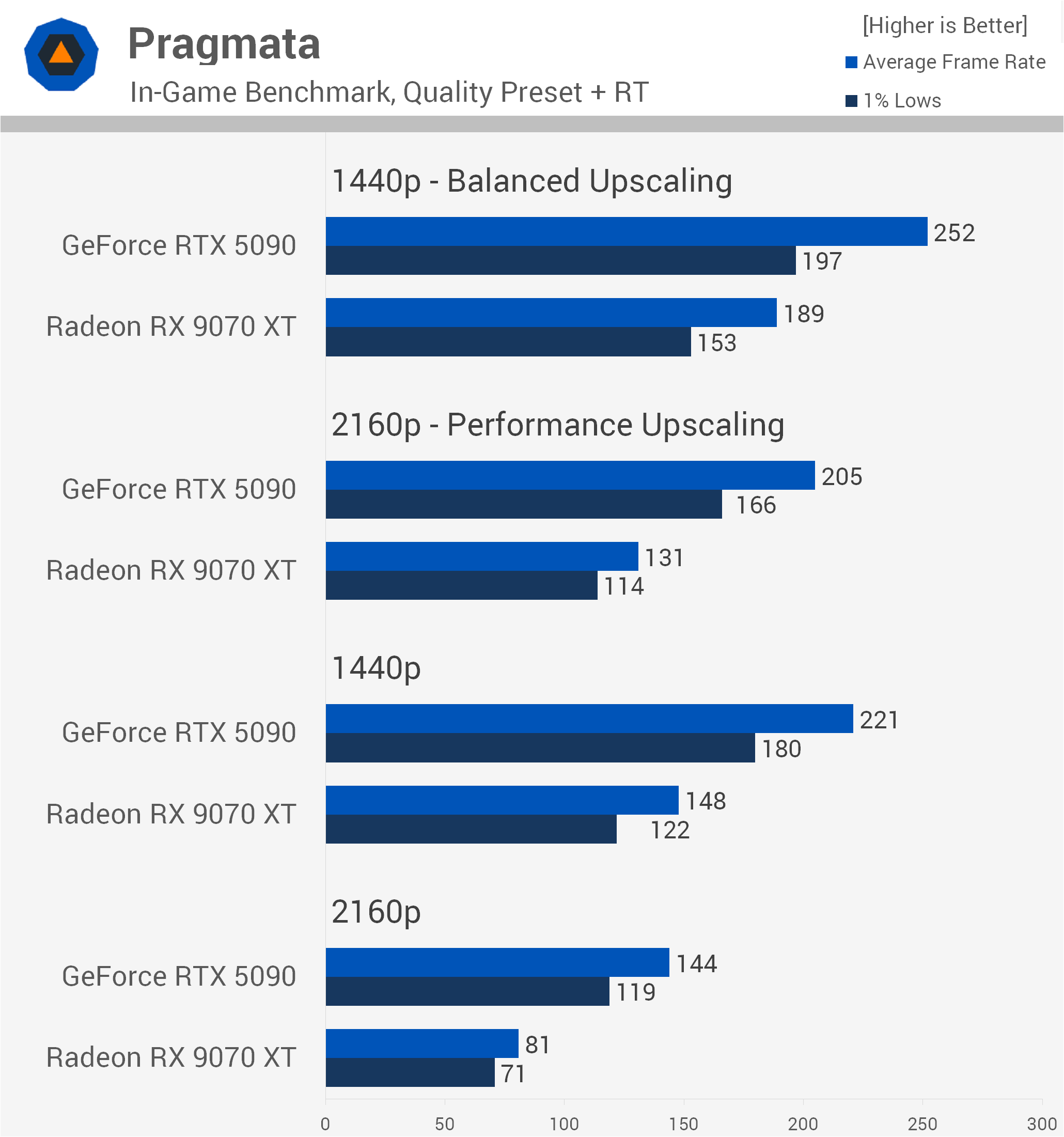
Dropping down to native 1440p sees that advantage shrink to 49%, though the RTX 5090 is still pushing an impressive 221 fps. Performance upscaling at 4K produces a similar 56% margin in favor of the GeForce GPU. However, at 1440p with Balanced upscaling, CPU limits begin creeping in, shrinking the RTX 5090's lead to 33% as it tops out at 252 fps.
Performance Preset
Switching over to the Performance preset pushes frame rates into the stratosphere. At native 4K, the RTX 5090 delivers a massive 85% performance advantage, averaging 200 fps against 108 fps for the RX 9070 XT.
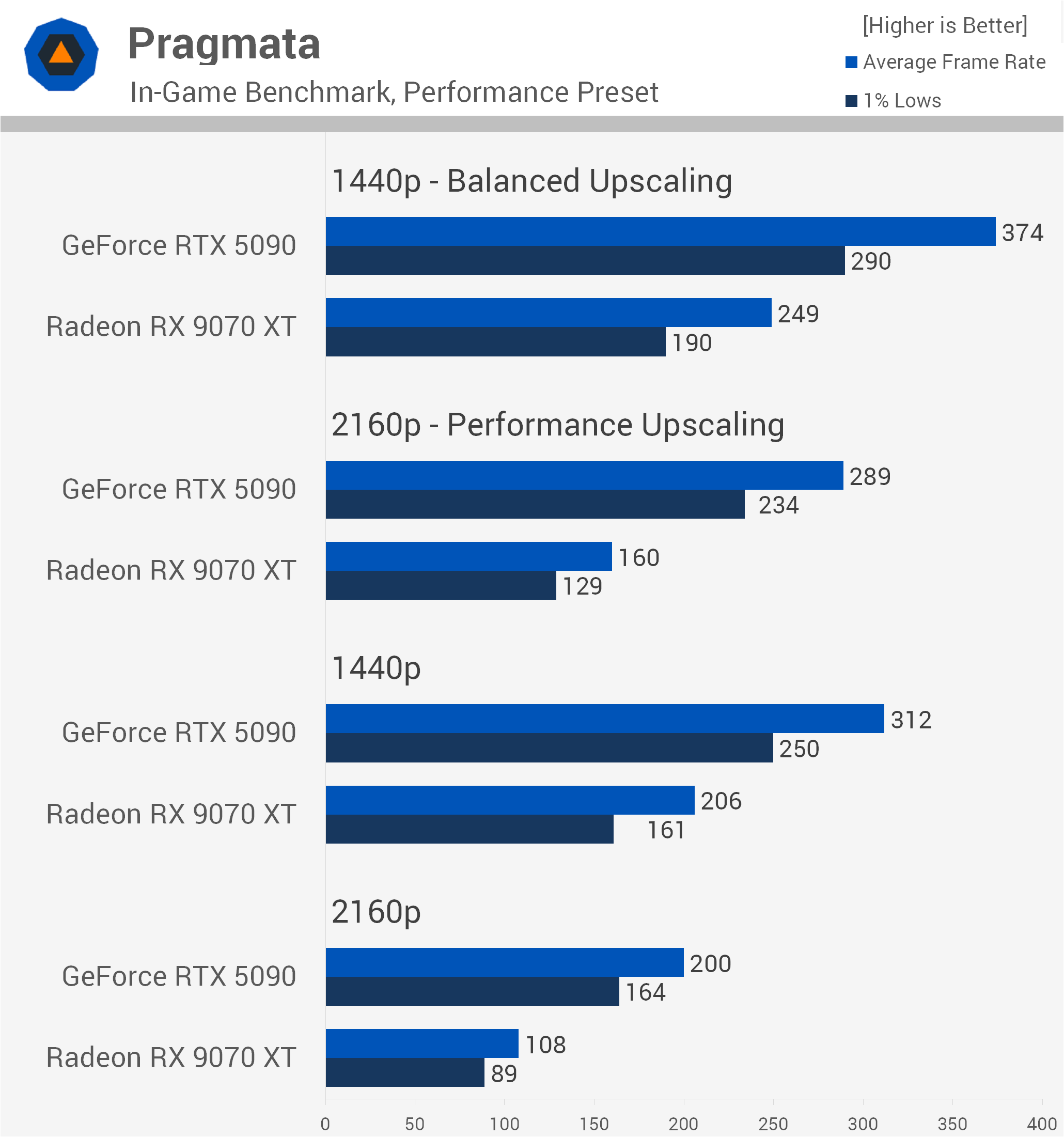
At native 1440p, that lead comes down to 51%, and unlike some other titles we've looked at, Nvidia doesn't appear hindered by driver overhead here.
With Balanced upscaling at 1440p, the RTX 5090 stretches its legs to average an absurd 374 fps, a 50% lead over the Radeon GPU, backed by a strong 53% advantage in 1% lows.
Marvel Rivals
Ultra Quality
Next up is Marvel Rivals, and starting with the Ultra preset, we find this hero shooter is reasonably demanding at native 4K. Here, the RTX 5090 is 85% faster than the RX 9070 XT, delivering 87 fps against just 47 fps, alongside a 79% lead in 1% lows.
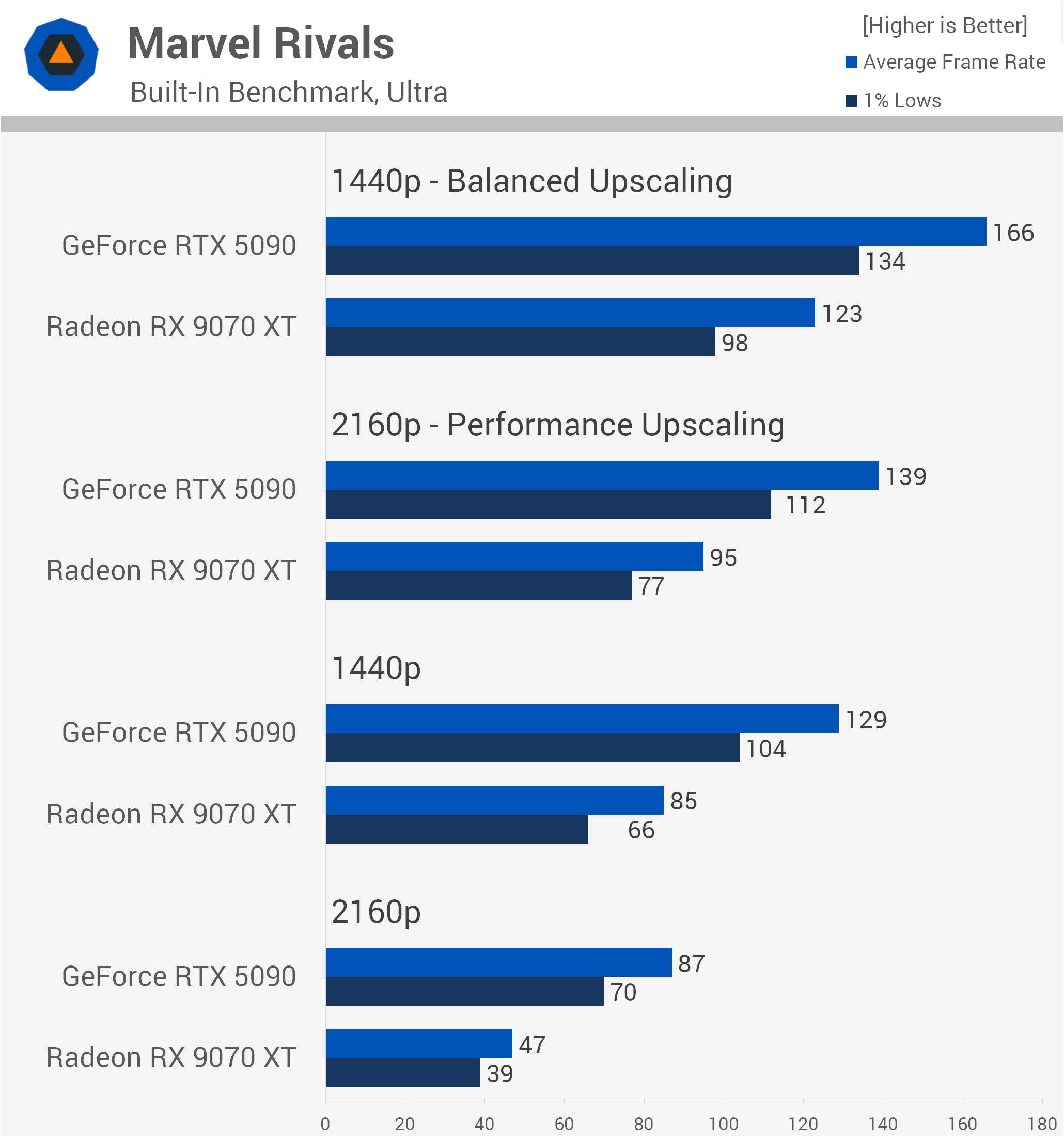
Dropping down to native 1440p sees that lead shrink to 52%, with the GeForce GPU averaging 129 fps versus 85 fps. With Performance upscaling at 4K, the RTX 5090 remains 46% faster, while 1440p Balanced upscaling narrows the margin to 35% as CPU limitations begin to factor in, though the RTX 5090 still pushes a solid 166 fps.
Low Quality
Switching to the Low preset dramatically increases frame rates across the board. At native 4K, the RTX 5090 maintains an 86% advantage, averaging 145 fps compared to 78 fps. Lowering the resolution to native 1440p results in a 62% lead for the GeForce GPU, averaging 252 fps.
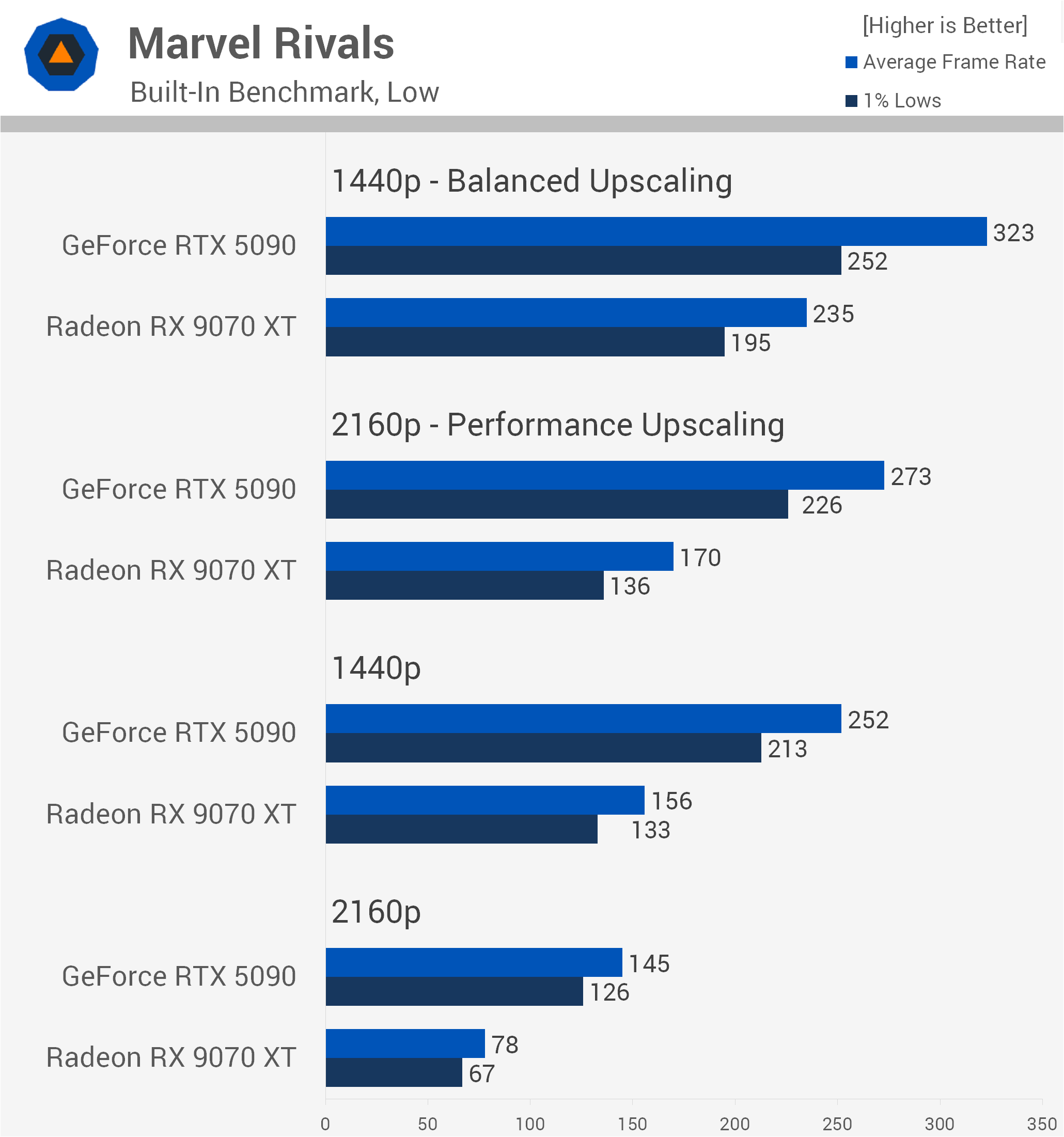
Finally, at 1440p using Balanced upscaling, the RTX 5090 clears 320 fps to finish 37% ahead of the RX 9070 XT, while retaining a healthy 29% advantage in 1% lows.
Assassin's Creed Black Flag Resynced
High Quality (Ray Tracing)
Next up we have Assassin's Creed Black Flag Resynced. Starting with the High preset and Extended RT enabled, we see solid scaling for the GeForce GPU at native 4K. Here, the RTX 5090 is 59% faster than the RX 9070 XT, delivering 81 fps compared to 51 fps, with a similar 63% advantage in 1% lows.
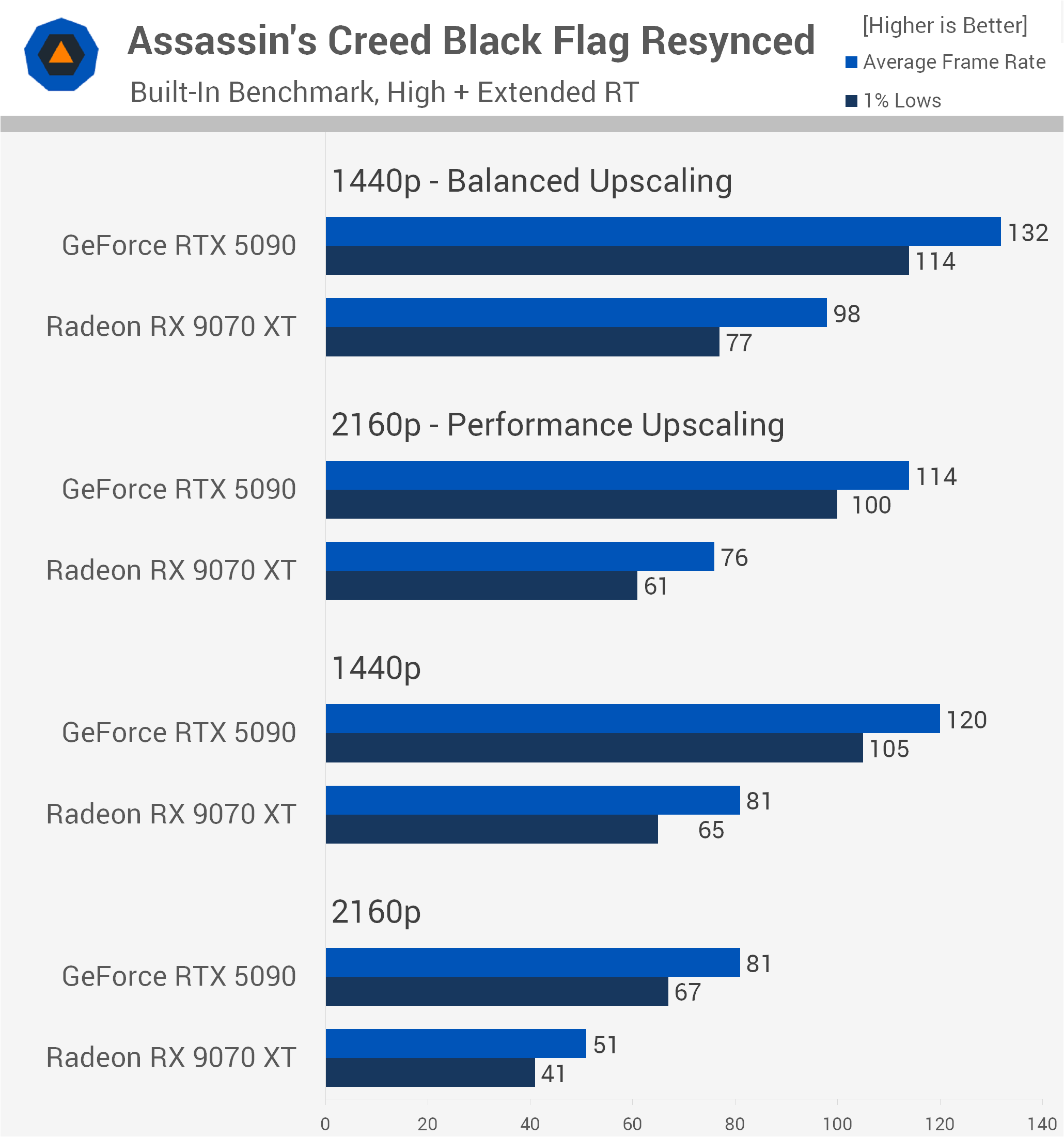
Dropping to native 1440p reduces that lead to 48%, with the RTX 5090 averaging 120 fps against 81 fps. Upscaling tells a familiar story. At 4K with Performance upscaling, the RTX 5090 remains 50% faster, but at 1440p using Balanced upscaling, CPU limitations begin creeping in. That margin shrinks to 35%, as the RTX 5090 only gains an extra 12 fps over its native 1440p performance.
Ultra Low Quality
Switching over to the Ultra Low preset reduces GPU demands significantly, making CPU limitations more apparent. At native 4K, the RTX 5090 maintains a respectable 46% lead, averaging 130 fps versus 89 fps. However, at native 1440p that gap narrows to 30%, and with 1440p Balanced upscaling, it falls to just 27%.
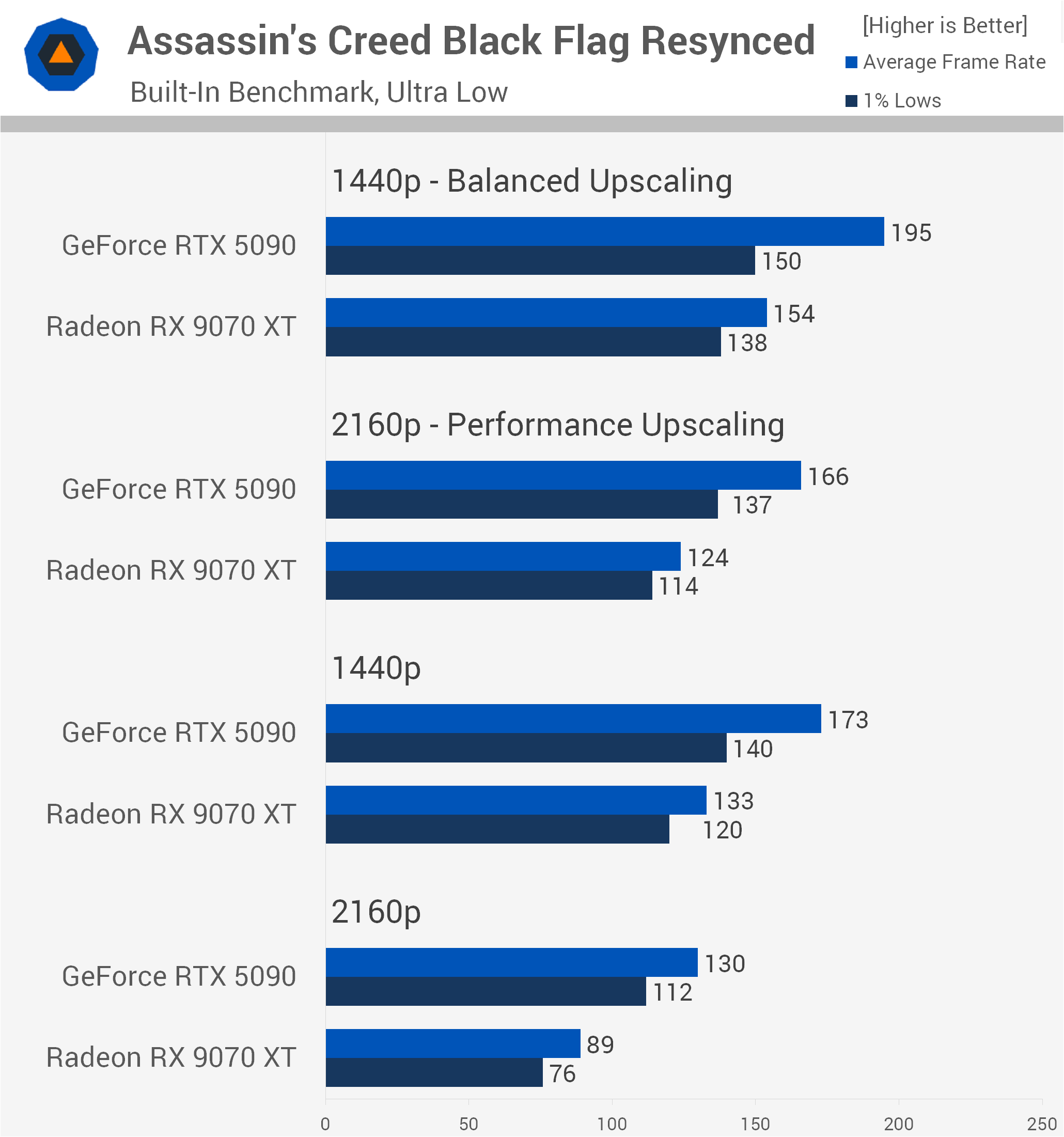
More tellingly, the 1% low advantage drops to a mere 9%, demonstrating how higher frame rates expose system bottlenecks and limit the RTX 5090's ability to stretch its legs.
Battlefield 6
Overkill Quality
Moving on to Battlefield 6, we'll start with the Overkill preset, which reveals a game that's heavily GPU-bound. At native 4K, the RTX 5090 is an impressive 88% faster than the RX 9070 XT, averaging 122 fps compared to 65 fps, with a similar 83% advantage in 1% lows. Dropping to native 1440p sees that massive margin hold steady at 88%, with the GeForce GPU rendering 188 fps versus 100 fps.
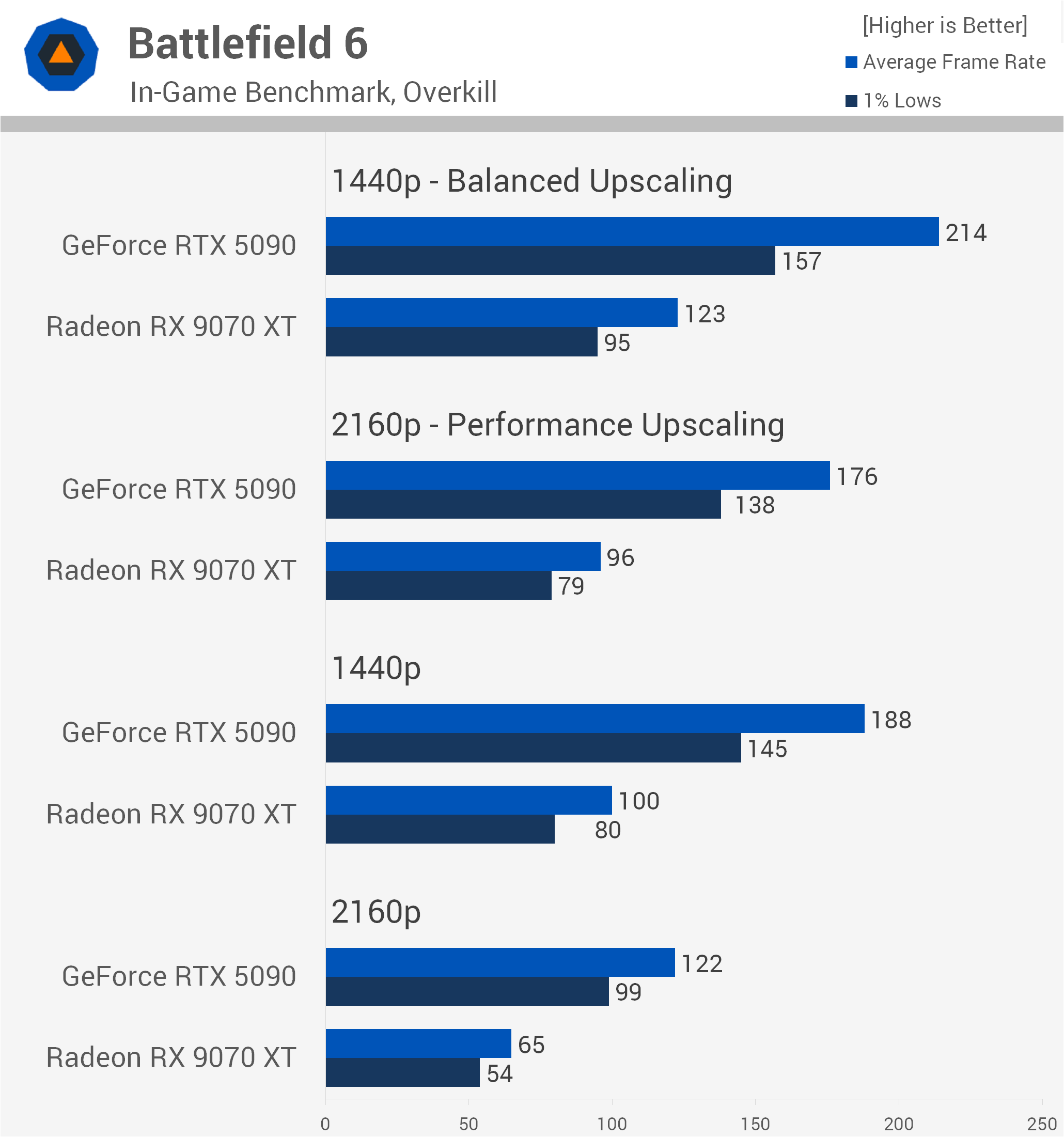
Even with upscaling enabled, CPU limits don't significantly restrict performance here. At 4K with Performance upscaling, the RTX 5090 remains 83% faster, and while 1440p Balanced upscaling trims the lead to 74%, the GeForce GPU is still comfortably pushing well over 200 fps.
Medium Quality
Dropping down to the Medium preset begins to relieve the GPU load and introduce typical CPU constraints. At native 4K, the RTX 5090 delivers a 57% performance lead, rendering 166 fps compared to 106 fps on the RX 9070 XT.
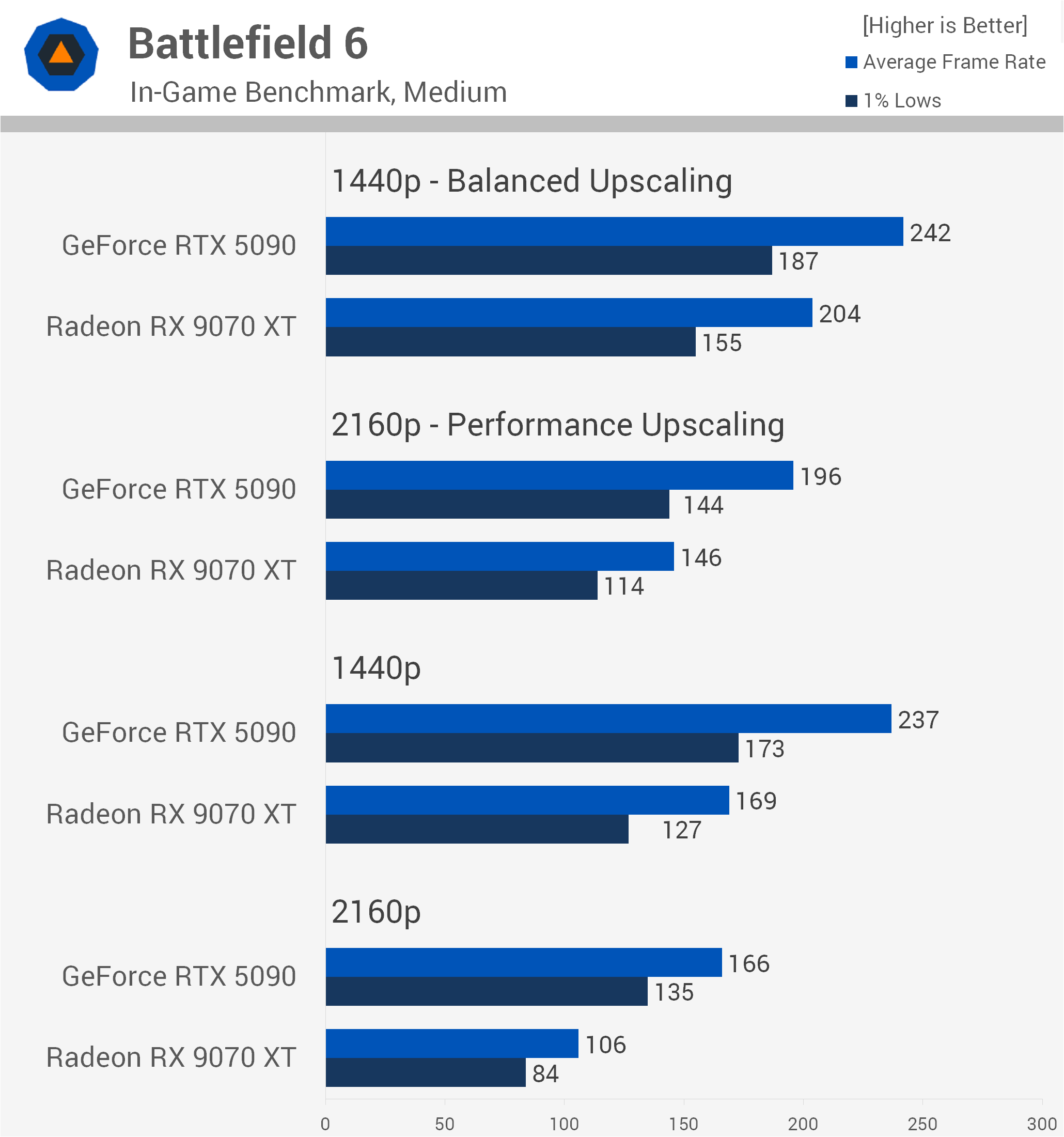
However, lower resolutions and upscaling shrink those margins significantly. At native 1440p, the RTX 5090 is now 40% faster, and once Balanced upscaling is enabled at 1440p, that advantage falls to just 19%, averaging 242 fps versus 204 fps.
The 1% lows also narrow to a 21% margin, showing that pushing high frame rates in this engine eventually runs into CPU limitations.
Cyberpunk 2077: Phantom Liberty
Ray Tracing: Overdrive (Path Tracing)
Finally, we have Cyberpunk 2077: Phantom Liberty, and testing with the path-traced Ray Tracing: Overdrive preset is an absolute bloodbath for the Radeon GPU. At native 4K, the RTX 5090 is an astonishing 200% faster than the RX 9070 XT, turning an unplayable 12 fps slideshow into an almost passable 36 fps average, with triple the 1% low performance.
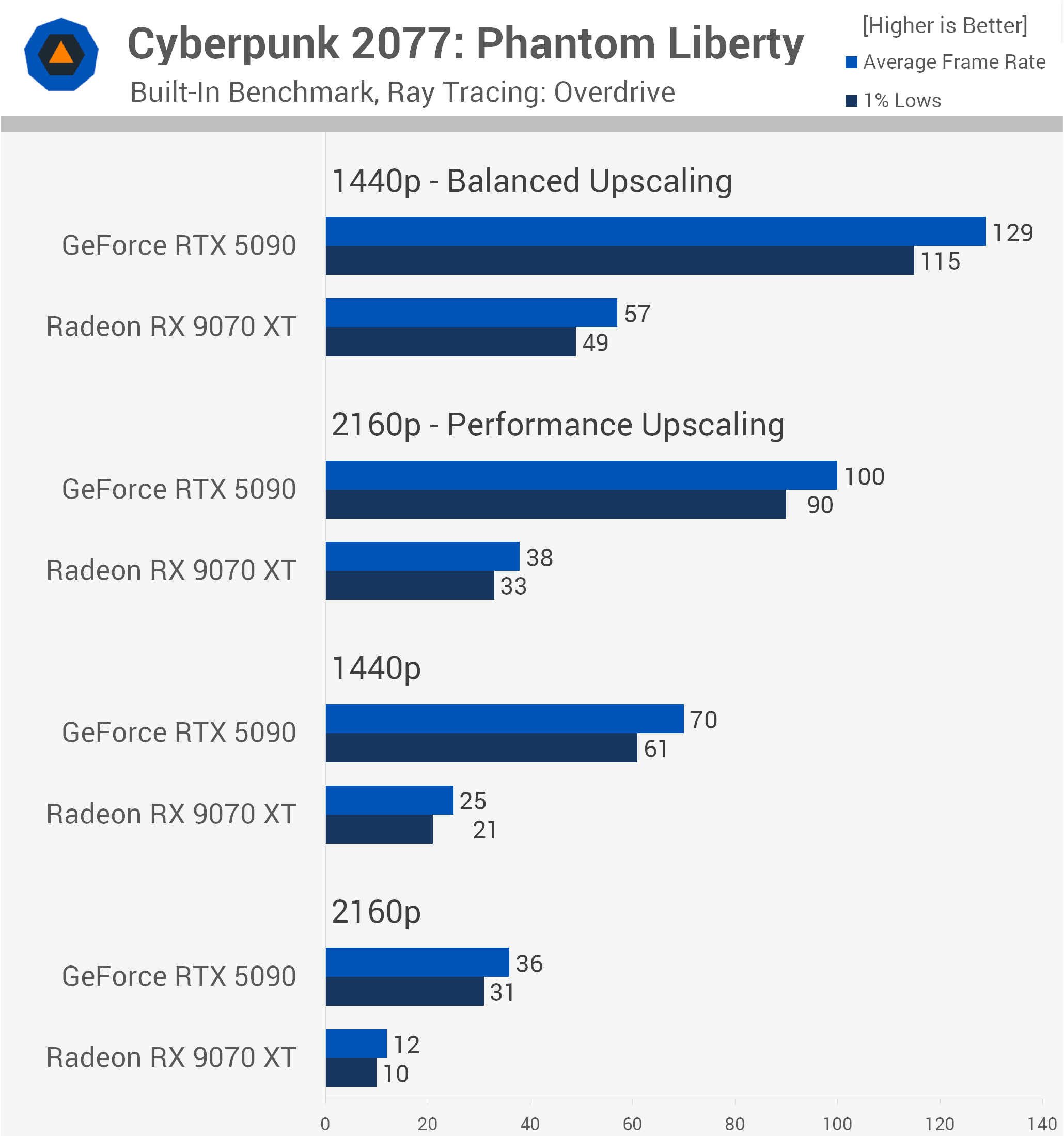
Dropping to native 1440p sees the RTX 5090 deliver 70 fps, making it 180% faster.
Even with upscaling enabled, AMD's RX 9070 XT simply cannot cope with this workload. At 4K with Performance upscaling, the GeForce card remains 163% faster, and at 1440p with Balanced upscaling, it's still 126% faster, easily clearing 120 fps while the RX 9070 XT fails to hit 60 fps.
Ultra Quality (Rasterization)
Switching over to the standard rasterized Ultra preset provides far healthier numbers across the board, though the GeForce GPU still commands a hefty lead. At native 4K, the RTX 5090 is 85% faster, pushing 115 fps versus 62 fps. At native 1440p, that margin comes down to 64%, while 4K Performance upscaling sees a 53% GeForce advantage.
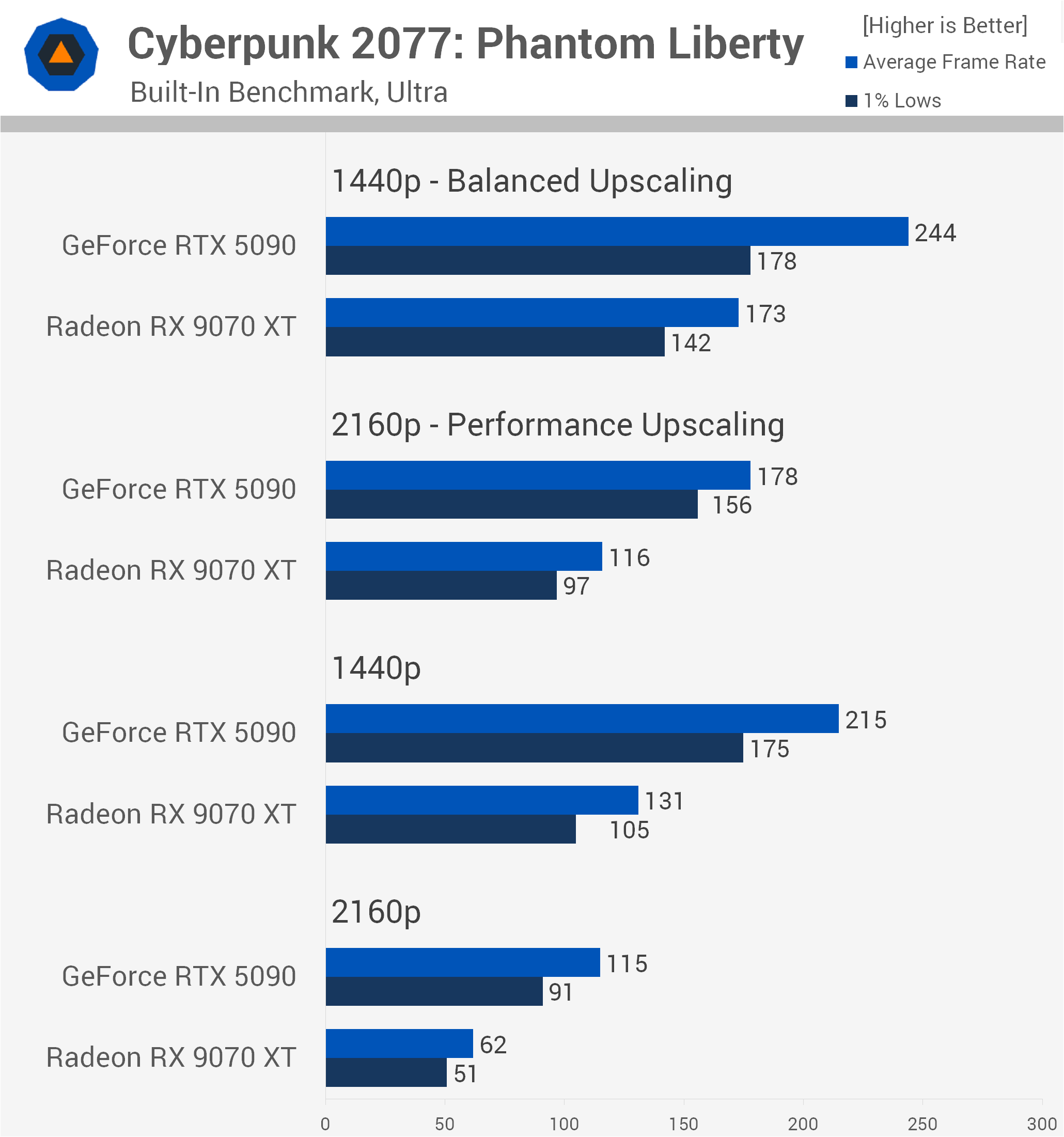
Finally, at 1440p with Balanced upscaling, CPU limitations begin to come into play, trimming the RTX 5090's lead to 41%, with 244 fps against 173 fps.
11 Game Average
Ultra Settings
Across the 11 games tested, focusing on the higher quality settings, the RTX 5090's dominance is undeniable. At native 4K, the GeForce GPU was a staggering 105% faster on average than the RX 9070 XT, delivering 78 fps compared to just 38 fps, alongside a massive 114% lead in 1% lows.
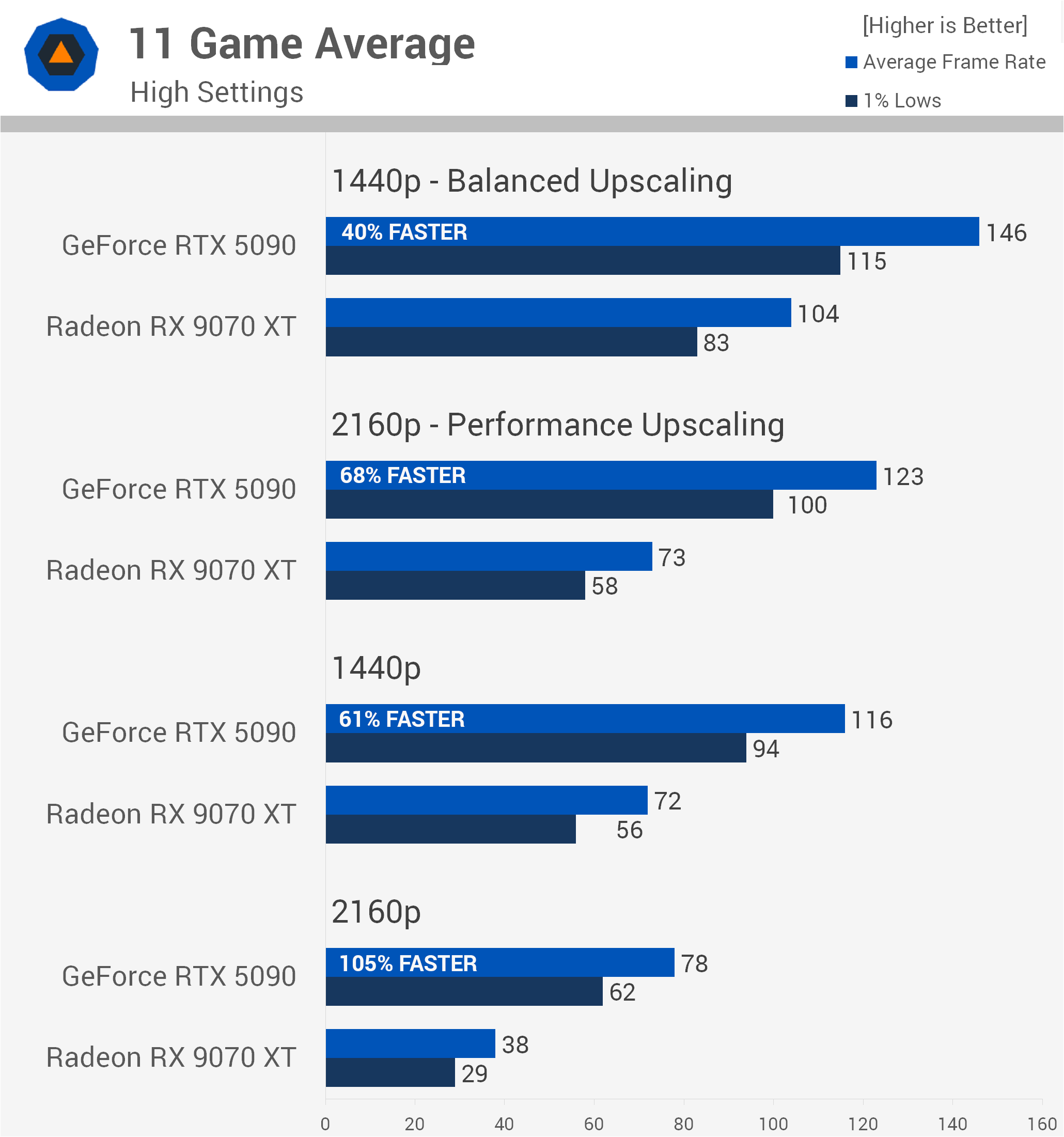
Dropping the resolution to native 1440p saw the RX 9070 XT average 72 fps, but the RTX 5090 still maintained a commanding 61% performance advantage.
With upscaling enabled, the RTX 5090 remained 68% faster at 4K using Performance upscaling. At 1440p with Balanced upscaling, that margin shrank to 40%, a significant reduction compared to what we saw at native 4K. Of course, this is largely due to CPU limitations becoming more of a factor.
Lower Settings
Lowering the visual quality across our 11-game suite naturally shifts the bottlenecks, but the RTX 5090 still remained comfortably ahead at native 4K, where it was 64% faster than the RX 9070 XT, averaging 144 fps compared to 88 fps.
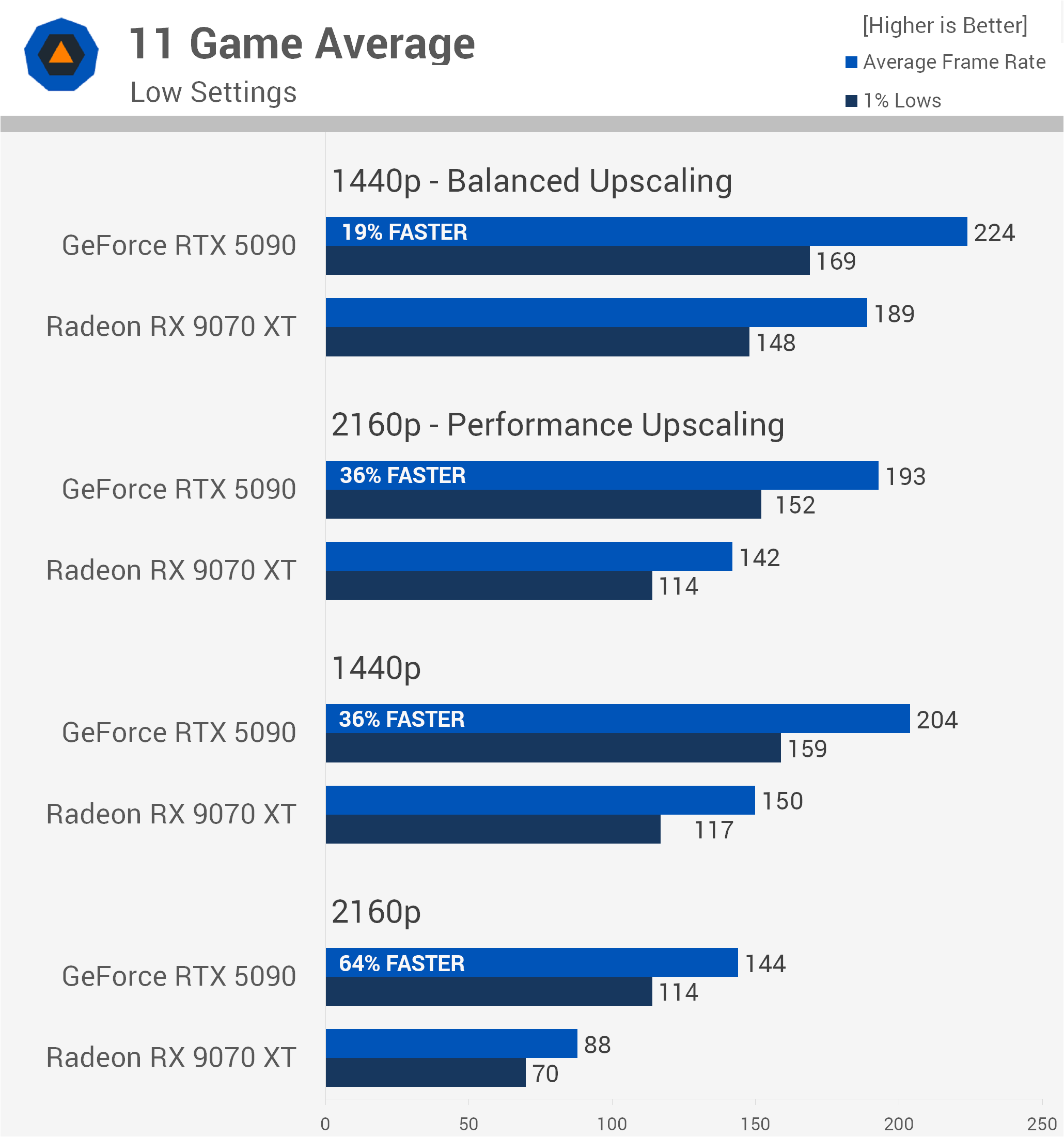
It also maintained a strong 63% lead in 1% low performance, delivering 114 fps versus 70 fps.
However, once we move to lower resolutions, system and CPU limits become much more obvious. At native 1440p, the GeForce lead drops to 36%, averaging 204 fps against 150 fps for the Radeon GPU. Enabling upscaling compresses those margins even further. At 4K with Performance upscaling, the RTX 5090 is 36% faster, rendering 193 fps versus 142 fps.
Then, at 1440p with Balanced upscaling, we hit a wall. The RTX 5090 manages 224 fps, while the RX 9070 XT pushes 189 fps, shrinking the average performance advantage to just 19%.
What We Learned: Nvidia's Driver Overhead in Perspective
So, is the RX 9070 XT as fast as the RTX 5090? Obviously not, it's not even close. Under the most GPU-demanding conditions we tested, the RTX 5090 was 105% faster on average.
Now, technically speaking, there are examples where the RX 9070 XT can end up faster than the RTX 5090, even with a flagship CPU such as the Ryzen 7 9800X3D, and this is due to Nvidia's driver overhead issue.
There are a few caveats, though. Using the highest or lowest quality settings in every game we tested, and we tested more than the 11 shown here, we didn't find a single example where the RX 9070 XT came close to matching the RTX 5090 at native 4K, let alone beating it. We also didn't find a single example where the RX 9070 XT matched or beat the RTX 5090 at native 1440p using High or Ultra settings. The same was true at 4K using Performance upscaling.
So if you're playing games using an RTX 5090 at 1440p or 4K with high quality settings, there's simply no chance the RX 9070 XT is coming close to delivering the same or better performance.
Where the RX 9070 XT can get very close to, match, or even beat the RTX 5090 using a flagship CPU is at 1440p with Balanced upscaling, or while running Low to Medium settings. But even then, this only applies to a select few games.
For example, the RTX 5090 was still comfortably ahead of the RX 9070 XT at 1440p using Balanced upscaling and the higher visual settings in Assassin's Creed Black Flag Resynced, Battlefield 6, Cyberpunk 2077, Pragmata, Marvel Rivals, Doom: The Dark Ages, and Spider-Man 2. That's seven of the 11 games tested.
The thing is, in many games the RTX 5090 wasn't much faster using Balanced upscaling at 1440p compared to native rendering. So if anything, you'd be better off enabling DLAA to improve image quality rather than using upscaling to try to increase frame rates.
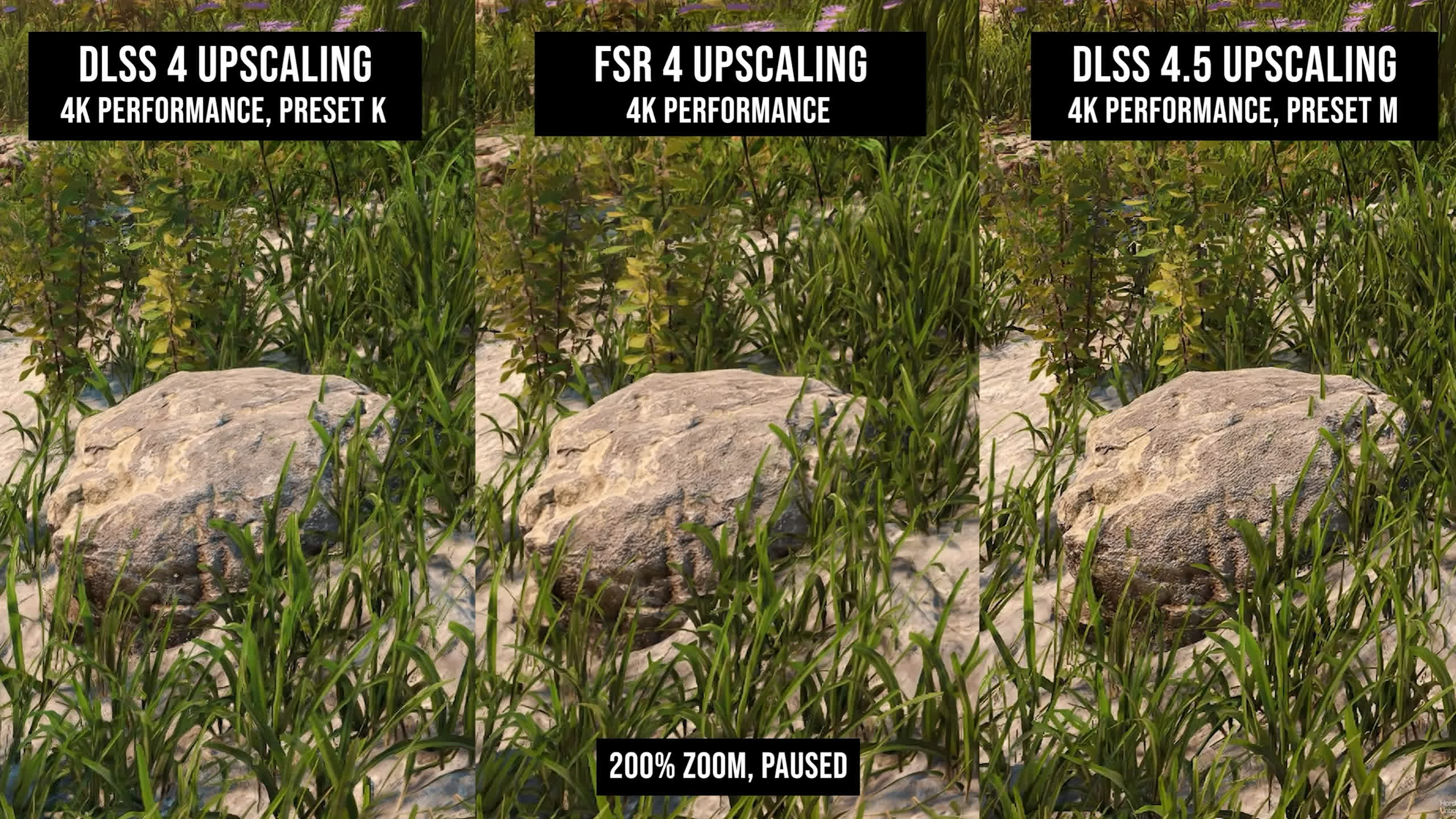
Something else worth considering when comparing results with DLSS upscaling enabled is that the DLSS algorithm has its own processing overhead. This is the time required by the AI algorithm to reconstruct a lower-resolution image into a higher-resolution one. In short, although DLSS is designed to boost frame rates, running the upscaling process isn't entirely "free." We should also note that FSR upscaling has the same kind of performance overhead.
CPU Bottleneck vs. Driver Overhead
Now, some will argue that across the 11 games tested, the RTX 5090 was 105% faster at native 4K but just 40% faster at 1440p using Balanced upscaling, even though that's still a jump from 104 fps to 146 fps. We can already imagine the mental gymnastics being performed here, with these results used to claim that the RTX 5090 isn't as powerful as people think under real-world conditions, or something along those lines.
That kind of argument is obviously nonsense, and as we've already said, none of this should be news to anyone. In our original RTX 5090 review, the GeForce GPU was 63% faster than the Radeon RX 7900 XTX at 4K, but just 38% faster at 1440p, and that was across 17 games. So the fact that a powerful GPU becomes increasingly limited by the CPU at lower resolutions shouldn't surprise anyone.
We feel this is being conflated with Nvidia's driver overhead issue, making it appear more serious than it actually is. Yes, Nvidia does have an overhead issue, but it's really not something RTX 5090 owners running a high-end CPU need to worry about.
As we demonstrated years ago, this becomes a much bigger problem for those running older CPUs, hoping to squeeze a bit more performance out of them when upgrading to a newer GPU. In those scenarios, you'll find more instances where Radeon GPUs can offer additional performance headroom.
What About High FPS Competitive Gaming?
We've also seen claims recently that Nvidia's overhead issue is a problem for high-end gaming, particularly for those with powerful CPUs targeting very high frame rates. This claim isn't entirely true either, and again, it conflates a few different issues.
The truth is, for those playing competitive shooters using competitive quality settings, which typically means Low settings, the GPU often doesn't matter nearly as much. Using Performance Mode, you can push crazy high frame rates in Fortnite with a Radeon RX 9060 XT or GeForce RTX 5060 Ti, so you absolutely don't need an RTX 5090, or even an RX 9070 XT for that matter. Rather, what you need is a screaming-fast CPU.
So the fact that the RTX 5090 isn't any faster than the RX 9070 XT at 1440p is to be expected. In our example, we were CPU-limited to around 700 fps. Yes, the RX 9070 XT was technically faster, but the margin was so small it's hardly worth talking about.
Moreover, you're not going to find a game where the RX 9070 XT can spit out 500 fps while the RTX 5090 is limited to less than 400 fps, at least with a Ryzen 7 9800X3D installed. You could probably achieve that kind of result with a Ryzen 5 5500, which would be interesting as a "for science" type of test, but it's not exactly useful for anyone who owns a high-end GPU or is considering buying one.
Ultimately, Nvidia's driver overhead is a real issue, but its impact on high-end gaming is often exaggerated. The RX 9070 XT might occasionally win a benchmark, but that doesn't make it the faster GPU.