

Uninstalr is an easy to use and very accurate software uninstaller for Windows. It can uninstall multiple apps at the same time.
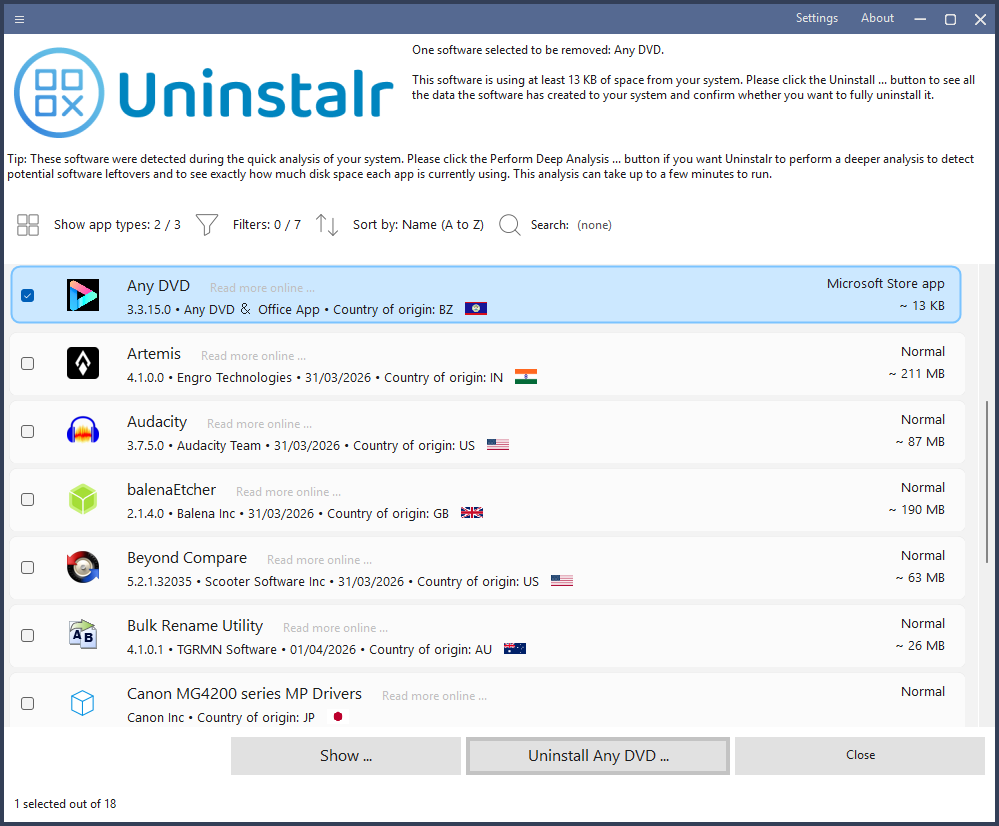
Uninstalr lists all the installed applications in your system on a single list for easy and quick access.
It also shows you how much space each app is using in your system - and this data is calculated in real-time, instead of relying on the notoriously inaccurate data from the Windows Installed Apps listing.
You can uninstall many apps at the same time. Uninstalr has one of the best - if not the best - support for unattended, batch uninstallation in Windows without any input required from the user after the process has started. Even if the uninstalled apps do not support silent uninstallation.
Features
- Batch uninstall many apps at the same time.
- Supports unattended uninstallation of apps.
- Supports monitoring of new software installations.
- Also detects portable apps and previously uninstalled software leftovers.
- Shows all the data added to your system by installed software on a file by file basis.
- Shows all the data it will remove before starting the uninstallation.
- Filter and search the list of installed software.
- According to our benchmark, Uninstalr is the most accurate software uninstaller by leaving the least amount of leftovers when uninstalling apps.
- Supports uninstallation of Microsoft Store, Steam, Chocolatey, NuGet and Ninite installed software.
- Supports Windows Dark Mode.
- Supports Windows 11, 10, 8 and 7.
- Comes with these translations builtin: Chinese Simplified, Chinese Traditional, Czech, Danish, English, Filipino, Finnish, French, German, Greek, Hindi, Hungarian, Indonesian, Italian, Japanese, Korean, Malay, Norwegian, Polish, Portuguese, Romanian, Slovak, Spanish, Swedish, Thai, Turkish, Ukrainian and Vietnamese.
- Has a single executable file portable version and a normal setup version.
- Uninstalr is freeware, lightweight and easy to use. No bells and whistles, no nonsense.
What's New
- The installed apps list now shows the country of origin for all known installed apps.
- The main user interface and the before uninstallation paths view both now displays checkboxes, allowing easier selection of data to be removed.
- The main window bar now includes Settings and About buttons.
Improvements:
- The installed apps list now shows the country of origin for all known installed apps.
- The listing of paths before uninstallation starts now displays checkboxes, allows user to uncheck any paths user doesn't want to be removed. Editing the list of paths was also possible before, but since the UI was not very clear about this, many users were not aware of this.
- Uninstalr now attempts to automatically detect system backup paths and adds them to the list of ignored paths.
- The main window bar now includes Settings and About buttons.
- Greatly improved support for detecting portable apps, especially NirLauncher ones.
- Greatly improved support for detecting leftover app detection.
- After software is uninstalled and the system restarted, Uninstalr now also says how long the entire process took.
- Improved support for systems with software installed over multiple drives.
- The Settings now also shows the builtin ignore list that contains all the automatically ignored folders from the system.
- Improved protection against potentially unwanted detections related to any software source code repositories stored in the system.
- Scrolling the Settings using the mouse wheel is now much smoother.
- The program now shows an additional warning message if you try to uninstall a potential leftover software. (Spoiler alert: You should not uninstall something just because Uninstalr says it could be a leftover. Notice the word COULD.)
- Added an option to skip the installed app size analysis to improve scan speed.
- The capitalization of software names is now handled better. For example, previously WinRAR could be listed as Winrar or WinRar.
- Installed software are now listed without their version number after the name. The version number is displayed normally under the name row.
- The program now uses less RAM.
- The program could list paths that do not actually exist in the path listing before uninstallation. While this was by design, and explained in the UI, it was rather confusing and many people reported it as a bug. This is no longer done and instead, the Settings now contain an option about allowing Uninstalr to delete any app related paths that did not exist before the uninstallation started. Yes, sometimes running the app's own uninstaller actually creates leftovers. This setting is to remove those.
