DroidDeck brings a SteamOS-like gaming experience to Android, allowing users to run Steam and compatible Windows PC games directly on supported phones and handhelds.
Using Valve's Proton compatibility layer and x86 translation, it enables local PC gaming without streaming or root access. Support for additional GPU architectures is available experimentally.
Features
SteamOS-like experience
Run Steam in Big Picture Mode with a controller-friendly interface.
Windows game support
Play compatible Windows PC games through ARM64 Proton.
Multiple game stores
Alongside Steam, GOG, Epic Games, and Amazon Games, DroidDeck offers itch.io integration and experimental support for Xbox and PC Game Pass libraries.
Linux desktop
Install and run ARM64 Linux applications through Flatpak and Flathub.
Game emulation
Optional desktop and emulator support.
No root required
Works on supported Android devices without rooting.
Experimental GPU support
DroidDeck now offers experimental compatibility with Mali, Xclipse, and PowerVR graphics, expanding support beyond Snapdragon-powered devices.
Open source
Free software licensed under GPL-3.0.
System Requirements
- OS: Android 9 or newer.
- GPU: Adreno 730 or newer, or Adreno 8xx.
- Experimental GPU support: Adreno 6xx, Mali, Xclipse, and PowerVR.
- Unsupported GPUs: Adreno 710.
- Storage: Approximately 3 GB for the runtime, plus 1.1 GB for optional desktop and emulator components.
- Root access: Not required.
Note: Game compatibility and performance vary depending on the device, GPU drivers, and title. Experimental GPU support may have significant limitations.
What's New
0.7.1 is a fix release for 0.7.0. Since 0.7.0, 4 people sent 33 pull requests, and 2 of them are first-time contributors. It fixes Steam launches that hung at "Processing install script", the endless loading screen after quitting a game and colour on PowerVR, plus GOG DLC and a new launcher theme.
Features
- Added the Scarlet snow launcher theme, DroidDeck's first light theme. (@EnzoDLofi, #2262)
- Added left and right picture alignment next to top and bottom. The controller pointer and direct touch follow the moved picture, also with glasses. (@EnzoDLofi, #2384)
- GOG installs the DLC you own, and the GOG search reaches GOG's whole catalog. (@maxjivi05, #2348, #2296)
Fixed
- Fixed Steam games stuck at "Processing install script" or a download that never finishes, and the black screen with "Abort game" after quitting, which started in 0.7.0. (@xXJSONDeruloXx, #2303)
- Fixed a game launched from DroidDeck stalling at Steam's launch screen: DroidDeck now waits for Steam to be ready. (@maxjivi05, #2362)
- Fixed an endless loading screen after a game exits back to Steam. (@maxjivi05, #2359)
- The bottom-screen Dashboard's Notifications page is removed, so DroidDeck no longer asks to read your notifications. (@xXJSONDeruloXx, #2342)
- Fixed grayscale Steam and games on PowerVR (Pixel 10 Pro and Pro XL) since the Ubuntu 26.04 runtime. (@maxjivi05, #2287)
- Fixed games that need EasyAntiCheat never starting: Linux-only tools such as the Proton EasyAntiCheat Runtime keep their native platform. (@maxjivi05, #2313)
- Fixed a Proton picked in Steam, such as Proton Experimental, being switched back to DroidDeck-Proton, and store apps launched before Steam opens reporting that no Proton is installed. (@maxjivi05, #2284, #2392)
- Fixed games failing with c000007b after an installer put an x64 system DLL into an ARM64 prefix. (@maxjivi05, #2318)
- Fixed emulators and other AppImage, Flatpak and Snap programs rendering through system memory on Adreno. They get the game GPU setting, and Flatpak apps open their window instead of playing audio only. (@maxjivi05, #2288, #2295, #2391)
- Fixed Linux emulators that run guest code natively hanging on launch. (@maxjivi05, #2279)
- Fixed Firefox tabs crashing and the desktop browser hanging in the Desktop session. (@xXJSONDeruloXx, @maxjivi05, #2360, #2304)
- Fixed taps on pop-up dialogs and windows away from the screen's top-left corner doing nothing. (@maxjivi05, #2280, #2285)
- Fixed direct touch with Relative mouse: Auto turning taps into small mouse movements when no mouse is connected. (@maxjivi05, #2305)
- Fixed the Controls below the game tabs being cut off, which left the panel stuck on the trackpads. (@maxjivi05, #2302)
- Fixed GOG: owned games missing from the library since 0.6.0 are back, and install scripts' support files reach the prefix, so modded editions start as installed. (@maxjivi05, #2296, #2294)
- Fixed stutter on devices with 13 GB of RAM or less: game memory the game reads straight back is no longer compressed again every 30 s. (@maxjivi05, #2312)
- Fixed the frame graph jumping around on the bottom-screen Dashboard's In-game stats. (@xXJSONDeruloXx, #2345)
- Fixed smaller things: programs whose allocator calls a hooked function at startup no longer abort with the input preload, droiddeckctl works on shells without the content command such as the Retroid Pocket Duo's, a full disk no longer crashes the app on an agent call, and ending a session without the graphics runtime pack no longer logs an error. (@xXJSONDeruloXx, @maxjivi05, #2361, #2321, #2325, #2316)
- Added experimental Xbox and PC Game Pass as a store. Sign in with your Microsoft account to see your owned and Game Pass games, then download them with pause and resume, update, verify and manage add-on content. Games launch through Proton or FEX from the Games tab or straight from Steam. Search results open with their artwork and details, and Game Pass titles you have not installed yet can be installed from their page. (@xXJSONDeruloXx, @moronigranja, #1156, #1164, #1170, #1193, #1279)
- Added an itch.io store. Sign in with your itch.io API key to see your library, then search the store or browse the newest, on-sale, free and top-rated shelves. DRM-free Windows builds install and launch through Steam like games from the other stores. (@kingokksa, #1064)
- Redesigned store pages. Each store has Library and Store tabs, and the library lists installed games first. A new capsule view shows portrait DVD-case art in every store. LB and RB switch between stores, and installed games get a Play button on their page. You can reorder and hide store tabs in the stores settings, and stores you are not signed in to are dimmed. (@xXJSONDeruloXx, @kingokksa, #1116, #1117, #1121, #1125, #1236)
- Added configurable touchscreen gestures: taps, double taps, holds, one-, two- and three-finger drags and pinch zoom. Each one can be mapped to an action from a searchable list, with defaults and per-game overrides. (@Nightwalker743, @kingokksa, #940, #1214)
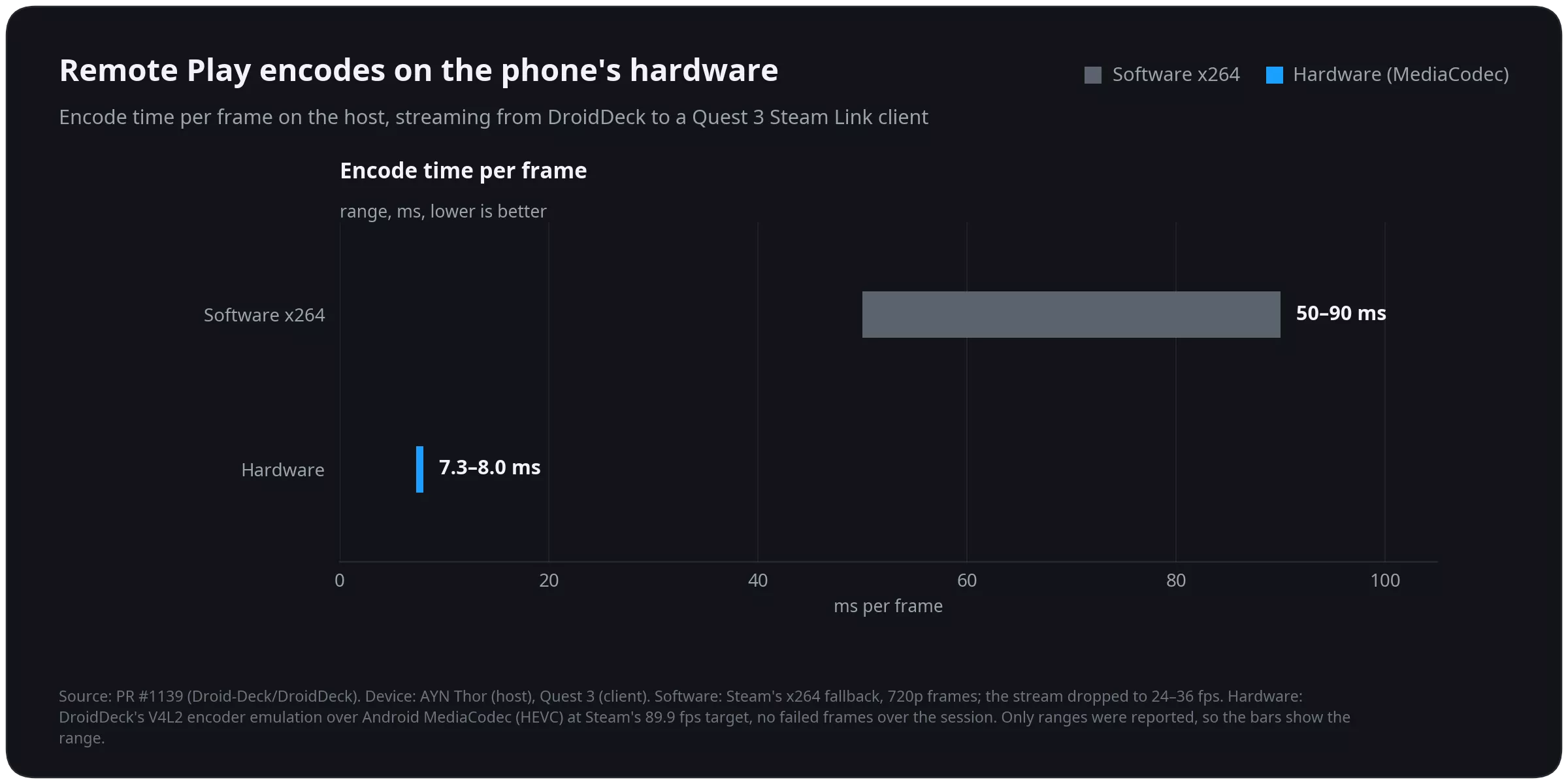
- Steam Remote Play from DroidDeck now streams video as well as audio and input. The picture is captured through PipeWire, as on SteamOS, and encoded by the phone's hardware encoder. On a Thor that takes 7.3 – 8.0 ms per frame, down from 50 – 90 ms with software encoding. Touch on the client can tap and drag, and games are heard on the stream. (@xXJSONDeruloXx, #1139)
- Boot movies from SteamDeckRepo. Search SteamDeckRepo, filter by device and browse the Trending, Most downloaded, Most liked and Newest tabs, then install a movie and use it. Installed movies are listed with covers. Imported movies go into Steam's own movie folder, and the sound has volume and length sliders. (@FX192, #1036, #1229)
- The performance HUD can show a colored frame-time graph and the battery temperature. Each part can be shown or hidden, and its colors and opacity can be changed. (@0x1Nawaf, #1256)
- Added a custom Gradient theme, with primary and secondary colors chosen from a color wheel, sliders or a hex code, and a light app icon option. (@FX192, @xXJSONDeruloXx, #1309, #1104)
- SteamVR controller types. Without VR controllers, the gamepad can act as Valve Index controllers (the default), Meta Quest 3 Touch Plus, HTC Vive wands, or a regular gamepad. The sticks move you in the game by default, and pressing both sticks switches them to moving the hands. The type can be changed while SteamVR runs. With glasses, the phone becomes a control panel with Recenter, the SteamVR menu, the keyboard, brightness and battery. Flat games started from VR open as a SteamVR panel. (@xXJSONDeruloXx, #1268)
- Added Rokid Max and Air glasses, with 3DoF head tracking, SBS modes, 120 Hz on the Max and brightness control, and experimental head tracking for VITURE Pro 2 without the vendor SDK. (@xXJSONDeruloXx, @informalTechCode, @kingokksa, #1266, #1115)
- Easy Anti-Cheat games with an offline mode start without the anti-cheat bootstrapper. This is on by default and can be turned off per game. Online modes that need Easy Anti-Cheat stay unavailable. (@xXJSONDeruloXx, #1039)
- The built-in controller can be turned off (Steam settings > Controller > None), so a connected controller becomes player 1 for games that only read the first pad. (@kingokksa, #1207, #1304)
- On foldables, the unfolded controls can stay while a controller is connected, for players who use a telescopic controller and still want the trackpads and back buttons. (@ovurrsl, #996)
- The component manager offers nightly DXVK, VKD3D-Proton and FEX builds from DroidDeck-Components, with a Stable | Nightly switch on each row. (@The412Banner, #1284)
- When a game started from the Games tab closes, DroidDeck returns you to where you launched it instead of leaving you in Big Picture. (@The412Banner, #395)
- Decky Loader installs from the upstream SteamDeckHomebrew release, has a Stable or Prerelease update channel, and shows Decky's own third-party warning before a plugin ZIP is installed. (@xXJSONDeruloXx, #1090, #1263, #1264)
- Desktop mode can be uninstalled from beside Open desktop, including a desktop install that was interrupted. Games, Steam, added apps and settings are kept. (@xXJSONDeruloXx, #1311)
- GOG and Epic installs can use your language. The install dialog has a Game language choice, which follows the app's language by default, and the stores settings can pin a default. GOG games no longer download only their English files. (@LooLL, #1199)
- Games can be uninstalled or removed from their page in the Games tab. Store games use their store's uninstaller. Steam games delete their install but keep their saves and Proton prefix. Added games only lose their shortcut, so their files stay. (@kingokksa, #1190)
Performance
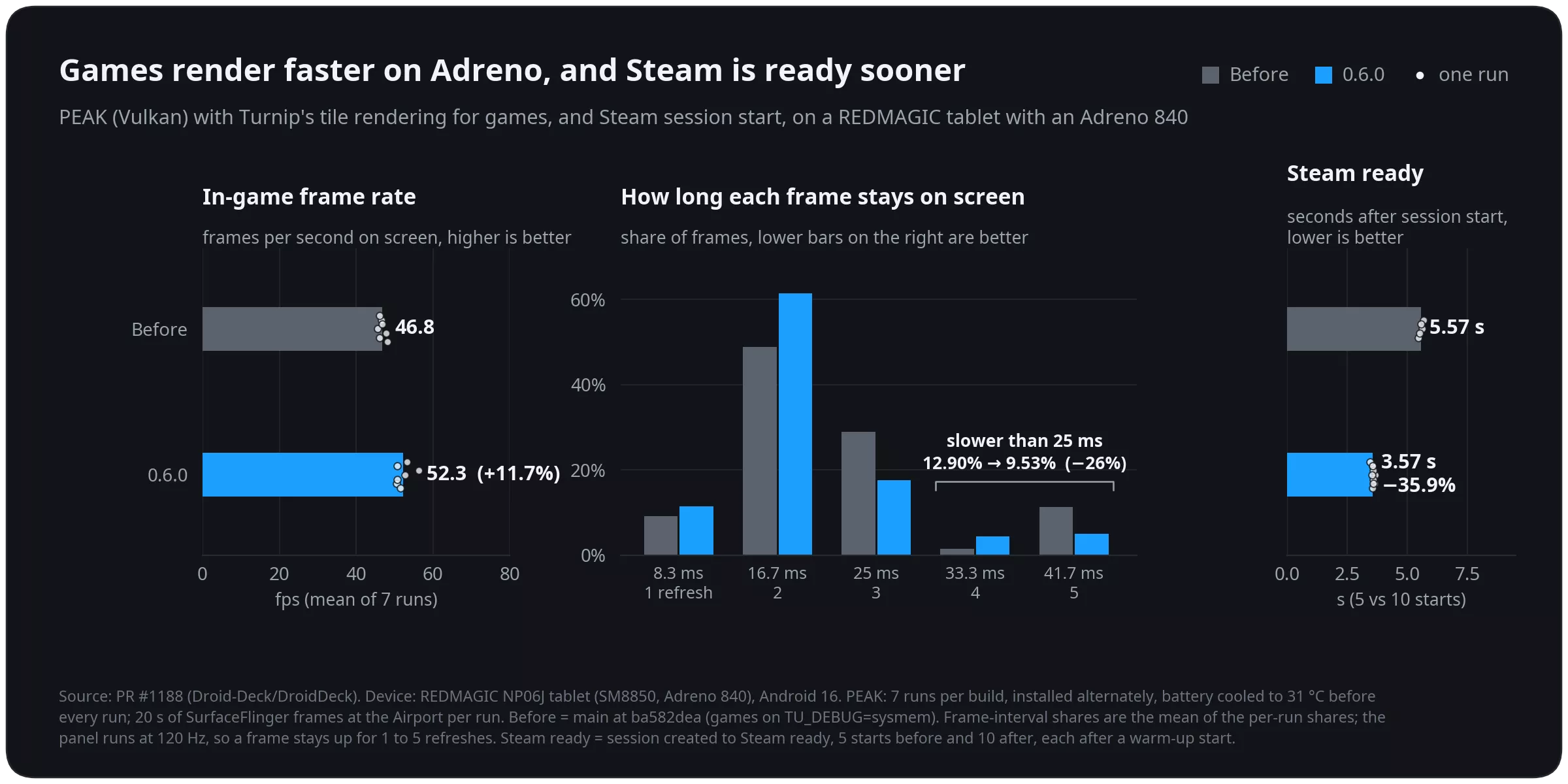
- Faster games and session starts on Adreno. Games now use Turnip's tile rendering while the Steam interface keeps system memory. In PEAK on an Adreno 840 tablet, the frame rate rose 11.7% and frames slower than 25 ms dropped by 26%. Steam is ready 35.9% sooner after a session starts (5.57 s to 3.57 s). (@maxjivi05, #1188)
- Faster game launches. Steam's install-script step is skipped once it has finished for a game. In testing, Moonlighter went from 10.5 s to 7.7 s from Play to the game window. FEX's file lookups skip proot, so Graveyard Keeper reaches its first scene 0.57 s sooner with 48% fewer proot stops. (@maxjivi05, #1273, #1283)
- Games on an SD card library load far faster. proot's fast path now names files and follows links inside a library the same way proot does, instead of handing every lookup back to proot. In testing, Red Dead Redemption 2's Story mode went from still loading after 16 minutes to the opening scene in about 2 minutes 10 seconds. (@maxjivi05, #1331)
- Less overhead from the performance overlay. gamescope's CPU use dropped from about 12.9% to 7.7% of a core with the overlay hidden, and a 60 fps game on a 120 Hz panel no longer gets extra composites while the overlay is shown. Wine's network queries also cost less. (@maxjivi05, #1272, #1274, #1275)
- The Steam client responds sooner: it paces itself to the panel's real refresh rate, and its interface sounds no longer queue about 112 ms of audio. The DirectAudio sink is now built from @The412Banner's DirectAudio source. (@maxjivi05, #1094)
- Reduced the APK size from 124.4 MB to 66.4 MB. (@xXJSONDeruloXx, #1198, #1204, #1265)
- Better battery life while a session is suspended. The device can now really sleep: every guest thread stops and the audio stream is stopped. Before, a Thor did not suspend once in 13 minutes. Steam downloads keep running with the Manual policy, including downloads to SD-card libraries, and a switched-off Steam Controller no longer wakes Bluetooth all night. (@xXJSONDeruloXx, @Detinator10, #1220, #1262, #1312)
- zRAM is always on where supported, and a session is paged out to zRAM before it is suspended, so Android is less likely to close it overnight. In testing, Bulletstorm's resident memory went from 1,886 MB to 318 MB while suspended, with the rest moved to zRAM. The zRAM setting has been removed. (@xXJSONDeruloXx, #1317)
- Sessions on an external display or DeX keep running while the phone's screen is off. (@maxjivi05, @xXJSONDeruloXx, #1211, #1320)
- Game cores now apply to games started with Linux x86 (FEX) too. (@coffeemeist3r, #1294)
- GPU drivers: Auto's picks come from a manifest in Drivers-CI, so a default can change without an app update. The Snapdragon SM8975 is recognized and Adreno 850 support is marked experimental. A trial driver that crashes at startup now rolls back automatically. (@xXJSONDeruloXx, @Danbro007, @ovurrsl, #977, #1249, #1031)
- The KDE desktop is updated to KWin 6.8.0. (@xXJSONDeruloXx, #1328, #1330)
- New sessions default to landscape, and the Deck controls open on both trackpads. (@xXJSONDeruloXx, #1287, #1295)
- Accessibility: buttons, tiles and list rows are announced as buttons by screen readers, the Electric theme's buttons meet WCAG contrast, and section headings are capitalized correctly in the app's language. (@ovurrsl, #891, #1149, #1145, #1148)
- Translations: Turkish covers every new screen, every language has the plural forms it needs, and English left in the translations is translated. New features in this release ship in all 32 languages. The KDE desktop's translations are now built as per-language packs, ready for a translated desktop. (@ovurrsl, @maxjivi05, @kingokksa, #989, #1102, #942)
- Building and testing DroidDeck yourself is easier: local builds find Java 17 installed with mise, reuse add-on packs a CI build installed, and tools/device-smoke.sh checks a build on a real device over plain adb. Session logs time each setup step to the millisecond. (@ugreg, @xXJSONDeruloXx, @ovurrsl, @maxjivi05, #1231, #1265, #911, #993, #1091, #1151)
Fixed
- Fixed Ubisoft games stopping with "Error at hooking API" (for example Immortals Fenyx Rising), and other programs that patch their own code under FEX. (@maxjivi05, #1163)
- Fixed Steam going back to sleep right after a long-paused session resumed. (@maxjivi05, #1162)
- Fixed controllers in Rewired (Unity) games such as Drova and Graveyard Keeper, and in Factorio's ARM64 build. (@Delete228, @maxjivi05, #1195, #1222, #1227)
- Fixed Linux games under FEX: games such as Stardew Valley start again, have sound, find OpenSSL 3 and reach FEXServer. CJK text shows in x86 apps such as the Epic Games Launcher, and clearing a game's compatibility tool in Steam keeps its Linux build. x86 Proton runs in the Steam runtime it requires. (@maxjivi05, @xXJSONDeruloXx, #1100, #1166, #1167, #1213, #1168, #1250, #1034)
- Fixed the x86-64 Steam client staying on a blank screen, asking for the password again and listing games twice. (@maxjivi05, #1096)
- Fixed garbled Chinese, Japanese and Korean text in Steam's interface. (@zooluis, @xXJSONDeruloXx, #1319)
- Fixed flicker and green flashes on Samsung One UI devices with a Snapdragon 8 Gen 2 (Galaxy S23 series, Tab S9). (@xXJSONDeruloXx, #1128)
- Fixed the GPU load reading 0% in the performance overlay on Adreno phones. (@angelrenefm, @xXJSONDeruloXx, #1326, #1327)
- Fixed gamescope running out of file handles in long sessions with lots of touch input. (@asdf17128, #1189)
- Fixed GOG games missing their registry entries, such as Fallout: New Vegas saying it is not installed, and the "already installed" markers of Windows redistributables never reaching the user registry. (@maxjivi05, @kaosjammo, #1159, #1286)
- Fixed a store game's first launch missing its cloud saves, and manual cloud-save Upload and Download reporting success when nothing was synced. (@maxjivi05, @ovurrsl, #1215, #1068)
- Fixed the on-screen pad covering Steam's keyboard and DroidDeck's PC keyboard. (@maxjivi05, @ovurrsl, #1217, #956, #1221)
- Fixed Steam touch layouts: third-party and added games load their own layout, layouts of non-Steam shortcuts such as the Epic Games Launcher can be edited and saved, and held controls stay pressed across action-set and layer changes. Labels with quotes no longer break the config. (@kingokksa, @maxjivi05, @ovurrsl, #1058, #1171, #1143, #1017)
- Fixed touch input: long-press right-click in Direct touch, the saved touch mode coming back when Steam Touch is turned off, and the touchpad cursor jumping after a two-finger scroll. (@xXJSONDeruloXx, @ovurrsl, #677, #1142)
- Fixed controller input: moving a stick no longer releases a held D-pad direction or trigger, Xiaomi HyperOS's virtual input device no longer takes player 1, and back-to-back reports to a Bluetooth Steam Controller are no longer dropped. (@ovurrsl, #1060, #954, #1032)
- Fixed Steam's "Steam Controller detected!" tour opening at every start, and the emulated Steam Controller looking out of date to Steam. (@xXJSONDeruloXx, #1321, #1323)
- Fixed SteamVR starting in a normal Steam session after a VR session had been used. (@xXJSONDeruloXx, #1137)
- Fixed adding games from an SD card, both a whole games folder and a single EXE, and adding a game whose folder sits inside another added game's folder. (@The412Banner, @maxjivi05, #1153, #1173, #1155)
- Fixed the games-folder scan hiding games such as Reach, Breach, Crashday and Observer, and Unreal Engine games being named "BootstrapPackagedGame". (@ovurrsl, @charan-rathore, #1023, #1020)
- Added games start sooner on large Steam libraries, and game files keep the full game name. (@ovurrsl, @maxjivi05, #994, #1230)
- Fixed a game's Components button opening the default profile instead of the game's own. (@jmarti326, #1146)
- Fixed desktop apps and emulators: RPCS3 opens from the emulator rail, RetroArch fills the screen, Chromium browsers start, browsers added as non-Steam games show their window, Flatpak apps open in the renamed app variants, user apps open at the Desktop's resolution, and programs that need an executable stack start. Apps started from the front end show their own cursor, and Steam shortcuts are kept out of the desktop's controls. (@maxjivi05, @Delete228, @xXJSONDeruloXx, #1191, #1194, #1280, #1243, #1192, #1172, #1208, #1154, #1318)
- Fixed store sign-in: GOG lets you sign in with a different account, and one failing image or script no longer replaces the Epic sign-in page with an SSL error. (@maxjivi05, #1235, #1238)
- Fixed the file manager: copy and move keep symbolic links, Cancel really stops a paste, a double tap no longer starts two pastes, selection follows the search filter, and a slow folder no longer replaces the one you moved to. (@ovurrsl, #1027, #1029, #1025, #1021, #1028)
- Fixed an interrupted desktop or package install breaking the Linux runtime, which used to need an app reinstall. (@xXJSONDeruloXx, #1078)
- A failed Steam client download now says your network or VPN may be blocking Steam and offers Retry, instead of silently ending the session. (@ovurrsl, #997)
- Fixed in-app updates on Android 9 and 10. (@ovurrsl, #1066)
- Fixed crashes with a full disk while fetching cover art and with an empty App ID in the game environment editor. (@ovurrsl, #1030, #1014)
- Fixed DirectAudio setup changing a game's audio choice during Steam's path queries and install scripts. (@xXJSONDeruloXx, #1044, #1046)
- Hidden and private Steam games no longer show on the Steam home art wall. (@xXJSONDeruloXx, #1097)
- Storage asks before bulk-removing unused components, and store search no longer reopens the keyboard when you scroll back up. (@ovurrsl, #1140, #1141)
- Moving a mouse no longer redraws the whole session overlay. (@maxjivi05, #1253)
Features
- Added SteamVR on Meta Quest 3 and 3S from the standard APK. Quest headsets are detected automatically and get their own driver defaults. Immersive SteamVR runs through a native OpenXR activity with headset tracking, Touch controllers and haptics, and SteamVR's dashboard and Steam library work in VR. (@xXJSONDeruloXx, @Jagger15, #642, #910, #733, #853, #905)
- Added experimental Meta Quest 2 support. (@Jagger15, #676)
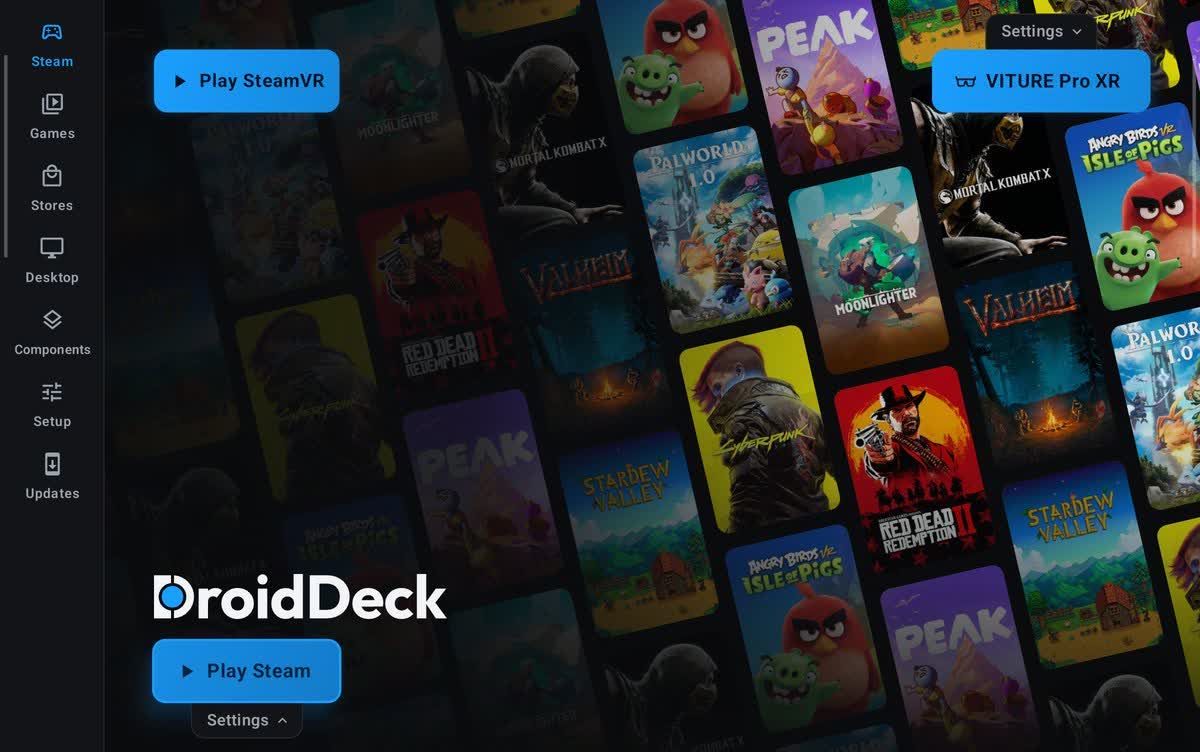
- Added XR glasses support for VITURE, RayNeo and XREAL. Games play straight on the glasses at their own refresh rate while the phone becomes the controller, and the glasses' refresh rate, 3D mode, brightness, volume and sunblock can be changed from the app or the session menu. Play SteamVR appears beside Play Steam when supported glasses are connected, with head tracking from the glasses. Joy-Cons work as SteamVR hands, and the phone's camera can track bare hands with Quest-style pinch gestures. Supports VITURE Pro XR, RayNeo Air and GT glasses, and XREAL 1S (experimental). Glasses with head tracking can also show a head-tracked virtual screen everywhere in DroidDeck, in its menus, desktop sessions and games, without starting SteamVR, set up from the new Setup → Smart glasses page. (@maxjivi05, @informalTechCode, #732, #907, #1035)
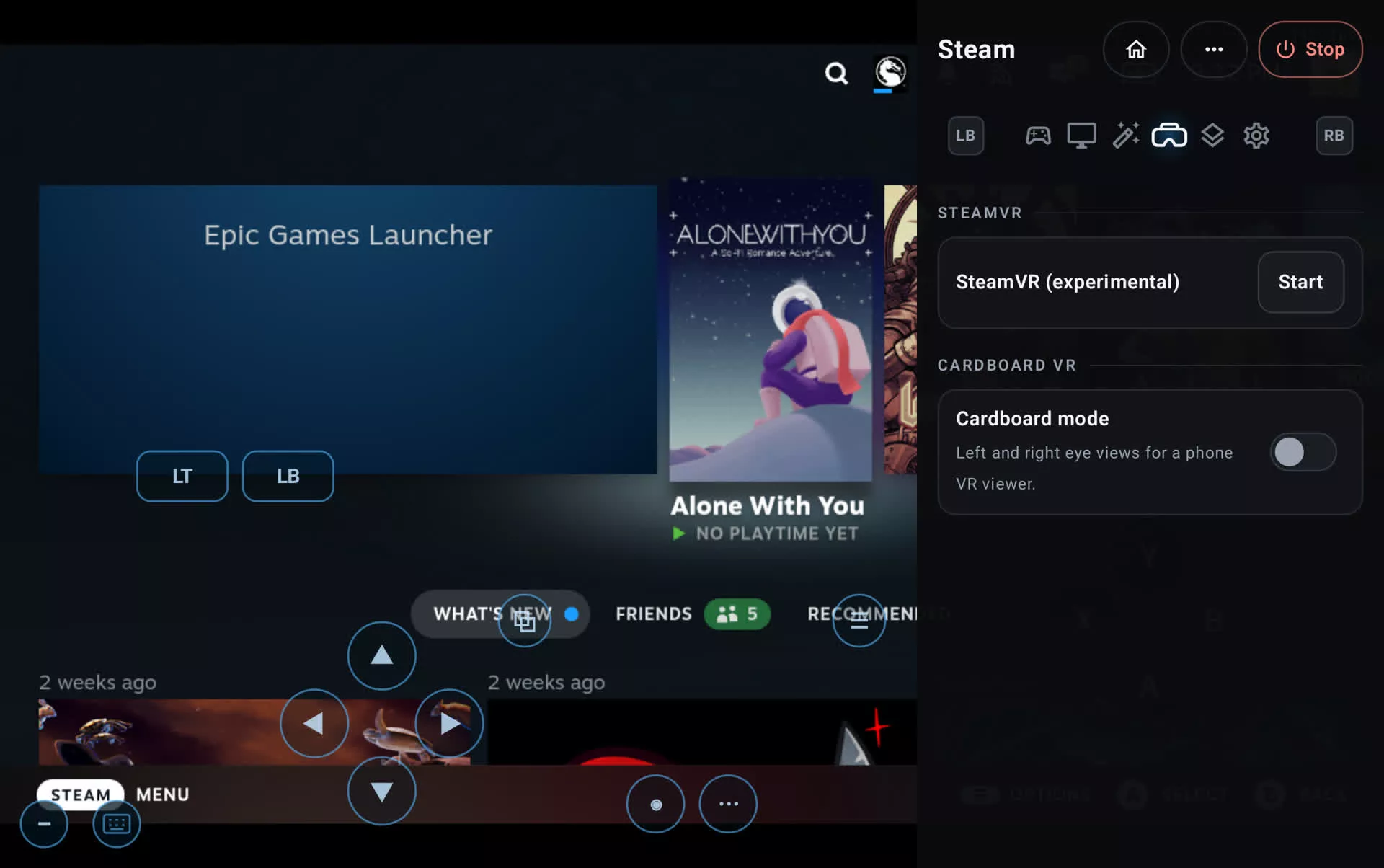
- Added Cardboard VR mode with Valve's ARM64 SteamVR, splitting the screen into two lens-corrected eyes with head tracking. Windows VR games such as Thumper and The Thrill of the Fight run through Proton. SteamVR and Cardboard share one VR tab in the session menu. (@xXJSONDeruloXx, #704, #959)
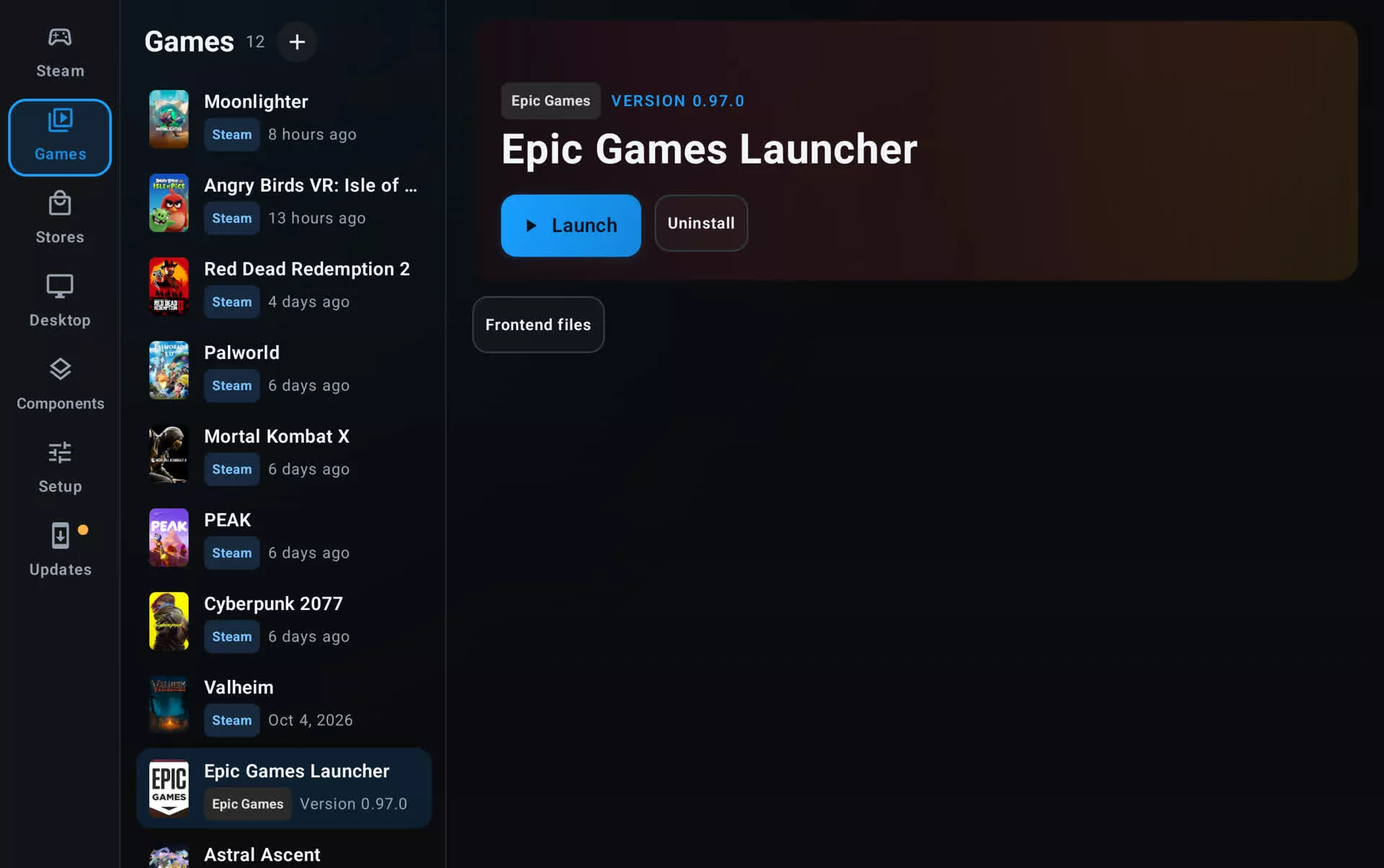
- Added Epic Games Launcher for Linux, Epic's own client, running under FEX and signed in automatically with your linked Epic account. Every Epic game now starts through Steam and the launcher, so games get the same sign-in and online services as on a PC, along with Steam Input and the performance overlay. The launcher can be driven with a gamepad or touch. Games installed from inside the launcher appear in the Games tab automatically, and your Steam games can be started from the launcher's library. (@maxjivi05, #928)
- Added an optional x86-64 Steam client: Valve's own Linux client, running under FEX beside the default ARM64 one. Choose it under Steam client in Steam settings; it applies at the next session. It has its own game library and shares your sign-in. Games with a Linux version, such as Team Fortress 2 and Half-Life, run their Linux builds on it, and Windows games use DroidDeck-Proton as before. New FEX builds reach it without an app update. (@The412Banner, #152, #1050, #1053)
- Linux games run under FEX out of the box. Proton Experimental ARM64, FEX and the Steam Linux Runtimes now download on the first Steam start instead of waiting as pending downloads. x86 Linux games start, keep running and take the controller under FEX, including Unity games, which used to crash or ignore the gamepad. Games that also have a Windows version stay on Proton by default, because the Windows build often runs better. To run a game's Linux build instead, choose Linux x86 (FEX) in its compatibility settings. (@maxjivi05, #1045)
- Store game pages now show HowLongToBeat times, Metacritic scores, developer, publisher and release date for GOG and Epic games, along with an achievements card with filters for unlocked, locked and hidden achievements. (@phobos665, @xXJSONDeruloXx, #641, #712, #775)
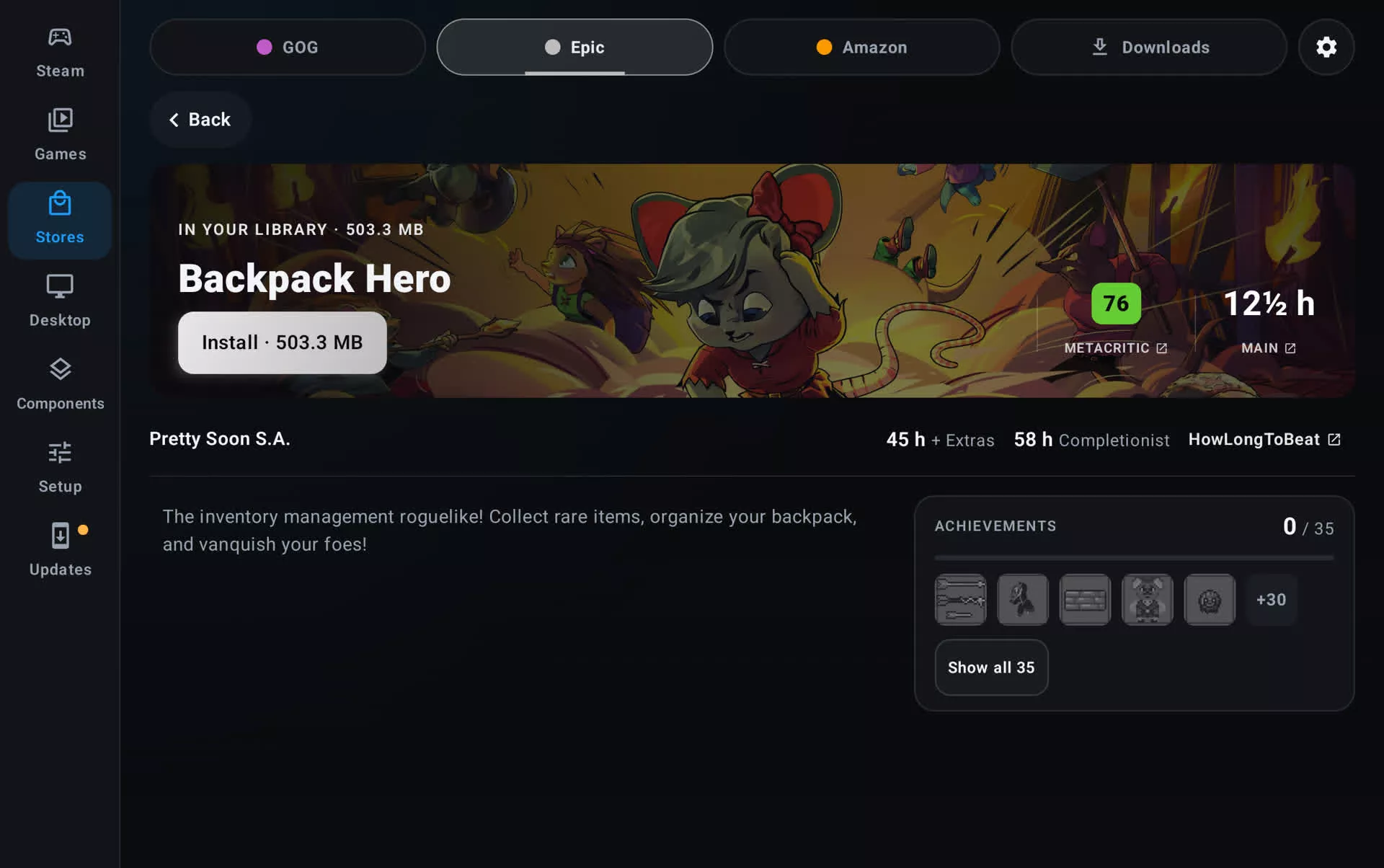
- Added opt-in GOG achievements syncing through Comet, with unlock notifications while you play. (@xXJSONDeruloXx, #651)
- Added sorting and a list view for the store Library and Installed tabs: sort by recently played, recently installed, title, size or release date, and switch between cards and a compact list. (@kingokksa, #798)
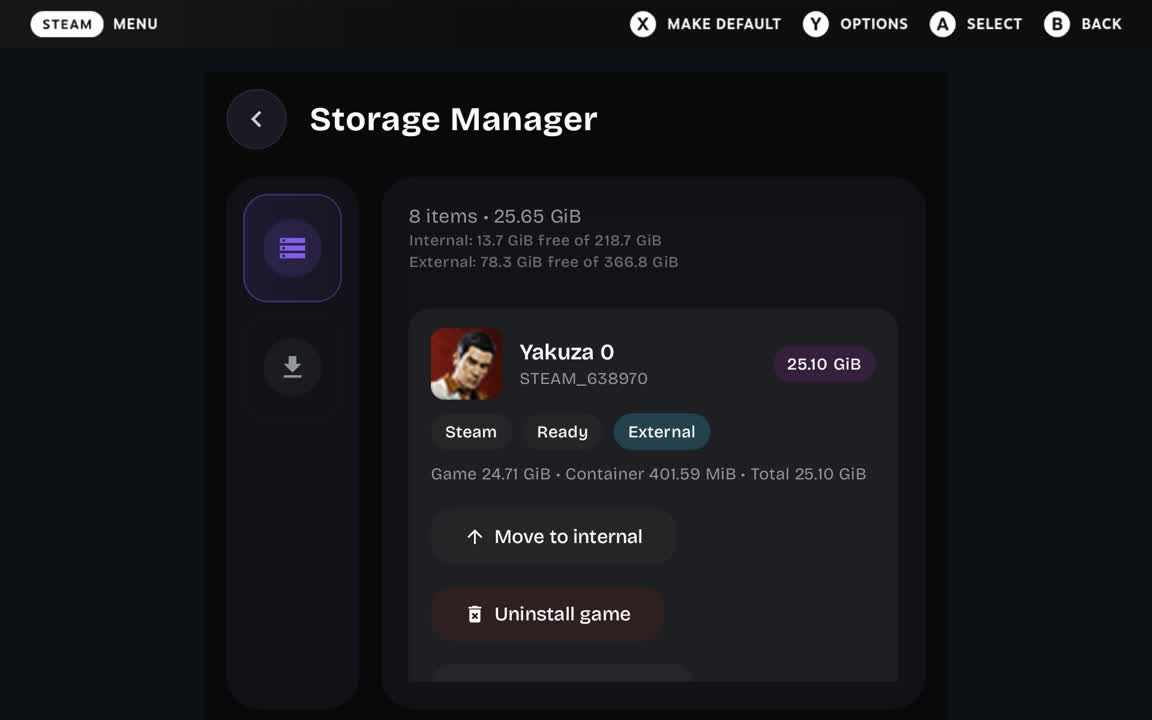
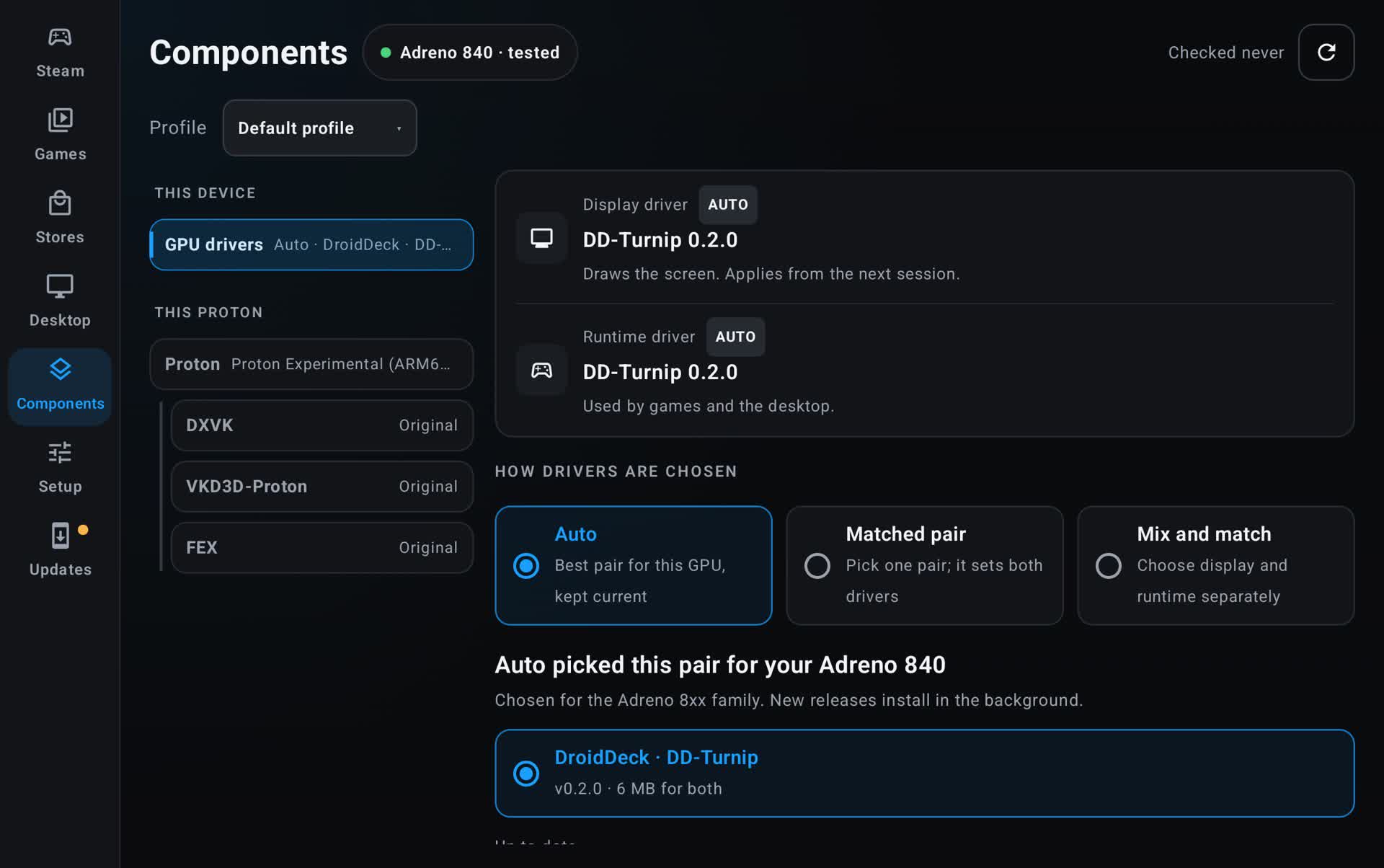
- Added a Storage page to Setup that shows where DroidDeck's storage goes and frees what is safe to remove: unused Steam runtimes, leftovers from uninstalled games, old logs, shader caches, unused components and Flatpak runtimes. Starting Steam with less than 10 GB free offers to free up space. (@xXJSONDeruloXx, #913)
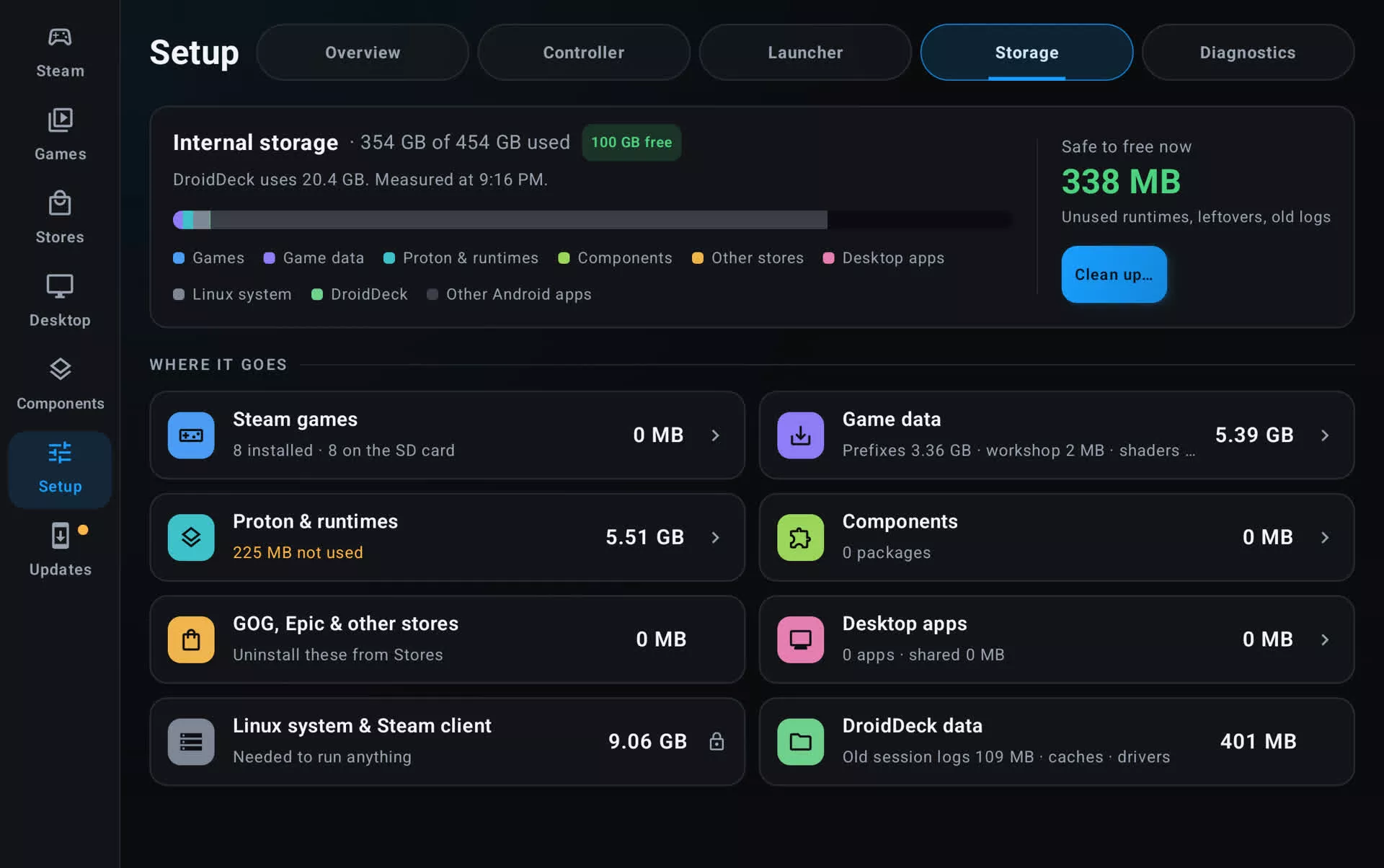
- Added artwork changing for Steam games and GOG, Epic and Amazon games, matching added games, with a SteamGridDB search in the art chooser. Adjust logo sets where a game's logo sits on its background and how big it is. Chosen art and logo positions are applied in Steam too. (@FX192, #876, #939, #948, #976, #1004)
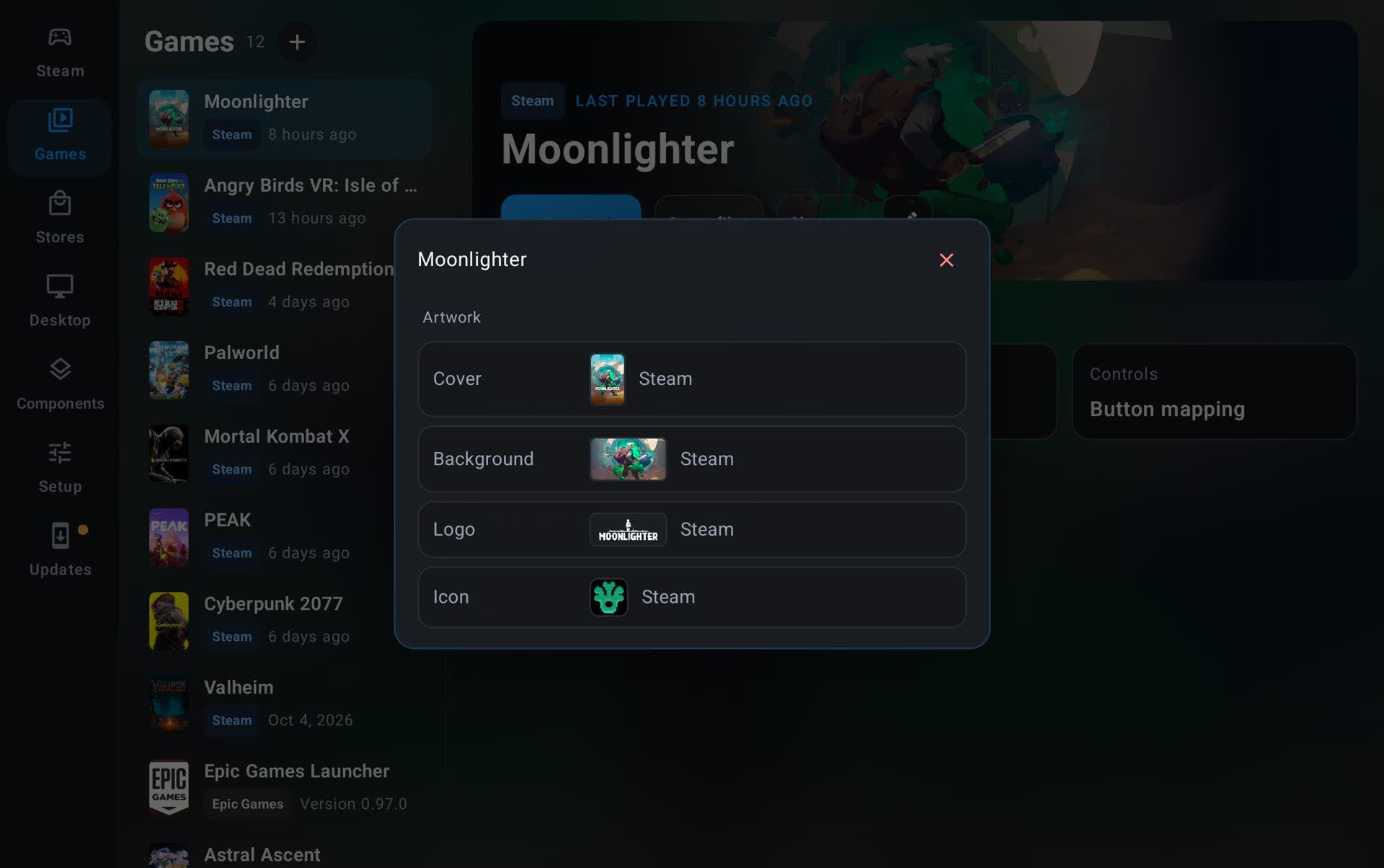
- Redesigned the GPU drivers page with three modes: Auto, Matched pair, or Mix and match display and runtime drivers. It also shows which drivers are in use now. Auto checks for new drivers when the app opens, and if a new pair never starts a session, it rolls back to the last pair that worked. (@xXJSONDeruloXx, #858, #972)
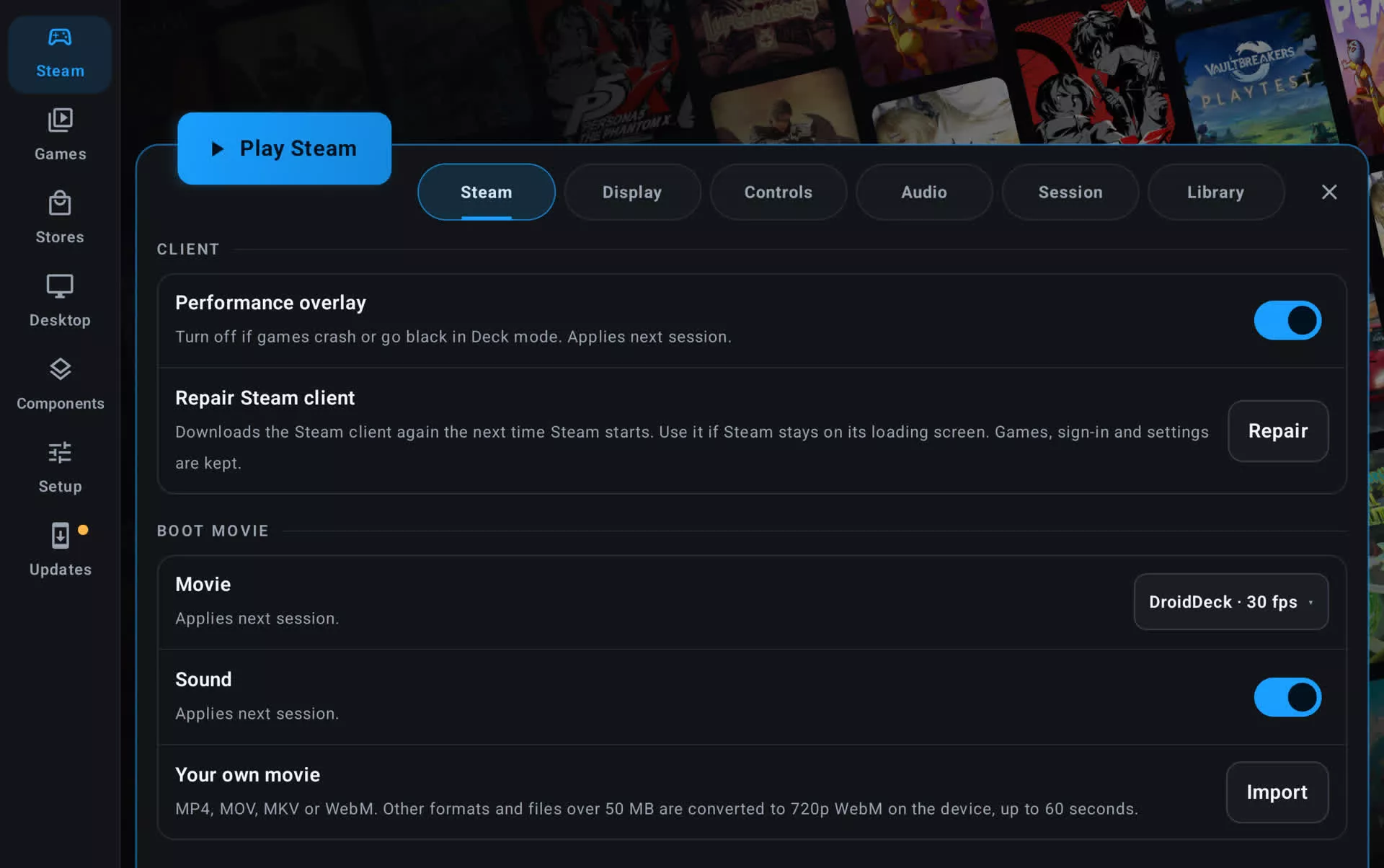
- Added Boot movie settings: the DroidDeck movie at 30 or 60 fps, with or without sound, or import your own video, which is converted on the device. (@xXJSONDeruloXx, #969)
- Added a per-game Start without Steam switch for games that close right away because of Proton's Steam setup. (@The412Banner, #659)
- Added Low-latency controller and Low-latency touch toggles to the session menu, which apply immediately while Steam is running. (@xXJSONDeruloXx, #808)
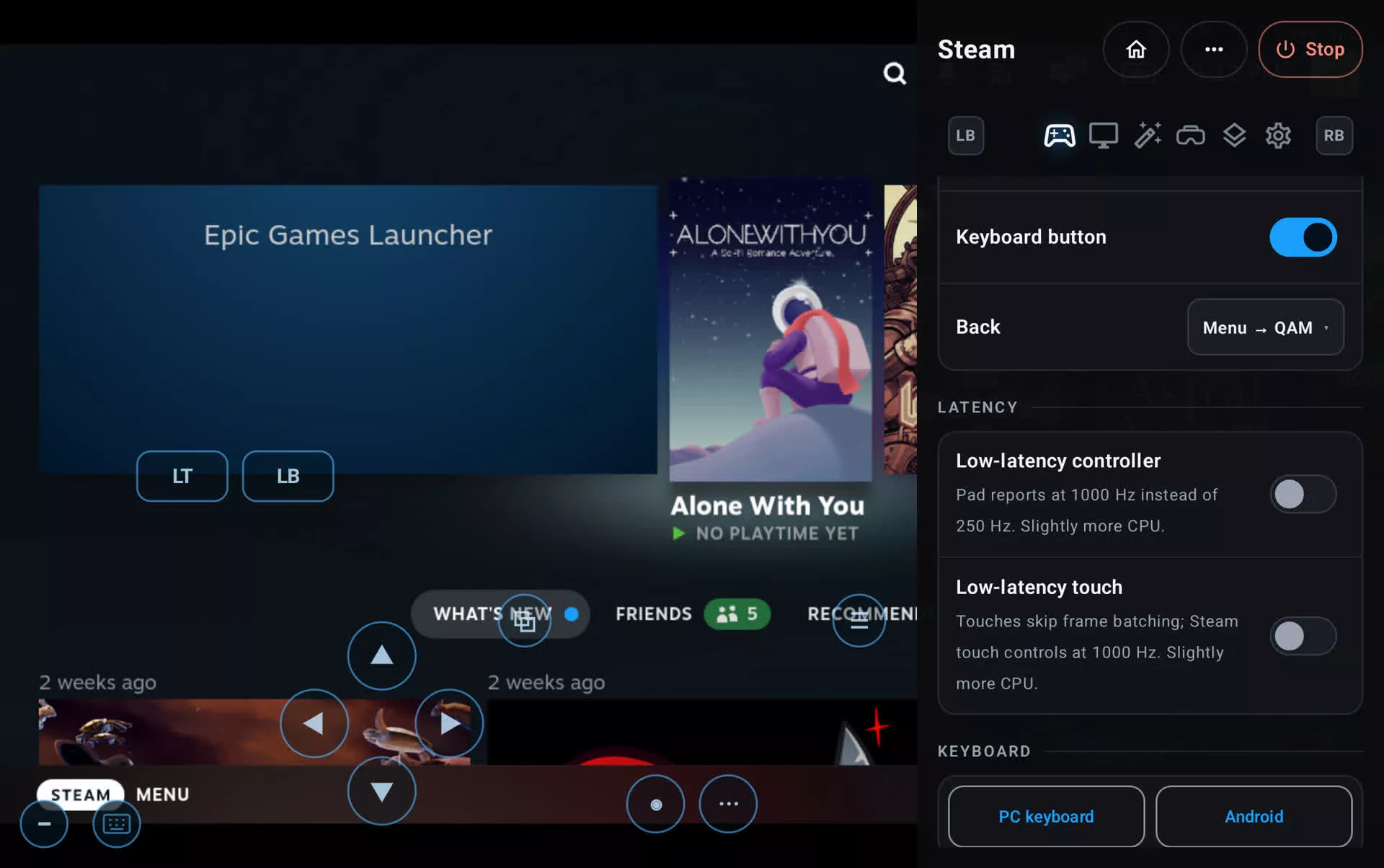
- A three-finger tap opens and closes Steam's on-screen keyboard in game. (@xXJSONDeruloXx, #782)
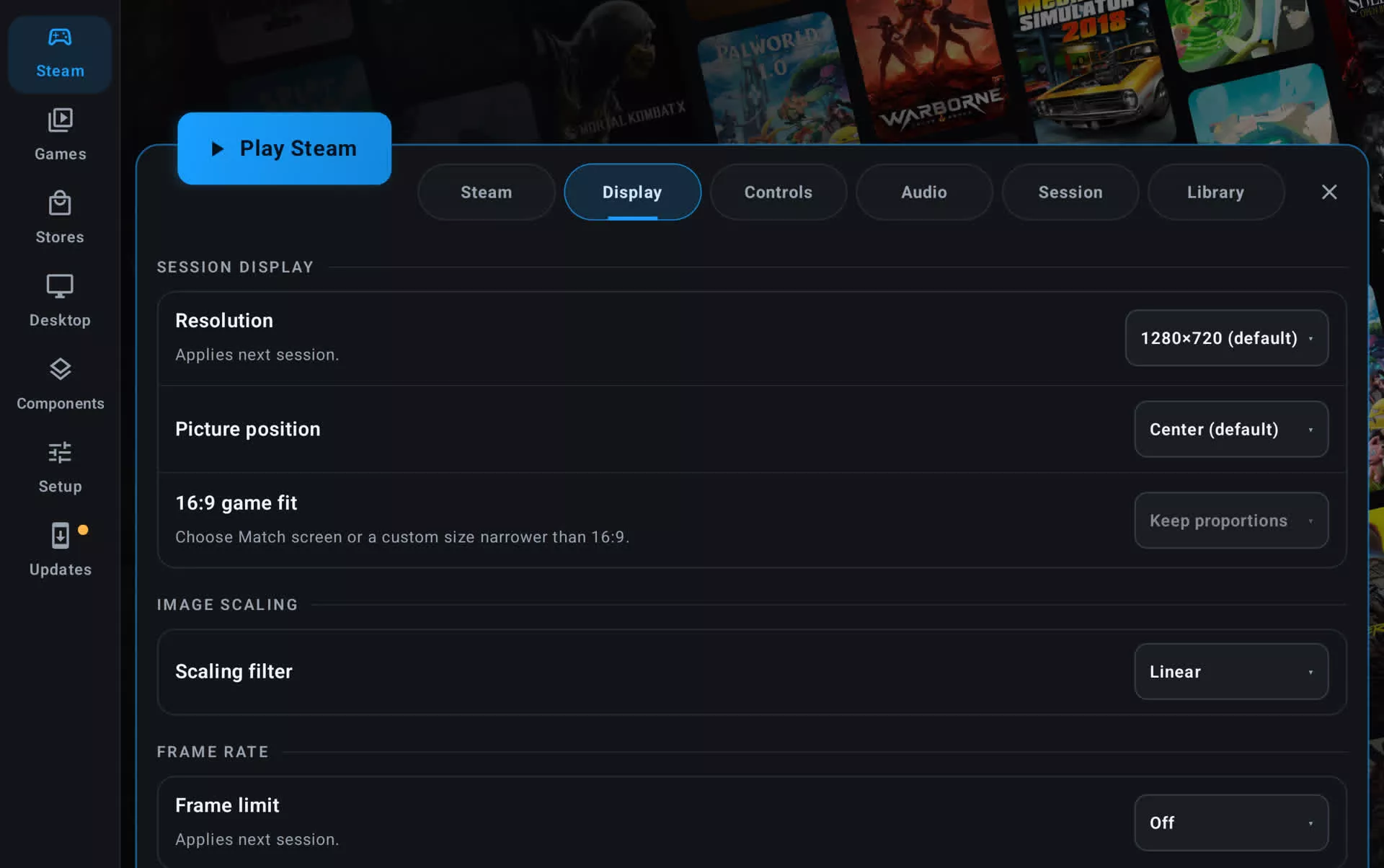
- Added Picture position (Top, Bottom or Center) for Steam sessions, so fixed-aspect games can sit away from on-screen controls on tall screens. (@asdf17128, #871)
- FEX, DXVK and VKD3D-Proton versions can be downloaded from the session menu. (@xXJSONDeruloXx, #679)
- Added opt-in zRAM compression for the Steam client while a game runs, freeing about 0.5 – 0.8 GB of memory in testing. (@maxjivi05, #442)
- Added 23 more languages, for 32 in total besides English, selectable in the app or in Android's per-app language settings. Steam follows the chosen language. (@maxjivi05, #669)
- Downloads now resume where they stopped and fall back to mirrors, with a download source setting that picks the fastest source automatically. This helps especially in mainland China. (@kingokksa, #623)
- Added Reset all settings in Setup > Diagnostics. It keeps your games, sign-ins and downloads. (@0x1Nawaf, #696)
- Store installs can go to internal storage, any SD card or your second library. (@maxjivi05, #928)
- Controllers with two back paddles (such as the 8BitDo Mobile Controller) map them to the Deck's L4 and R4. (@Vynex, #797)
- The second screen's Deck controls now include the Gamepad tab. On foldables, the unfolded controls hide while a controller is connected. (@ovurrsl, @Gustash, #895, #829)
- Added experimental Android Auto support. DroidDeck is only available while the car is parked, and needs Android Auto's developer mode with unknown sources enabled. (@zekena2, #952)
Improvements
- Rewrote the Epic and Amazon store modules, with byte-exact download verification and proper controller focus on store game pages. Existing sign-ins and installs carry over. (@The412Banner, #802, #804)
- Epic installs need far less free space. Files are assembled as they download instead of caching the whole game first, so a 71 GB game no longer needs about 142 GB free. Store installs also check for space first and recover better when they run short. (@jmarti326, #710)
- Fewer background processes. An idle Steam session went from about 41 processes to about 30, keeping it further under Android's child-process limit, and Steam's web helper uses about 250 MB less memory. (@xXJSONDeruloXx, #566, #575)
- Smoother frame pacing. The session respects Android's peak refresh rate setting, frames are timed to the display's vsync, Steam's frame limiter paces each game by time, and frame generation follows the game's real frame rate. On a 60 Hz Thor, distinct frames on screen rose from about 49.5 to 59.4 a second. (@xXJSONDeruloXx, #715, #717, #731, #753, #927)
- The game's busiest threads are boosted onto the prime cores on the Odin 3, and Snapdragon 8 Gen 2 devices get default core assignments for games and Steam. (@kmnkv1, @xXJSONDeruloXx, #682, #654)
- Games on SD-card libraries launch faster, about 46% faster in testing. (@xXJSONDeruloXx, #757)
- The Steam home wall now fills from your own Steam library, and the store sign-in screens show each store's featured art. (@xXJSONDeruloXx, #835, #878)
- Older and less common devices: sessions start on kernels that drop fork events (such as the Xiaomi Pad 5), Flatpak installs work on older kernels, the Linux runtime installs on 16 KB page-size devices, and USB drives that only appear as raw storage can be granted All files access. (@xXPOLYGONXx, @xXJSONDeruloXx, @ovurrsl, @Imgau, #457, #752, #900, #760)
- Controller-driven cursors now show in nested Wayland sessions. (@xXJSONDeruloXx, #759)
- An interrupted Linux runtime download resumes instead of starting again. (@ovurrsl, #847)
- Native Linux and FEX compatibility choices are kept instead of being reset to Proton. (@xXJSONDeruloXx, #749)
- DroidDeck-Proton releases now come from the Droid-Deck/DroidDeck-Proton repo. (@The412Banner, #875)
- Folding or unfolding no longer restarts the front end, file manager or store sign-in. (@ovurrsl, #832, #886)
- Session reports include the memory page size, why the app's last processes ended, the panel's refresh modes and the device's thermal state. Logs are synced to storage every 2 seconds, so a hard reset keeps them, and only the 3 newest session log folders are kept. (@ovurrsl, @kmnkv1, @xXJSONDeruloXx, #897, #513, #852, #990)
- The store sign-in page can no longer read local files. (@ovurrsl, #890)
- Expanded and refreshed translations, including Chinese, Japanese, Turkish, German, French, Spanish, Italian, Portuguese, Russian, Korean and Hungarian. Every language now has every string, including the new Storage, GPU drivers and artwork pages, and Latin American Spanish is complete. (@Dantalian-dev, @ovurrsl, @kingokksa, #539, #826, #849, #850, #884, #1013)
Fixed
- Fixed Android UI flickering during games on Adreno 740 devices such as the AYN Thor and Odin 2 Portal. (@xXJSONDeruloXx, #963)
- Fixed game rumble stopping after one second under Proton. (@TideGear, #938)
- Fixed Shut Down and Restart in Steam's power menu. Shut Down now ends the session, and Restart restarts the client. (@muazkadan, #629)
- Fixed the Quick Access button doing nothing when the pad is set to Xbox 360, DualShock 4 or DualSense. (@muazkadan, #631)
- Fixed store games becoming Steam installs when you also own them on Steam. (@xXJSONDeruloXx, #816)
- Fixed added games sometimes never starting on a cold launch with large Steam libraries. (@xXJSONDeruloXx, @ovurrsl, #758, #914, #973)
- Fixed games that never started after a long pause, and "Steam is paused" staying up after the first Resume tap. (@maxjivi05, #928)
- Fixed the session ending the third time Steam restarted, for example after changing language. (@KirkPatrickJunsay, #754)
- Fixed Steam touch controls ignoring the layout chosen in Steam, including community layouts. (@xXJSONDeruloXx, #840)
- Fixed Batman: Arkham City crashing at startup and getting stuck on "Running install script". (@TjebbeKerstens, #792, #793)
- Fixed .NET Desktop and .NET Core runtimes failing to install from Windows components, which blocked MelonLoader mods and Baldur's Gate 3. (@The412Banner, #740)
- Fixed the microphone in DirectAudio games. (@xXJSONDeruloXx, #747)
- Fixed FEX games failing with "Couldn't connect to FEXServer socket". (@angelrenefm, #841)
- Fixed wired PowerA and PDP Xbox controllers' right stick and triggers. (@Raidennrl, #692)
- Fixed touchpad taps not registering in some games, and the touchpad not moving a game's own cursor when it locks the pointer. (@KirkPatrickJunsay, @Gustash, #644, #772)
- Fixed native touch taps snapping the cursor to the top-left corner in some games. (@asdf17128, #803)
- Fixed the Android keyboard needing two taps to open after it was dismissed. (@KirkPatrickJunsay, #665)
- Fixed Shift staying held after typing capitals on a physical keyboard in the desktop. (@The412Banner, #766)
- Fixed an unfolded Follow screen session no longer turning to portrait. (@Gustash, #626)
- Fixed battery estimates showing thousands of hours on phones that report current in mA. (@muazkadan, #820)
- Fixed blurry home-screen shortcuts for Steam games. (@KirkPatrickJunsay, #825)
- Fixed SteamGridDB art staying "no match" after a failed lookup. (@FX192, #876)
- Fixed Steam crashes returning to the launcher silently. They now show DroidDeck's error screen, and Steam no longer crashes on Quest when a SteamVR runtime is installed. (@xXJSONDeruloXx, #905)
- Fixed the in-session achievements page staying on "Reading...". (@xXJSONDeruloXx, #961)
- Fixed crashes from failed store background jobs and cloud save recovery, and a memory error in the directory cache. (@KirkPatrickJunsay, @ovurrsl, @wallentx, #846, #898, #685)
- Fixed expired Epic and Amazon sign-ins failing with a generic error instead of asking you to sign in again. (@The412Banner, #804)
- Fixed the child-process limit check on Android 12, and its switch name now matches Android's wording. (@ovurrsl, #955, #848)
- Fixed the launcher offering its own display as a second screen. (@ovurrsl, #889)
- Fixed Windows component detection being confused by folder names above the game folder. (@xXJSONDeruloXx, #859)
- Fixed FEX dropdown scaling and Flathub search focus. (@xXJSONDeruloXx, #681)