
Months after launch, most current-gen graphics cards have finally reached MSRP levels. Both Nvidia and AMD have refreshed the mid-range, launching new mainstream cards outfitted with either 16GB or 8GB of VRAM, the latter of which should be avoided if you want to play at high resolutions or settings in the short-to-long term.
The RAM market, however, has swung in the opposite direction. DDR5 prices have surged in recent months, in some cases doubling compared to earlier this year, turning what used to be a low-friction upgrade into a notable expense – especially for users who were just looking for an affordable solution for web browsing with many open tabs, this can be a significant setback.
On the CPU front, AMD's Threadripper 9000 series has arrived, carving out a fresh pocket of performance headroom for professional video editors, and 3D artists building around multi-GPU workflows.
This edition of the TechSpot PC Buying Guide features five carefully assembled builds, tailored to different budgets and use cases. However, the ideal system for you may very well blend components from two or more of them.
The Utility Box $600
The Gaming Journey Starter $1,200
The Lean & Mean Gaming Machine $2,400
The Show-Off Machine $5,400
The Extreme Workstation $11,600
All recommendations are based on availability and pricing at the time of writing. If a component from the list you're considering is unavailable or becomes significantly more expensive, don't worry – we provide explanations for each choice so you can make informed alternative purchases.
The Utility Box
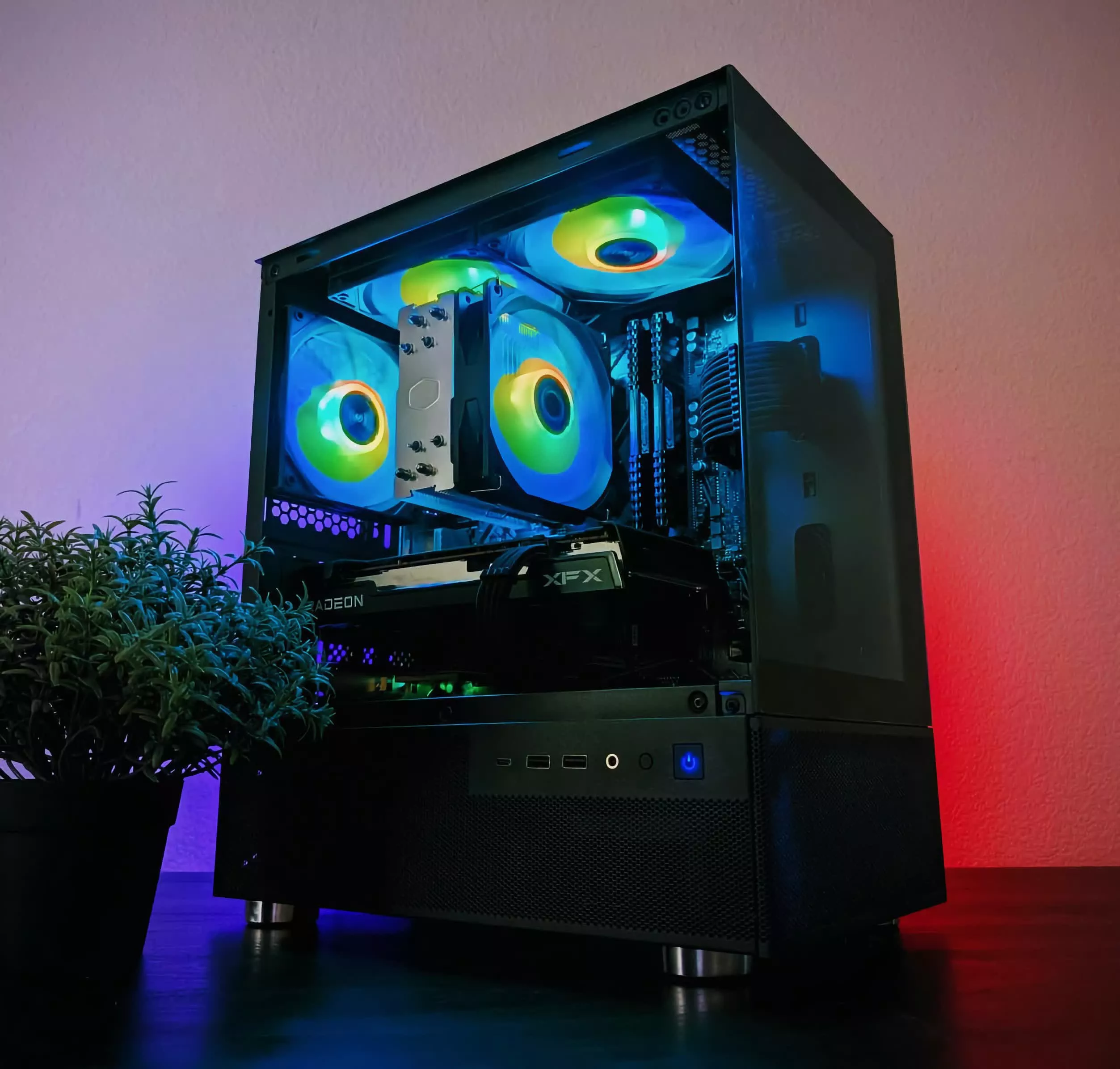
This system is well-suited for web browsing with dozens of open tabs, 1080p live streaming, and basic content creation. If you're not sure how you'll use your computer yet, this is a solid place to start. If you add a graphics card, it will become a perfectly good gaming machine.
| Component | Product | Price | |
| Processor | AMD Ryzen 5 7600 | $185 | |
| Motherboard | Asrock B850M Pro RS | $130 | |
| Memory | 32GB (2 x 16GB) DDR5-6000 CL36 | $120 | |
| Storage | Samsung 990 Evo Plus 1TB | $75 | |
| Graphics | Integrated / Radeon RX 9060 XT 8GB | $0 / $270 | |
| PSU | Thermaltake Smart 500W | $40 | |
| Case | NZXT H3 Flow | $60 | |
| Monitor, Keyboard & Mouse (see notes) | |||
|
Core System Total
|
$610 | ||
Image credit: Marketplace Build 28
Okinos Aqua 3 photo by MaydenAmerica
With AMD seemingly phasing out the graphically enhanced Ryzen 8000G series, we chose the Ryzen 5 7600, which works better with a separate graphics card. With a 65W TDP, it can be adequately cooled by the stock cooler in a well-ventilated case.
When relying on integrated graphics, it's also important to ensure the motherboard has both DisplayPort and HDMI ports for monitor compatibility. The Asrock B850M Pro RS also offers decent thermal performance, four memory slots, and three M.2 slots for storage.
If you plan to add a dedicated graphics card later, the $270 Radeon RX 9060 XT 8GB is your best option for high frame rates with lower resolutions and settings. If you prefer more eye candy, the Intel Arc B580 is a better purchase at $250 thanks to 12GB of VRAM.
Despite the current RAM price trend, we selected a 2 x 16GB kit of DDR5 memory for this system, as it still offers better value than 2 x 8GB kits and helps avoid an upgrade down the line. DDR5-6000 is the sweet spot for Zen 4 processors in terms of memory speed. If you compromise on latency, you can still find quality kits around $120.
To save a bit on storage, we went with the Samsung 990 Evo Plus, which delivers performance comparable to the Corsair MP600 Elite. While it's not among the very best SSDs on the market, it's close enough for most users. At the time of writing, the more advanced SK Hynix Platinum P41 was actually a few dollars cheaper, but we wouldn't count on it to remain so for long.
The Thermaltake Smart is our recommended budget PSU, offering 500W, 80 Plus efficiency, and a 5-year warranty. Since we're using an mATX motherboard, we opted for a compact mATX case – a full-size ATX case would look awkwardly empty without a graphics card. Around $60 you have several good options, but we chose the NZXT H3 Flow for its great ventilation and ease of use. If you prefer something flashier, check out the Okinos Aqua 3.
Monitor, Keyboard & Mouse
If you're considering this system, we assume you prioritize work comfort over gaming performance. The Dell S2725QS is a solid 4K, 120Hz option with height, tilt and swivel adjustment. More options for different budgets can be found in our best monitors feature.
The Razer DeathAdder Essential and Logitech Wave Keys is our recommended keyboard and mouse combo at this price point. For more options, see our recommended lists of top keyboards and mice.
The Gaming Journey Starter

This PC is designed for those looking to get the best gaming experience for their money in the latest games, while keeping plenty of upgrade options open for the future.
| Component | Product | Price | |
| Processor | AMD Ryzen 5 7600X | $177 | |
| CPU Cooler | Thermalright Burst Assassin 12 Evo | $26 | |
| Motherboard | Asrock B850 Pro RS | $190 | |
| Memory | 32GB (2 x 16GB) DDR5-6000 CL36 | $120 | |
| Storage | SK Hynix P41 Platinum 2TB | $150 | |
| Graphics | AMD Radeon RX 9060 XT 16GB | $350 | |
| PSU | Thermaltake Toughpower GX2 | $56 | |
| Case | NZXT H5 Flow (2024) | $85 | |
| Monitor, Keyboard & Mouse (see notes) | |||
|
Core System Total
|
$1,154 | ||
Image credit: First PC build
NZXT H5 Flow photo by avipoo
For this build, we chose the last-gen AMD Ryzen 5 7600X, as the newer Ryzen 5 9600X still doesn't justify the price difference, yet both run on the same AM5 platform which has plenty of longevity left. The full-size Asrock B850 Pro RS motherboard offers exceptional thermal performance for the price, and is capable of supporting a serious CPU upgrade down the line.
Our CPU of choice doesn't ship with a cooler, so you'll need to add one. However, you don't need a heavy cooler that hides half of the motherboard. A dual-fan, single tower cooler like the Thermalright Burst Assassin 120 Evo should be more than enough.
A 2 x 16GB DDR5 memory kit is great for modern games. The SK Hynix P41 Platinum is one of the best SSDs on the market, with bus-saturating PCIe 4.0 performance. For a desktop, it performs similarly to the WD Black SN850X or Samsung 990 Pro, but it was cheaper at the time of writing.
The AMD Radeon RX 9060 XT is the cheapest graphics card with 16GB of VRAM that we can recommend. If you want to maximize the system's performance per dollar, you can go with the Radeon 9070 for about $200 more.
The Thermaltake Toughpower GX2 is a high-quality basic PSU with ratings of 600W and 80 Plus Gold efficiency, and a 5-year warranty.
For the case, we selected the 2024 version of the NZXT H5 Flow, mostly because it was cheaper than other popular options, like the new Corsair 4000D RS. If you plan to put your PC on a desk, you may prefer a shorter case with bottom connectors like the NZXT H6 Flow. Our best cases guide includes more solid options for under $100.
Monitor, Keyboard & Mouse
The Radeon RX 9060 XT 16GB can handle 1440p gaming at 60 fps with high settings, or push 120 - 180 fps in less demanding titles or with reduced settings. The AOC Q27G40XMN enables you to take full advantage of this performance on a 27-inch Mini-LED display at a fair price.
Clearly, there are dozens of good monitor options you can choose from and that's why we have entire guides dedicated to monitor shopping and gaming monitors especifically.
The Razer DeathAdder V3 is a safe bet for a mouse, and so is the Corsair K65 Plus for a keyboard. Once again, our best mice and keyboards guides include more options for more specific needs and budgets.
The Lean & Mean Gaming Machine

This gaming PC build is for those who prioritize absolute performance and the latest features without completely disregarding value. With today's top-tier GPUs, gaming at 1440p and 4K becomes a seamless experience – and this build is designed to deliver exactly that.
| Component | Product | Price | |
| Processor | AMD Ryzen 7 7800X3D | $385 | |
| CPU Cooler | Thermalright Burst Assassin 120 Evo | $26 | |
| Motherboard | Asrock Phantom Gaming X870E Nova | $270 | |
| Memory | 32GB (2 x 16GB) DDR5-6000 CL30 | $140 | |
| Storage | WD Black SN850X 4TB | $275 | |
| Graphics | Nvidia GeForce RTX 5080 | $1,000 | |
| PSU | Be Quiet! Pure Power 13 M 1000W | $140 | |
| Case | Lian Li Lancool 217 | $120 | |
| Monitor, Keyboard & Mouse (see notes) | |||
|
Core System Total
|
$2,356 | ||
Image credit: 9800X3D 5800 VR Flight Sim Build
Lian Li Lancool 217 photo by TheUnclearReactor
The Ryzen 7 9800X3D is one of the best gaming processors money can buy, but the Ryzen 7 7800X3D isn't far behind and is $100 cheaper. Depending on the games you play and graphics settings, you may never notice a difference throughout the system's lifetime. It's also very efficient and can be cooled effectively with the same compact cooler recommended in the previous build.
For a motherboard, we chose the Asrock Phantom Gaming X870E Nova for its five M.2 slots and chart-topping thermal performance. At this price point, we can afford to spend a bit more on lower-latency RAM, which can help a little bit in CPU-bound games. We also chose a 4TB SSD, so you won't need to worry about a storage upgrade for a while.
The Nvidia RTX 5080 is the most expensive graphics card we can recommend to a gamer who cares about money at all. If you don't want to pay that much, you can save good money with the RTX 5070 Ti.
The Be Quiet! Pure Power 13 M delivers a kilowatt of power with 80 Plus Gold efficiency, a 10-year warranty, fully modular cables, and a native 16-pin GPU connector – a must-have for modern high-end graphics cards. Equivalent options from MSI, Corsair and NZXT are also available.
The Lian Li Lancool 217 doesn't just look great, but will also make sure that the system remains cool with two front 170mm fans. Again, our best cases guide includes more good options.
Monitor, Keyboard & Mouse
The Asus ROG Swift PG32UCDM is arguably the best 4K OLED gaming monitor for most, but if you want to play competitively at 480Hz (a niche use case), the Asus ROG Swift Pro PG32UCDP will serve you better with its 1080p mode.
Ultimately, the best gaming monitor for you depends on the types of games you play, so if you are looking for specific features, we suggest that you simply read our best gaming monitors guide.
The wireless Razer Deathadder V4 Pro offers the best sensor on the market and great battery life. Similarly, the Razer Hunstman V3 Pro keyboard uses analog optical switches with an adjustable actuation point. Our best mice and keyboard guides include more options.
The Show-Off Machine

If you have more money than you need, you can either donate to charity and medical research, or build a computer with all of the best parts for the home market. If you choose what we thought you would, then here is the build for you.
| Component | Product | Price | |
| Processor | AMD Ryzen 9 9950X3D | $650 | |
| CPU Cooler | Arctic Freezer III Pro 420 | $103 | |
| Motherboard | Asus ROG Strix X870E-E Gaming WiFi | $454 | |
| Memory | 64GB (2 x 32GB) DDR5-6400 CL32 | $300 | |
| Storage | Samsung 9100 Pro 8TB | $901 | |
| Graphics | Nvidia GeForce RTX 5090 | $2,500 | |
| PSU | Be Quiet! Straight Power 12 1200W | $233 | |
| Case | HAVN HS 420 | $230 | |
| Monitor, Keyboard & Mouse (see notes) | |||
|
Core System Total
|
$5,371 | ||
Image credit: Clean Blue Nova
HAVN HS420 ATX case photo by dozeman
The AMD Ryzen 9 9950X3D is basically a 9800X3D and a 9800X on the same die, making it perfect for gaming at high frame rates, livestreaming at 4K, or even both at the same time. This CPU isn't particularly efficient, but we aren't going to settle for an ugly chunk of metal to keep it cool. Instead, we chose the Arctic Freezer III Pro 420, with three 14mm fans.
The Asus ROG Strix X870E-E Gaming WiFi offers PCIe 5.0 for three M.2 drives, and more USB ports than you'll need. We chose a 2 x 32GB memory kit, so you won't need to upgrade any time soon. With Zen 5, 6400MHz is the new 6000MHz, and CL32 is the new CL30.
The Nvidia RTX 5090 is the only option for this kind of build. If you shop around, you may find it at its MSRP.
PCIe 5.0 SSD drives start making sense at high capacities, as they drop to PCIe 4.0-like speeds when you fill a large portion of the drive at once. The 8TB option set the Samsung 9100 apart from its competition.
As with other parts, we chose to pay a premium for the 80 Plus Platinum-rated Be Quiet! Straight Power 12. If you really want to go to the extreme, the 80 Plus Titanium-rated Dark Power Pro 13 is for you. The HAVN HS 420 chassis combines a unique look with great cooling capabilities. As always, our best cases guide includes more options.
Monitor, Keyboard & Mouse
If you buy this system, we suspect that you want input devices that aren't just well-performing but also somewhat unique. This is why we are suggesting the Corsair Scimitar Elite Wireless SE mouse and the Wooting 80HE magnetic analog keyboard.
Similarly, we have the perfect monitor for you: the LG 45GX950A has the same vertical resolution as a 4K monitor, and can fill your entire field of view when you sit at the right distance.
The Extreme Workstation

This machine is ideal for demanding workloads – from 4K video rendering to all kinds of 3D modeling. When paired with a high-end GPU, it also delivers gaming performance on par with the best gaming rigs. While not cheap, can save you a lot of work time compared to a consumer-level PC.
| Component | Product | Price | |
| Processor | AMD Ryzen Threadripper 9970X | $2,499 | |
| CPU Cooler | Noctua NH-U14S TR5-SP6 | $192 | |
| Motherboard | Gigabyte TRX50 Aero D | $620 | |
| Memory | 128GB (4 x 32GB) R-DIMM DDR5-6400 CL32 | $900 | |
| Storage | 2 x Samsung 9100 Pro 8TB | $1,803 | |
| Graphics | 2 x Nvidia GeForce RTX 5090 | $5,000 | |
| PSU | Be Quiet! Dark Power Pro 13 1600W | $450 | |
| Case | Antec Flux Pro | $179 | |
| Monitor, Keyboard & Mouse (see notes) | |||
|
Core System Total
|
$11,643 | ||
Image credit: Albion's Dream by Javera
If you aren't sure which of the new AMD Threadrippers to get, we suggest the Ryzen 9970X, with four 8-core CCDs that can run at high clock speeds even when fully utilized. For prolonged core-heavy workloads, we recommend air coolers like the Noctua NH-U14S TR5-SP6.
We went with the Gigabyte TRX50 Aero D motherboard, simply because its heatsink design leaves enough room for massive air coolers. With a quad-channel memory controller, a 4-module kit of ECC-registered RAM is a must-have.
If your work involves creating copies of huge files, the ideal setup for you is two PCIe 5.0 drives. If you need 8TB per drive, the Samsung 9100 Pro is your best option.
One of the main reasons to choose a Threadripper is when no single GPU is enough for you. Choosing the best graphics card for this system depends heavily on the software you use.
We recommend searching for specific benchmarks relevant to your workflows. In rare cases (Siemens NX is a prime example), professional RTX A-series and Radeon Pro graphics cards may justify their price with certain ease. As a default, we chose two RTX 5090s.
To power this monstrosity, we chose the 80 Plus Titanium-rated Be Quiet! Dark Power Pro 13, which wasn't more expensive than 80 Plus Platinum-rated units at the same capacity.
For the case, we chose the Antec Flux Pro, which can keep this system cool while still looking professional. As always, our best cases guide includes more options.
Monitor, Keyboard & Mouse
Some of the most comfortable and accurate peripherals we've tested include the Logitech MX Master 3S mouse, which is being replaced by the MX Master 4, and Keychron Q1 HE keyboard.
As with storage, your monitor choice depends on your specific needs. If you want to view 3D models in fine detail, the Dell UltraSharp U3225QE is an excellent option with its wide-gamut, 4K IPS panel.
For 4K video editing, the higher-end Asus ProArt PA32UCDM uses an OLED panel with exceptional contrast and qualifies for HDR 400 True Black. It also features a true 10-bit panel, capable of displaying a color range few other monitors can match.