

EasyBCD extends and revamps the Windows BCD bootloader. Setting up and configuring a dual-boot between Windows 11, Windows 10, Windows 8, Windows 7, Windows Vista, older versions of Windows such as XP & 2003, Linux, Ubuntu, BSD, and macOS is a breeze. You just point and click and EasyBCD does the rest.
Is EasyBCD suitable for UEFI / GPT systems?
EasyBCD primarily manages the Windows Boot Manager (BOOTMGR) and supports editing BCD on UEFI systems. It is not itself a boot manager; it configures what Windows boot manager will load. For EFI-specific tasks, tools like EasyUEFI are often recommended.
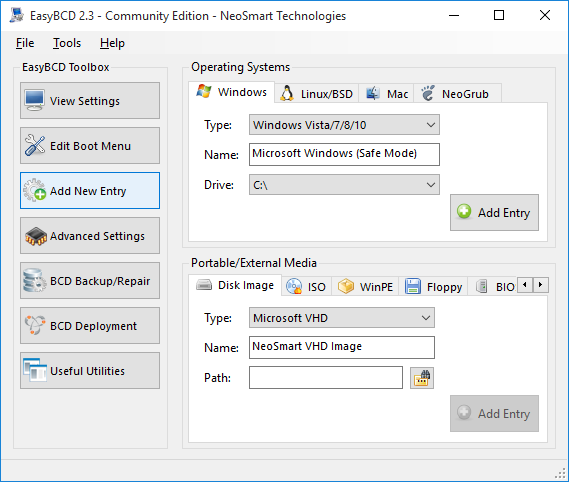
Can I add Linux or macOS entries in the Windows boot menu via EasyBCD?
Yes. For Linux, you can add an entry, select GRUB2, and point to the correct partition – then reboot and chainload GRUB properly. macOS is chainloaded via the Darwin bootloader in a similar fashion.
What should I do if the boot menu entries disappear after an OS switch?
This can happen if EasyBCD's changes get overwritten by another OS or bootloader. A good solution is to use the "Reset BCD Configuration" and then rebuild or recreate the boot menu entries. In persistent cases, repairing the BCD using Windows recovery media and then reconfiguring in EasyBCD often works.
How do I restore a broken or corrupted bootloader caused by EasyBCD edits?
Use a Windows installation or recovery disc (preferably matching your Windows version) to run a startup repair or command-line repair. Common commands include bootrec /fixmbr, bootrec /fixboot, and bootsect /nt60 C: /mbr, followed by rebuilding the BCD from EasyBCD.
What precautions should I take before using EasyBCD?
It's important to back up your BCD before making changes and ensure you're using a version compatible with your OS. Misconfigured entries or advanced tweaks can render the system unbootable.
Features
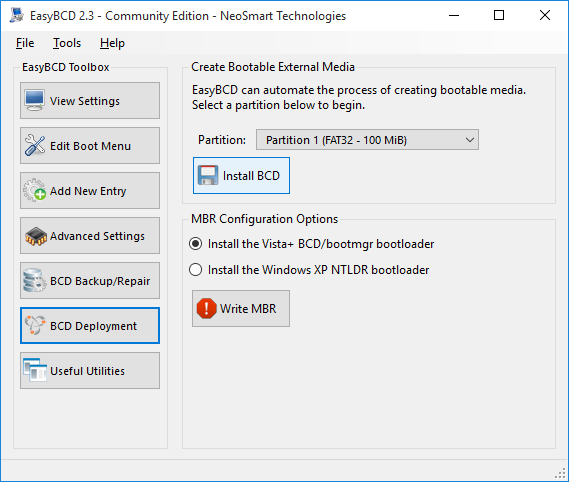
EasyBCD is geared for users of all kinds. Whether you just want to add an entry to your old XP partition or want to create a duplicate for testing purposes; if you're interested in debugging the Windows Kernel or septuple-booting your seven test operating systems, EasyBCD is the key.
- Boot anything. Windows, Linux, Mac, & BSD. Boot both from and into USB drives, ISO images, virtual disks, and more.
- Boot anywhere. Create bootable USB sticks with repair utilities that you can take with you anywhere.
- Protect against disaster. Create entries to boot into recovery utilities or safe mode to prepare for a rainy day.
- Painless editing. Add, rename, remove, configure, and reorder entries at whim.
- Solve difficult problems. Use EasyBCD to troubleshoot Windows, back up and repair the bootloader, and more.
- Powerful scripting with NeoGrub. You'll have the power to hide partitions, change active flags, and create complex boot scenarios.
What's New
- [EBCD-562] - Fixed: bcdboot parameters in RepairBootDrive call
- [EBCD-566] - Fixed:/NLT crashes on malformed XML translation files
- [EBCD-578] - Fixed: partitions with 64-bit extensions are not supported
- [EBCD-564] - Fixed: Detect
- [EBCD-572] - Fixed: Statusbar height shrinks when blank under Windows 10
- [EBCD-568] - New: Add autocompletion to all path textboxes
- [EBCD-571] - New: Add Ability to turn on/off hypervisor state for entries
- [EBCD-565] - New: Verify destination of "change boot partition" is at least 75 MiB
- [EBCD-561] - Include Bulgarian in BCD/BOOTMGR locale list
- [EBCD-567] - Include XML validity checks as part of build process
- [EBCD-573] - Custom SWF high-DPI support in EasyBCD
- [EBCD-574] - High-DPI support in EasyBCD setup
- [EBCD-564] - Do not repeatedly apply existing settings when modifying entry attribute
