

From drafting documents to exploring creative ideas, Gemini is always just a shortcut away-ready to help right where you are so you never break your flow. Built for how you actually work on desktop. Explore how Gemini helps you tackle everyday projects across Windows and macOS.
With our new native desktop experience, you can share anything on your screen with Gemini to get help with exactly what you're looking at, including local files. If you're reviewing a complex chart, you can share your window and ask, 'What are the three biggest takeaways here?' to get an instant summary. This brings powerful context to your creative work as well.
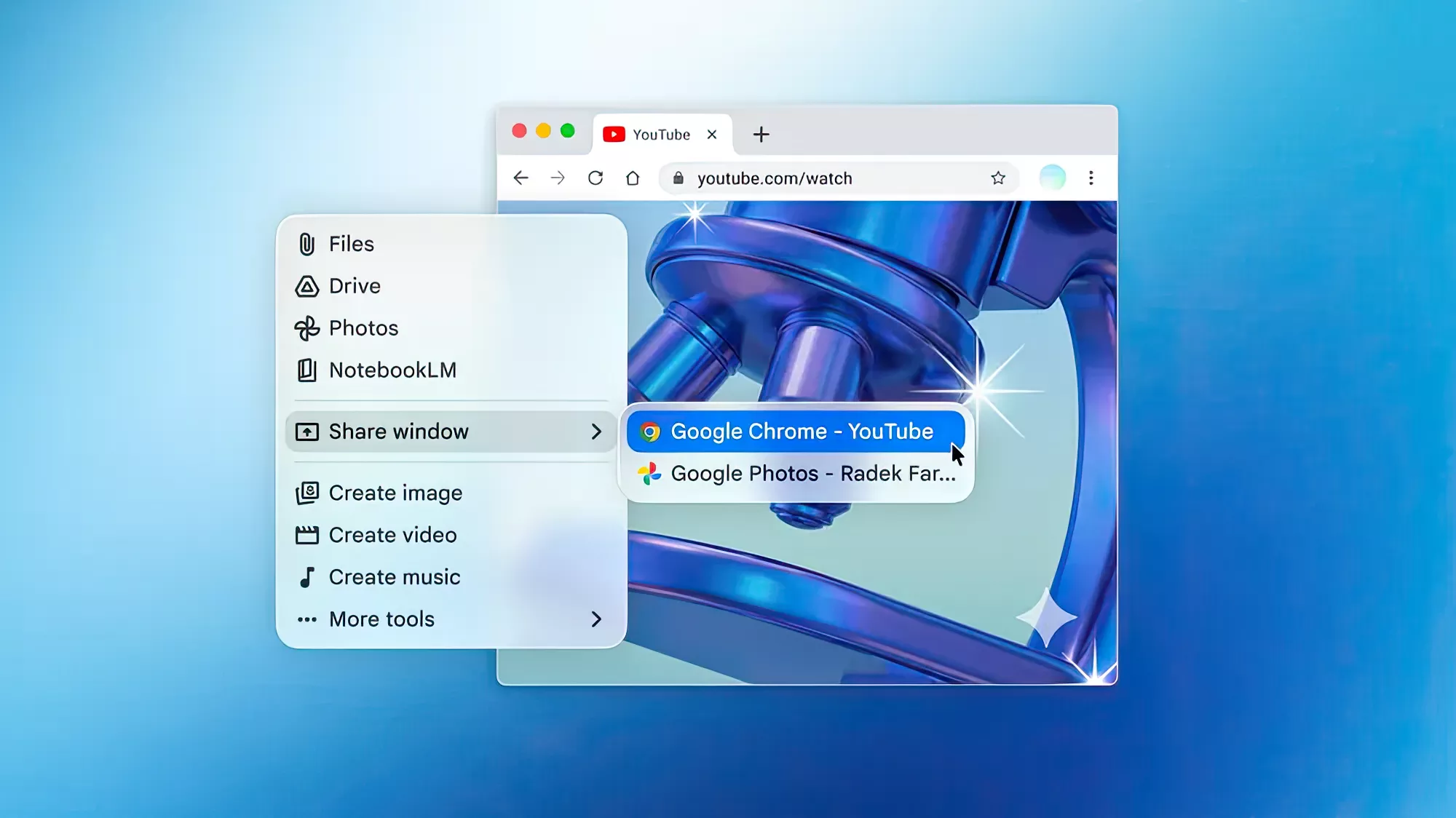
Help right where you need it. Gemini can jump in when you need a hand. Share your window to get instant contextual help based on what you're looking at.
Features
One shortcut to answers
Press Alt + Space on Windows or Option + Space on Mac to summon Gemini over your active work. Ask questions, verify facts, or draft text, then jump right back into what you were doing.
Your most complex to-dos, done
Hand off multi-step research, planning, and synthesis to Gemini Spark, your 24/7 personal AI agent. It operates autonomously, but always under your direction
Connected to your everyday Google apps
Pull information across Gmail, Google Drive, Docs, and Calendar directly into your desktop workflow. Ask Gemini to find details buried in email threads, summarize shared documents, or cross-reference meeting notes
Creativity for your desktop
Bring creative concepts to life in a dedicated desktop workspace. Generate custom images with Nano Banana and direct high-quality video creation with Gemini Omni, ready whenever inspiration strikes
Helpful tips for your busiest days
Discover new ways to get things done on desktop. Explore additional features available today on macOS, with more coming to Windows over time.
What is Gemini?
Gemini is an interface to a multimodal LLM (handling text, audio, images and more). Gemini is based on Google's cutting-edge research in LLMs, which began with the Word2Vec paper in 2013 that proposed novel model architectures that mapped words as mathematical concepts, followed by the introduction of a neural conversational model in 2015. This framework demonstrated how models could predict the next sentence in a conversation based on the previous sentence or sentences, leading to more natural conversational experiences. This was followed by our breakthrough work on Transformer in 2017 and multi-turn chat capabilities in 2020, which demonstrated even more compelling generative language progress.
We initially launched Gemini (then called Bard) as an experiment in March 2023 in accordance with our AI Principles. Since then, users have turned to Gemini to write compelling emails, debug tricky coding problems, brainstorm ideas for upcoming events, get help learning difficult concepts, and so much more. Today, Gemini is a versatile AI tool that can help you in many ways. We already see Gemini helping people be more productive, more creative, and more curious and we add new functionality and innovations regularly.
Is Gemini available for my country?
The Gemini desktop app is available in all languages and countries where Gemini app is supported.
- Windows: Runs on Windows 10 or later (x64 and Arm64).
- macOS: Runs on Apple Silicon MacBooks and requires macOS Sequoia (15.0) or later.
Feature availability varies.
How can I access the Gemini app for Mac?
There are several quick ways to access Gemini on your desktop:
Windows:
- Customizable shortcut: Press Alt + Space to summon Gemini instantly from anywhere.
- Taskbar & System Tray: Launch the app from the Windows Taskbar or click the Gemini icon located in your system tray.
macOS:
- Customizable shortcuts: Press Option + Space to open the mini chat, or Option + Shift + Space for the full chat experience.
- Menu bar & Dock: Select the Gemini icon located in the menu bar at the top of your screen, or click its icon in the Mac Dock.
How can I share my screen's context with Gemini?
To give Gemini context about your current work:
- Click the Add files and tools in the Gemini app.
- Select Share window.
- Choose the specific window you want to share.
Gemini will use what's visible on your screen to tailor its answers. To let it read full pages in the browser, go to your Mac's System Settings > Privacy & Security and enable Accessibility for Gemini.
Can I use the same account across web, desktop and mobile?
Yes! As long as you are signed into the same Google account, your chat history and memory will sync across all devices.
What's New
Today, we're launching the Gemini app for Windows. Designed to work seamlessly alongside your favorite tools and daily applications, the new desktop app gives you instant assistance without breaking your flow.
Here are three ways you can use the Gemini app on your PC:
Access Gemini instantly with a keyboard shortcut.
Press Alt + Space on your PC at any time to open Gemini over your active work. Whether you need a quick fact-check on a document or a few catchy title ideas for a presentation, you can get the help you need and jump right back into your workflow.
Power through deep work in a dedicated workspace.
Inside the new app, you can access everything you use Gemini for already. Hand off multi-step tasks to Gemini Spark 1 , your 24/7 personal AI agent, or ask Gemini to draft a project summary by pulling information directly from your Google apps like Gmail and Google Drive.
Create images and videos.
Bring creative concepts to life directly from your desktop. You can generate custom images with Nano Banana for a presentation, direct a high-quality video with Gemini Omni 1 , and best of all you can do it all in one convenient place.
Lightweight and quiet, the app runs without slowing down your PC. This is just the beginning for the Gemini app on Windows, with more native desktop capabilities rolling out over time. The app is available today globally for Windows 10 and 11.
Previous Release Notes:
Today, we're rolling out updates to Gemini Spark that make it even more helpful, from a new desktop experience to deeper connections with your favorite apps. Here's a look at what's new:
Bring Gemini Spark to your Mac
We're bringing Spark to the Gemini macOS app to help you automate time-consuming tasks across your desktop.
Gemini Spark can now move beyond the chat window, and tackle the heavy lifting across your desktop files and apps. For example, you can turn hours of manual file sorting into an instant action by asking Gemini Spark to sort all the PDFs in your Downloads into specific folders. Gemini Spark also connects your desktop and Google Workspace, so you can simply ask it to create a budget spreadsheet using the latest invoices saved to your computer, and create a schedule to update it regularly. To keep your information secure, Gemini Spark only has access to the files you give it permission to use.
And coming soon, you'll even be able to run tasks remotely. You can assign a multi-step task to Gemini Spark from your phone - like asking it to find a specific sales report on your Mac, pull the total revenue number, and email it to you - and let it execute the work on your computer while you're away.
Gemini Spark for macOS is available in Beta to Google AI Ultra subscribers aged 18 and over, starting in the US.
Connect Gemini Spark to your favorite apps
We've expanded our connected apps so Spark can help you across more of the services you use. It now works with Google Tasks and Google Keep, meaning you can ask Spark to scan your scattered brain-dumps in Keep and turn them into action items in Tasks. We're also launching integrations with Canva, Dropbox, Instacart, OpenTable and Zillow Rentals, so you can easily design custom flyers, access and share your files, reserve a table for date night, order your weekly groceries or reserve an apartment tour. These connected apps are rolling out over the next week on Gemini Spark on web and mobile and will be rolling out to the macOS app in the coming weeks.
We're also rolling out support for custom Model Context Protocol (MCP), giving you the ability to connect your favorite apps directly into Spark to build a more tailored assistant.
Stay up to date on topics in real time
We're also giving Gemini Spark the ability to intelligently track topics and react to events in real time. For example, if you want to stay up to speed on highlights and analysis after your favorite soccer team plays, Spark brings you the latest the moment the match ends. Or, you can ask Spark to send you a detailed financial report if a stock reaches a certain threshold. You can now ask Spark to keep an eye on blogs, news sites, social media, finance, shopping, weather and sports, in addition to your email, so you don't have to constantly hit refresh.
